


Updated August 21, 2026
Introduction
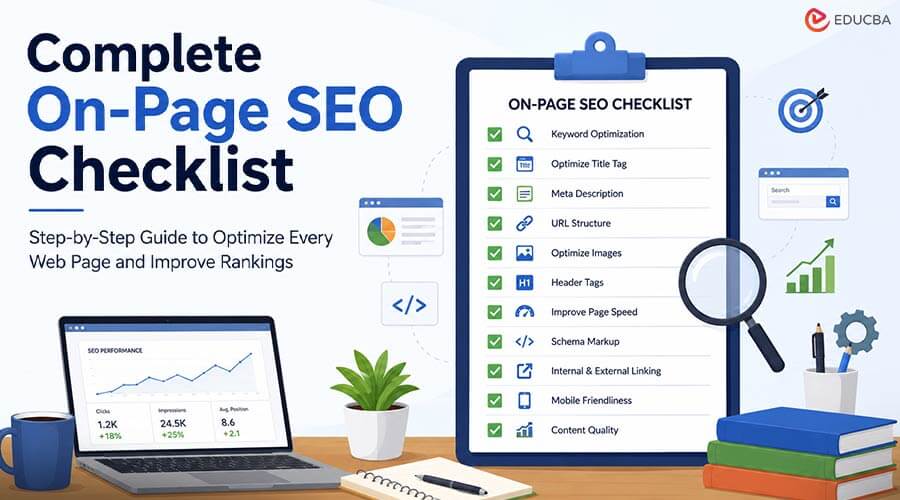
Search engines evaluate hundreds of ranking signals before deciding where a web page appears in search results. While backlinks and technical SEO play an important role, on-page SEO remains one of the most controllable ranking factors. It involves optimizing individual web pages to help search engines understand their content while improving the user experience. A well-optimized page improves visibility, increases click-through rates (CTR), enhances user engagement, and ultimately drives more organic traffic. This guide covers a complete on-page SEO checklist for blog posts, landing pages, service pages, and product pages.
Table of Contents
- Introduction
- Why is On-Page SEO Important?
- Complete On-Page SEO Checklist for Beginners
- Perform Proper Keyword Research
- Optimize the Page Title
- Write an Engaging Meta Description
- Use SEO-Friendly URLs
- Structure Headings Properly
- Create High-Quality Content
- Place Keywords Naturally
- Optimize Images
- Add Internal Links
- Link to Trusted External Sources
- Optimize for Featured Snippets
- Improve Page Speed
- Ensure Mobile Friendliness
- Use Schema Markup
- Add an FAQ Section
- Monitor Performance
- Common On-Page SEO Mistakes
- Quick On-Page SEO Checklist
Why is On-Page SEO Important?
Proper on-page optimization helps:
- Improve search engine rankings
- Increase organic traffic
- Enhance user experience
- Reduce bounce rate
- Increase average session duration
- Improve conversion rates
- Help search engines understand page topics
Even excellent content may struggle to rank if these elements are overlooked.
Complete On-Page SEO Checklist for Beginners
Follow these essential on-page SEO steps to optimize your pages and improve search performance.
1. Perform Proper Keyword Research
Every page should target one primary keyword and several related keywords.
Best Practices:
- Choose one primary keyword.
- Include secondary keywords naturally.
- Focus on search intent.
- Avoid keyword stuffing.
To understand search demand before creating content, use a keyword research tool to compare monthly search volume, keyword difficulty, and related search terms.
Popular Keyword Research Tools Include:
- Google Keyword Planner
- Ahrefs Keywords Explorer
- SEMrush Keyword Magic Tool
- Ubersuggest
- Moz Keyword Explorer
Working Example:
Search your main keyword in one tool
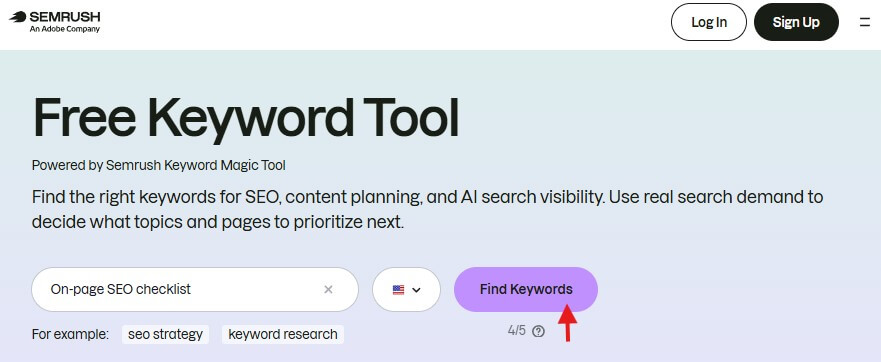
Image Source: SEMRUSH
Note the volume and intent, then choose supporting terms that match the topic on the same page.
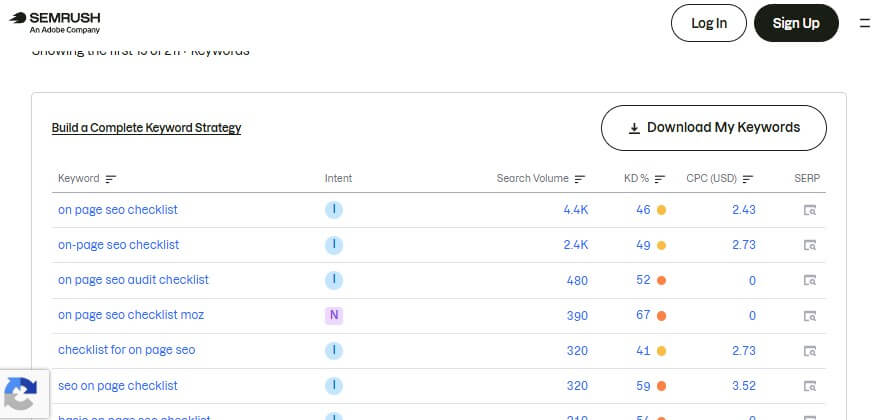
Image Source: SEMRUSH
2. Optimize the Page Title
The title tag is one of the most important on-page SEO ranking factors.
Best Practices:
- Keep it between 50–60 characters.
- Include the primary keyword.
- Make it compelling.
- Add numbers or years when appropriate.
Good Example:
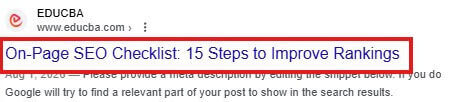
(Includes the target keyword, uses a number to attract attention, maintains an appropriate length, and clearly communicates value to users.)
Poor Example:
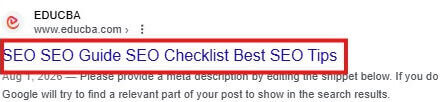
(Repeats keywords unnecessarily, lacks a clear structure, does not communicate user intent, and may appear spammy to both users and search engines.)
Extra Tip:
If the page keyword is “on-page SEO checklist,” make sure the title begins with the keyword or clearly includes that phrase.
3. Write an Engaging Meta Description
Meta descriptions have a big impact on click-through rates even though they are not a direct ranking factor.
Best Practices:
- 150–160 characters
- Include the target keyword
- Explain the page’s value
- Encourage users to click
Good Example:
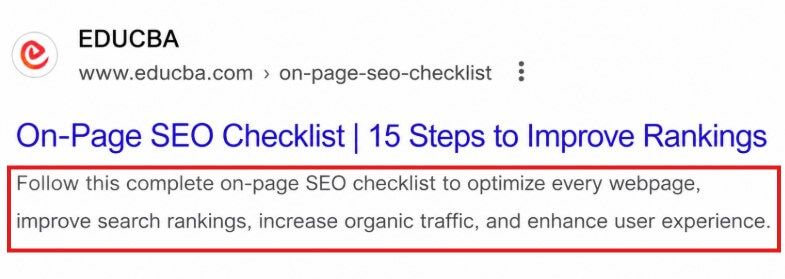
(Includes the target keyword naturally, stays within the recommended length, clearly explains the page value, and encourages users to click.)
Poor Example:
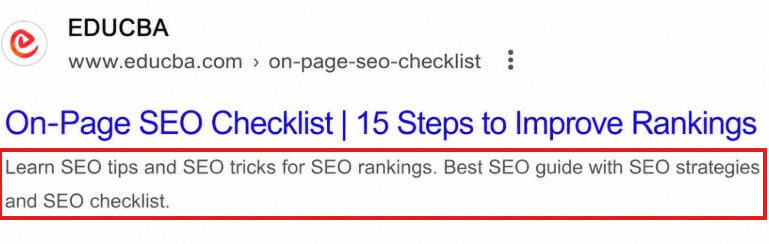
(Uses keyword repetition unnecessarily, lacks a clear message, does not explain user benefits, and may reduce click-through rates.)
4. Use SEO-Friendly URLs
A URL should make sense even without the page open. Compare your URL structure with top-ranking pages to ensure it is clear and search-friendly.
Guidelines:
- Short
- Descriptive
- Lowercase
- Hyphen-separated
- No unnecessary parameters
Good URL:

Poor URL:

5. Structure Headings Properly
After publishing, inspect your page structure using browser extensions that display heading levels. This helps identify missing or incorrectly nested headings. Search engines use headings to understand content organization.
Recommended Structure:

Example:
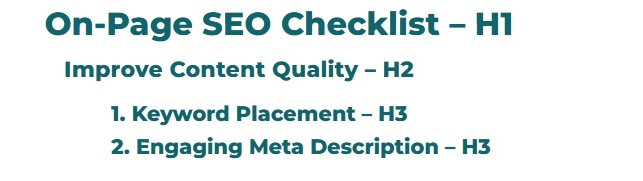
Note: Only one H1 should appear on a page.
6. Create High-Quality Content
Examine the top-ranked pages for your target keyword to determine the subjects they frequently address.
Characteristics of quality content:
- Original
- Comprehensive
- Helpful
- Well-structured
- Factually accurate
- Easy to understand
Avoid:
- Duplicate content
- Thin content
- AI-generated content published without human editing
- Excessive repetition
Use:
- Short paragraphs
- Bullet points
- Numbered lists
- Tables
- Images
- White space
Before publishing, review your content for originality, readability, and topical coverage using trusted SEO writing tools.
7. Place Keywords Naturally
Keywords should support the content, not control it. The goal is to include them in important places without making the text sound forced.
Important Locations Include:
- Title
- First paragraph
- H2 headings
- Image alt text
- URL
- Meta description
- Conclusion
Avoid forcing keywords into every paragraph.
8. Optimize Images
Images can improve engagement, but only when they are properly compressed and described. Optimized images also help with accessibility and image search visibility.
Checklist:
- Compress images
- Use descriptive filenames
- Add alt text
- Choose modern formats (WebP where possible)
- Resize appropriately
- Use responsive images
Example:
Filename: on-page-seo-checklist.webp
Alt text: On-page SEO checklist showing key optimization steps
Optimized images load faster and help search engines understand visual content.
9. Add Internal Links
Internal linking helps users discover related content and distributes page authority.
Example:
Once your on-page SEO is complete, move on to Technical SEO to make sure your website is fully optimized for search engines.
Best Practices:
- Use descriptive anchor text.
- Link only when relevant.
- Avoid excessive linking.
10. Link to Trusted External Sources
External links help provide context and credibility.
Examples Include:
- Official documentation
- Government websites
- Research papers
- Respected industry publications
When you reference a claim, linking to a trusted source makes your content more reliable and useful.
11. Optimize for Featured Snippets
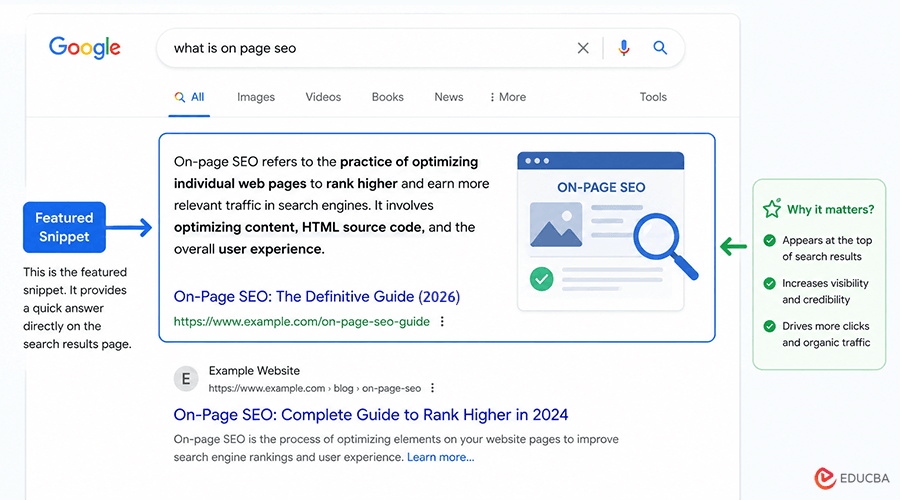
Featured snippets are highlighted search results that appear at the top of Google Search, providing users with quick, direct answers to their queries. They can significantly increase your page’s visibility and click-through rate.
Example:
Use:
- Definitions
- Lists
- Tables
- Step-by-step instructions
If your answer is short, direct, and clearly formatted, search engines are more likely to feature it in snippet results.
12. Improve Page Speed
A slow website negatively impacts both rankings and user satisfaction.
Focus on:
- Image compression
- Browser caching
- CSS and JavaScript minification
- Content Delivery Network (CDN)
- Fast hosting
- Lazy loading
Ideal Performance Targets
| Metric | Recommended Value |
| Largest Contentful Paint (LCP) | Under 2.5 seconds |
| Interaction to Next Paint (INP) | Under 200 ms |
| Cumulative Layout Shift (CLS) | Under 0.1 |
13. Ensure Mobile Friendliness
Responsive design is vital because the majority of searches take place on mobile devices.
Checklist:
- Responsive layout
- Readable font sizes
- Clickable buttons
- Fast mobile loading
- No horizontal scrolling
A mobile-friendly page makes reading and navigating easier on small screens, which is essential for modern SEO.
14. Use Schema Markup
Structured data allows search engines to analyze page content better.
Common Schema Types:
- Article
- FAQ
- How-To
- Product
- Organization
- Breadcrumb
- Review
Rich results can improve visibility in search. Adding schema helps search engines understand whether the page is a guide, an FAQ, a product page, or a how-to resource.
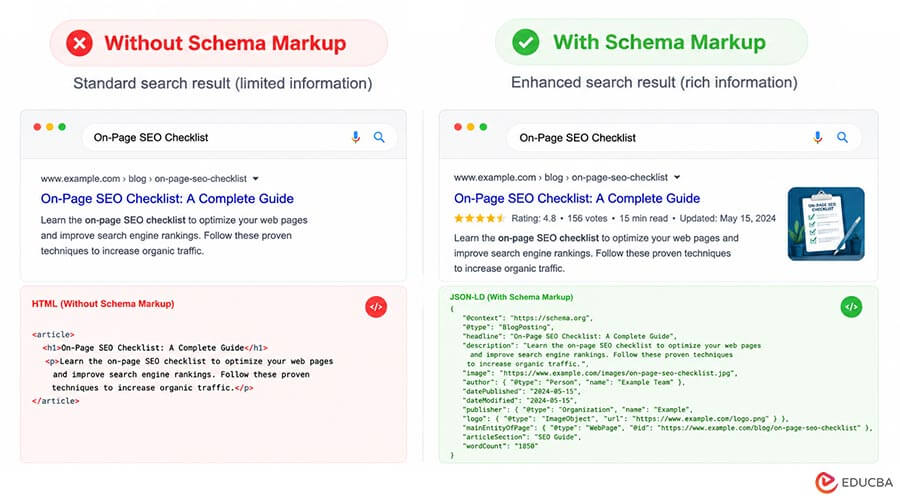
How to Add Schema Markup?
- Choose the appropriate schema type for your page, such as Article, FAQ, Product, or Organization.
- Generate the structured data using a schema generator or write it in JSON-LD format.
- Add the JSON-LD code inside the <head> section or before the closing </body> tag of your webpage.
- Validate the markup using Google’s Rich Results Test or Schema Markup Validator to ensure there are no errors.
- Publish the page and monitor Google Search Console to check whether your structured data is detected and eligible for rich results.
15. Add an FAQ Section
FAQs target long-tail keywords and may improve visibility in search results.
Example Questions:
- What is on-page SEO?
- How often should on-page SEO be updated?
- Difference between on-page and off-page SEO?
FAQs help answer common questions directly, improving usability and supporting search visibility.
Example:
16. Monitor Performance
Track key metrics regularly.
| Metric | Why It Matters |
| Organic Traffic | Measures SEO growth |
| Keyword Rankings | Tracks visibility |
| Click-Through Rate | Indicates title and meta effectiveness |
| Bounce Rate | Reflects engagement |
| Average Engagement Time | Shows content usefulness |
| Indexed Pages | Confirms search engine accessibility |
Tracking results helps you understand which pages need updates and which changes are working well. Link Google Search Console and Google Analytics for reporting and tracking.
Common On-Page SEO Mistakes
Avoid these frequent issues:
- Keyword stuffing
- Duplicate content
- Missing title tags
- Missing meta descriptions
- Multiple H1 tags
- Broken internal links
- Unoptimized images
- Slow page speed
- Poor mobile usability
- Thin content
Even a single major mistake, such as a missing title tag or a broken internal link, can weaken a page’s performance.
Quick On-Page SEO Checklist
| Task | Completed |
| Keyword research completed | ✅ |
| SEO title optimized | ✅ |
| Meta description written | ✅ |
| SEO-friendly URL | ✅ |
| Proper heading structure | ✅ |
| High-quality content | ✅ |
| Images optimized | ✅ |
| Internal links added | ✅ |
| External references included | ✅ |
| Mobile-friendly design | ✅ |
| Fast loading speed | ✅ |
| Schema markup implemented | ✅ |
| FAQ section included | ✅ |
| Performance monitored | ✅ |
Final Thoughts
An effective on-page SEO strategy combines high-quality content, thoughtful keyword placement, strong technical optimization, and an excellent user experience. Rather than optimizing only for search engines, focus on creating pages that answer user questions clearly and comprehensively. Applying this checklist consistently across your website can improve visibility, attract qualified organic traffic, and support sustainable long-term growth.
Frequently Asked Questions (FAQs)
Q1. How often should on-page SEO be updated?
Answer: Review important pages every 3–6 months or whenever there are significant changes in user intent, search trends, or industry information.
Q2. Does on-page SEO improve rankings immediately?
Answer: No. Improvements typically take several weeks or months to be reflected in search rankings, depending on factors such as competition, crawl frequency, and overall website authority.
Q3. Is keyword density still important?
Answer: Modern SEO focuses on relevance and natural language rather than a specific keyword density. Use the primary keyword where it fits naturally and cover the topic comprehensively.
Q4. Which is more important: on-page SEO or backlinks?
Answer: Both are important. While high-quality backlinks increase authority, strong on-page SEO helps search engines understand your content. The best results come from combining both strategies.
Recommended Articles
We hope this comprehensive on-page SEO checklist helps you improve your website’s user experience and search engine rankings. Check out these recommended articles for more SEO strategies, optimization techniques, and best practices to grow your organic traffic.

