


Updated September 30, 2026
A website needs more than useful content to perform well in search. It also needs a technical foundation that allows search engines to discover, crawl, render, understand, and index its pages efficiently. That is where technical SEO comes in.
If you own a website, you would know that SEO plays an important role in attracting organic traffic. Content remains a major part of an effective SEO strategy, but strong content can still struggle to perform when technical problems prevent search engines or users from accessing it properly. Technical SEO focuses on the website infrastructure and technical elements that support organic visibility.
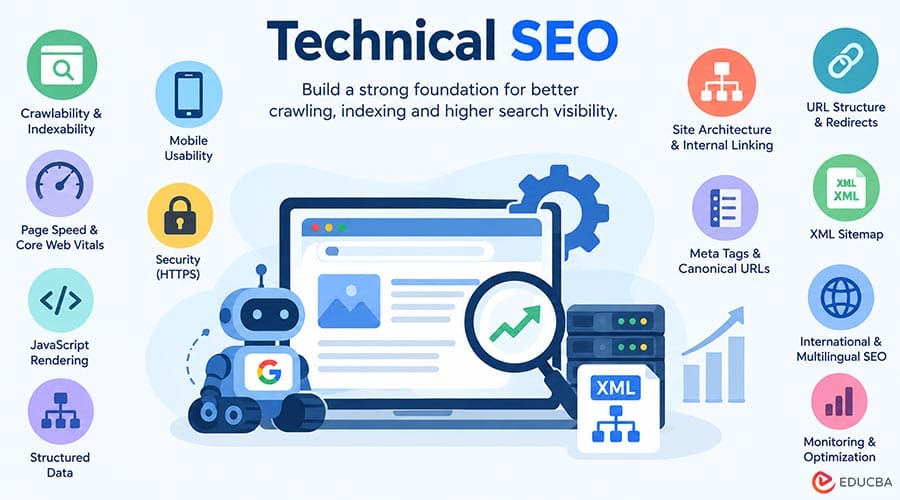
Technical SEO covers areas such as crawlability, Indexability, site architecture, URL structure, redirects, structured data, mobile usability, page performance, JavaScript rendering, and security. It also helps search engines identify each page’s importance and understand relationships between URLs.
In 2026, technical SEO also supports visibility across newer search experiences, including Google’s AI features. Google states that its generative AI search experiences rely on the same fundamental Search systems and technical requirements, so websites still need to make their content accessible, crawlable, and indexable.
When search engines can navigate and understand your website efficiently, important pages can gain greater visibility for relevant searches.
Learn how to drive new customers through website traffic, evaluate your site’s performance, and apply effective on-site and off-site optimization techniques.
Why Is Technical SEO Important?
Imagine a car with an attractive exterior, a powerful engine, and plenty of fuel. However, if the brakes, transmission, or engine systems do not work correctly, the car cannot perform reliably.
A similar principle applies to SEO. You may publish original, useful content, but technical problems can prevent search engines from discovering or indexing those pages correctly. Users can also leave when pages load slowly, navigation becomes confusing, or a website does not work properly on mobile devices.
Technical SEO helps you build a website that:
- Allows search engines to crawl important pages.
- Helps search engines understand which URLs should be indexed.
- Provides a logical structure for users and search engines.
- Supports fast and stable page experiences.
- Reduces problems caused by duplicate or conflicting URLs.
- Helps search engines understand page and site relationships.
- Makes JavaScript-based websites easier to crawl and render.
- Supports eligible search features through accurate structured data.
- Creates a stronger technical foundation for traditional and AI-powered search experiences.
Technical SEO does not replace content quality, relevance, or authority. Instead, it helps ensure that search engines can properly access and process the content you create.
Technical SEO Checklist for 2026
Technical SEO includes many areas, but the following elements should form the core of a modern technical SEO strategy.
1. Conduct a Technical SEO Audit
A technical SEO audit identifies issues that can interfere with crawling, indexing, rendering, performance, security, or website usability.
Start by reviewing how search engines access your website. Check for:
- Pages blocked accidentally by robots.txt.
- Important pages carrying a noindex directive.
- Broken internal links.
- Incorrect canonical URLs.
- Duplicate or near-duplicate URLs.
- Redirect chains and loops.
- Broken or outdated redirects.
- Incorrect HTTP status codes.
- Orphan pages.
- Poor internal linking.
- Slow or unstable pages.
- Mobile usability problems.
- Incorrect sitemap entries.
- JavaScript rendering problems.
- HTTPS and security issues.
- Incorrect structured data.
- Unnecessary URL parameters and faceted URLs.
Google Search Console offers valuable insights into crawling and indexing, Core Web Vitals, structured data, and the status of specific URLs.
A technical SEO audit should not just generate a long list of errors. Prioritize problems according to their potential effect on important pages. For example, accidentally blocking an entire section of a website from crawling is generally more urgent than correcting a minor HTML warning.
Some businesses also use SEO AI tools to automate parts of technical analysis and identify potential issues across large websites. Alternatively, SEO agencies can provide technical expertise when a website needs extensive audits, migrations, or development work.
2. Optimize for Mobile-First Search
Mobile optimization is no longer optional for modern websites. Google has used mobile-first indexing for many years, so website owners should ensure the mobile version includes the important content and functionality search engines need.
A responsive website should provide:
- Consistent content across desktop and mobile.
- Easy-to-use navigation.
- Readable text without unnecessary zooming.
- Buttons and interactive elements that work on smaller screens.
- Properly sized images and media.
- Fast loading on mobile networks.
- Stable layouts that do not shift unexpectedly.
Do not rely only on opening a website on your own phone. Test important templates and page types across different screen sizes and use Search Console and browser-based testing tools to identify problems.
The goal is not simply to make a website “mobile-friendly.” It is to make the mobile version fully usable, accessible, and equivalent to the desktop experience in important content and functionality.
3. Manage Robots.txt Correctly
The robots.txt file tells compliant crawlers which URL paths they are allowed or not allowed to crawl. Google explains that its automated crawlers retrieve and interpret robots.txt rules before crawling a site.
A common technical SEO mistake occurs when developers block sections of a website during development and forget to update the rules when the site goes live.
For example, an overly broad rule could prevent crawlers from accessing important resources or URL paths.
Review your robots.txt file whenever you:
- Launch a new website.
- Add a new website section.
- Change your CMS.
- Migrate domains.
- Change URL structures.
- Introduce new filtering or faceted navigation.
- Make major changes to JavaScript or rendering.
Remember that robots.txt controls crawling; it should not be treated as a general method for removing URLs from Google’s index. For pages that you do not want search engines to display, apply the relevant indexing directives to control their visibility.
4. Control Indexability
Crawling and indexing are different processes.
A search engine may be able to crawl a URL but still decide not to index it. Therefore, technical SEO should examine which pages are accessible and which pages are actually eligible for indexing.
Review:
- Noindex directives.
- Canonical tags.
- HTTP status codes.
- txt rules.
- Login requirements.
- Duplicate URLs.
- Soft 404s.
- Thin or unnecessary pages.
- Pages that return unexpected content.
Use Google Search Console’s URL Inspection tool to investigate individual URLs. It can help you understand whether Google can access a page and how Google processes it.
For large websites, create clear indexation rules rather than allowing every automatically generated URL to become a potential search result.
5. Create a Logical Site Architecture
A clear site structure helps users navigate your website and gives search engines useful context about how pages relate to one another.
Organize pages into logical categories and connect related content through internal links.
For example:
Home → Category → Subcategory → Individual Page
Avoid creating unnecessarily deep structures where important pages require many clicks from the homepage or other well-connected pages.
A good architecture should also minimize orphan pages. An orphan page exists when no useful internal links point to it from other pages on the website.
When restructuring a website, map old URLs to their corresponding new URLs and implement appropriate redirects. Do not simply delete large numbers of URLs without considering their traffic, links, rankings, and user value.
6. Improve Core Web Vitals and Page Experience
Website performance remains an important part of technical SEO and user experience.
Google’s current Core Web Vitals include:
- Largest Contentful Paint (LCP): Measures loading performance.
- Interaction to Next Paint (INP): Measures responsiveness to user interactions.
- Cumulative Layout Shift (CLS): Measures visual stability.
INP replaced First Input Delay as a Core Web Vital.
Improving performance can involve:
- Compressing and appropriately sizing images.
- Serving modern image formats where suitable.
- Reducing unnecessary JavaScript.
- Removing unused CSS and scripts.
- Improving server response times.
- Using caching effectively.
- Optimizing fonts.
- Reducing third-party scripts.
- Preventing unexpected layout shifts.
- Using a content delivery network where appropriate.
Use real-user data where possible rather than focusing only on laboratory scores. Google also notes that Core Web Vitals are part of its ranking systems, but achieving perfect scores does not guarantee top rankings. Overall relevance and page experience still matter.
7. Use HTTPS and Maintain Website Security
HTTPS protects information exchanged between a user’s browser and your website. It is also an expected technical standard for modern websites.
Check that:
- Every important page loads over HTTPS.
- HTTP versions redirect correctly to HTTPS.
- Internal links use HTTPS.
- Canonical tags point to HTTPS URLs.
- Images, scripts, fonts, and other resources load securely.
- Your SSL/TLS certificate remains valid.
- Mixed-content issues do not occur.
Security also extends beyond HTTPS. Keep your CMS, plugins, frameworks, dependencies, and server software updated. A compromised website can create serious usability, reputation, and search visibility problems.
8. Build and Maintain an XML Sitemap
An XML sitemap guides search engines toward the website’s most important URLs, helping them discover relevant pages more efficiently.
Sitemaps can be especially valuable for large or newly launched websites, sites with complicated structures, and platforms that regularly publish or modify content.
Your sitemap should generally contain the canonical URLs you want search engines to discover and consider for indexing.
Avoid filling the sitemap with:
- Redirecting URLs.
- URLs returning errors.
- Non-canonical duplicates.
- URLs blocked from crawling.
- Pages that should not be indexed.
Submit the sitemap through Google Search Console and keep it updated automatically when possible.
Google’s current documentation also recommends using sitemaps to help keep Google informed about changes to structured-data-enabled pages.
9. Understand HTTP Status Codes and Redirects
HTTP status codes tell browsers and crawlers what happened when they requested a URL.
Some important codes include:
- 200: The request succeeded, and the page was served normally.
- 301: The requested URL has been permanently redirected.
- 302: The URL is temporarily redirected.
- 404: The requested resource was not found.
- 410: The resource has been permanently removed.
- 503: The service is temporarily unavailable.
Do not treat every 404 as a technical emergency. A 404 is normal when a genuinely nonexistent URL is requested. The important task is to identify valuable URLs that have been removed or incorrectly linked.
When a page permanently moves to another relevant URL, use a suitable permanent redirect and update internal links to point directly to the new destination.
Avoid long redirect chains such as:
Old URL → Redirect 1 → Redirect 2 → Final URL
Whenever possible, redirect the old URL directly to the final destination.
10. Manage Canonical URLs
Websites often have multiple URLs that display identical or substantially similar content.
For example:
- com/page
- com/page/
- com/page?source=email
- example.com/page
- com/category/page
Depending on the website configuration, these URLs can create duplication or consolidation problems.
A canonical tag helps communicate the preferred version of a page. However, a canonical tag is a signal, not an absolute command. Search engines can choose a different canonical when other signals conflict.
Maintain consistency between:
- Canonical tags.
- Internal links.
- XML sitemaps.
- HTTPS versions.
- Preferred domain variants.
Google’s recent documentation specifically clarifies canonicalization for JavaScript-powered websites and recommends making the preferred canonical URL clear as early as possible.
11. Optimize URL Structure
A clean URL helps users understand where a page belongs and makes website management easier.
For example:
Less descriptive:
site.tld/page.php?id=502
More descriptive:
site.tld/technical-seo-guide
When creating URLs:
- Keep them descriptive.
- Use words that clearly represent the page.
- Avoid unnecessary parameters.
- Avoid excessive URL complexity.
- Use hyphens to separate words.
- Keep URLs stable whenever possible.
- Avoid changing URLs without a clear reason.
Do not change established URLs to make them shorter. A URL change can require redirects and may create unnecessary migration work.
Also, avoid treating URL length, underscores, or subdomains as standalone ranking shortcuts. The goal should be a clear, consistent URL system that supports users and search engines.
12. Optimize JavaScript Rendering
Modern websites frequently depend on JavaScript for navigation, content loading, filters, personalization, and interactive features.
Google can render JavaScript, but developers still need to ensure that important content and links are accessible to search engines. Google’s documentation has also updated its guidance to reflect how extensively Google Search handles JavaScript today.
Check whether:
- Important content appears in the rendered page.
- Internal links are crawlable.
- Navigation does not rely entirely on inaccessible interactions.
- Canonical tags remain consistent.
- JavaScript does not accidentally create conflicting metadata.
- Important pages do not return errors during rendering.
For JavaScript-heavy websites, test important URLs through Search Console’s URL Inspection tool and compare the rendered output with what users receive.
13. Implement Structured Data Correctly
Structured data provides standardized information about a page’s content. It can help search engines understand entities, relationships, and content types.
Common structured data types include:
- Article
- Breadcrumb
- Organization
- Local Business
- Product
- Event
- Recipe
- Software App
- Profile Page
- Video
However, adding structured data does not guarantee a rich result. The markup must follow Google’s guidelines and accurately represent visible page content.
Google recommends validating structured data with the Rich Results Test and checking how Google accesses the page through URL Inspection.
Avoid adding schema simply because a plugin offers every available markup type. Use only relevant structured data and keep it accurate as the page changes.
14. Optimize Metadata and Search Appearance
Metadata helps search engines and users understand individual pages.
Pay particular attention to:
- Title tags.
- Meta descriptions.
- Canonical tags.
- Robots meta tags.
- Open Graph metadata.
- Image metadata.
- Language and regional signals where relevant.
Create a unique, descriptive title for every important page. Keep it focused on what the page actually provides rather than repeating keywords.
Meta descriptions are useful for communicating the page’s value and can influence how a search snippet appears, but they are not a direct ranking factor.
Do not fill descriptions with repeated keywords. Write them for users and make sure they accurately represent the page.
15. Optimize Images and Media
Images can significantly affect page performance, especially when websites use large hero images, product galleries, or media-heavy layouts.
Modern image optimization should include:
- Compressing images.
- Choosing appropriate dimensions.
- Using suitable modern formats.
- Providing descriptive file names where useful.
- Adding meaningful alternative text.
- Using responsive images.
- Lazy-loading appropriate below-the-fold images.
- Avoiding unnecessarily large image files.
- Specifying image dimensions to reduce layout shifts.
Alternative text should describe the image when the information is meaningful. Do not use alt text as a place to insert keywords unnaturally.
For important search and social previews, also configure the preferred image metadata appropriately. Google has clarified that both structured data and og: image can provide information used when determining image thumbnails.
16. Manage Faceted Navigation and URL Parameters
E-commerce websites and large content platforms often generate URLs through filters and sorting options.
For example:
/shoes?color=black
/shoes?size=9
/shoes?color=black&size=9
If thousands of combinations create crawlable URLs, search engines may spend resources crawling pages that add little value.
Review which filtered URLs need to be crawlable and indexable. Use appropriate internal linking, canonicalization, robots controls, or other technical solutions based on the site’s requirements.
Do not automatically block every parameterized URL. Some filtered URLs may have genuine search value and deserve to be discovered and indexed.
17. Use Internal Linking Strategically
Internal linking is both a content and technical SEO consideration.
Links help search engines discover pages and understand relationships across a website.
Create internal links that:
- Connect related topics.
- Help users discover useful next steps.
- Point to important pages.
- Use descriptive anchor text.
- Avoid unnecessary link duplication.
- Reduce orphan pages.
Do not build internal links solely to increase the number of links on a page. Each link should serve a useful navigational or contextual purpose.
18. Use H1, H2, and H3 Headings Correctly
Semantic HTML helps organize page content.
Use headings to establish a logical hierarchy:
H1 → Main page topic
H2 → Major sections
H3 → Subsections within an H2
Do not treat heading tags as a ranking trick. Their main purpose is to organize content and communicate structure.
A page can technically contain more than one H1 in some implementations, so do not treat “multiple H1S” as an automatic SEO penalty. Instead, focus on whether the page has a clear and understandable heading hierarchy.
19. Manage International and Multilingual Websites
International websites require additional technical signals.
If a website provides different versions of a page for different languages or regions, use appropriate hreflang annotations and maintain consistent URL relationships.
For example, a business may have separate versions for:
- English users in the US.
- English users in the UK.
- French users in France.
Make sure the alternate versions reference one another correctly and that each page has an appropriate canonical URL.
Incorrect language or regional annotations can create confusion, so test them carefully after implementation.
20. Prepare Technical SEO for AI Search
Search is increasingly incorporating generative AI features, but that doesn’t mean websites need a completely separate technical SEO system.
Google’s current guidance says that the same foundational SEO practices remain relevant for its AI search experiences. Pages need to meet Google’s technical requirements and be eligible for Search visibility before they can be considered for these experiences.
For technical SEO, this means focusing on fundamentals such as:
- Crawlable pages.
- Indexable content.
- Clear site architecture.
- Accurate structured data.
- Strong internal linking.
- Accessible page content.
- Reliable rendering.
- Fast and usable pages.
- Clear canonicalization.
- Helpful, accessible media.
Do not assume that creating a special AI file automatically improves visibility. Google clarified in 2026 that llms.txt is not required for Google Search and does not provide a ranking or visibility benefit in Google Search.
Instead, make your website technically accessible and ensure that the underlying content provides clear value to users.
How to Monitor Technical SEO Performance
Technical SEO should not end after an audit. Websites change continuously, so monitoring is essential.
Use tools such as Google Search Console and site-crawling platforms to monitor:
- Indexing issues.
- Crawl errors.
- Core Web Vitals.
- Sitemap status.
- Page experience.
- Structured data.
- Search performance.
- Mobile issues.
- Security problems.
- Newly created or removed URLs.
For large websites, consider monitoring server logs to understand how crawlers interact with the site. Log analysis can reveal crawl patterns that standard SEO tools may not show clearly.
Run technical audits after major changes such as:
- Website redesigns.
- CMS migrations.
- Domain migrations.
- HTTPS migrations.
- URL restructuring.
- Large-scale content updates.
- JavaScript framework changes.
Regular monitoring helps teams identify problems before they affect many pages.
Common Technical SEO Mistakes to Avoid
Even technically sophisticated websites can develop avoidable SEO problems. Watch for these common mistakes:
- Blocking important pages in robots.txt.
- Accidentally applying noindex to indexable content.
- Publishing incorrect canonical tags.
- Leaving redirect chains after a migration.
- Allowing broken internal links to accumulate.
- Creating thousands of unnecessary parameter URLs.
- Ignoring JavaScript rendering issues.
- Uploading oversized images.
- Treating every 404 as a critical SEO problem.
- Adding structured data that does not match the visible content.
- Focusing entirely on PageSpeed scores instead of user experience.
- Changing established URLs without proper redirects.
- Creating duplicate versions of the same content.
- Forgetting to update XML sitemaps after major changes.
- Treating technical SEO as a one-time project.
Frequently Asked Questions (FAQ’s)
Q1. How does server response time affect technical SEO?
Answer: A slow server can delay page loading and affect how quickly users and search engines access website content. Improving server performance can support better site speed and user experience.
Q2. What is a 301 redirect in technical SEO?
Answer: A 301 redirect permanently directs users and search engines from an outdated URL to its replacement. It is useful when pages move, URLs change, or outdated pages need to point to relevant alternatives.
Q3. What is an orphan page in SEO?
Answer: An orphan page exists without links from other pages on the same website. Creating relevant internal links can improve its discoverability for both visitors and search engines.
Q4. How does website migration affect technical SEO?
Answer: Website migration can involve changes to URLs, site structure, redirects, and other technical elements. Proper planning and monitoring can help prevent crawling, indexing, and traffic-related issues during the transition.
Q5. What is crawl budget in technical SEO?
Answer: Crawl budget refers to the resources a search engine allocates to crawling a website. It matters most for large websites, where unnecessary or duplicate URLs can consume crawling resources.
Final Thoughts
Technical SEO gives a website the foundation it needs to perform effectively in search. From crawlability and Indexability to site architecture, redirects, Core Web Vitals, structured data, and JavaScript rendering, each technical element can affect how search engines access and understand a website. Regular monitoring also helps identify issues before they affect important pages or user experience.
As search continues to evolve, technical SEO remains focused on the same core goal: making websites accessible, understandable, fast, and useful. Businesses should therefore treat technical SEO as an ongoing process rather than a one-time audit. By maintaining a technically sound website alongside helpful, relevant content, website owners can create a stronger foundation for organic search visibility and long-term growth.
Recommended Articles
We hope this guide helps you understand the key aspects of technical SEO, from crawlability and indexing to Core Web Vitals, structured data, site architecture, and JavaScript SEO. Explore our recommended articles for more insights into SEO strategies, website optimization, search engine visibility, and digital marketing.

