

Updated March 6, 2023
Difference Between JSP and JSF
Java Server Pages (JSP) is a technology for creating Web pages that support dynamic content. This helps programmers embed java code in HTML pages by making use of specific JSP tags, most of which begin with <% and end with %>. Java Server Pages (JSP) is a server-side programming technology that allows the creation of a dynamic, platform-independent method for developing Web-based applications. Java Server Faces (JSF) is a Java-based web application framework proposed to simplify web-based user interfaces’ development integration. JavaServer Faces is a patterned display technology, which was formalized in a specification through the Java Community Process. Java Server Faces (JSF) is an MVC web framework that explains the construction of User Interfaces (UI) for server-based applications using reusable UI components on a page.
What is JSP?
A Java Server Pages component is a type of Java servlet that is intended to fulfill the role of a user interface for a Java web application. JSP has access to the whole family of Java APIs, including the JDBC API, to access enterprise databases. Web developers create JSPs as text files that join HTML or XHTML code, XML elements, and embedded JSP actions and commands. Using JSP, you can assemble input from users over Webpage forms, present records from a database or different sources, and build Web pages dynamically. JSP tags can be used for a variety of purposes, such as retrieving data from a database or registering user preferences, accessing JavaBeans components, passing control among pages, and sharing information between requests, pages, etc. Java Server Pages usually serve the same purpose as programs executed using the Common Gateway Interface (CGI).
But JSP offers many benefits in contrast with the CGI. Firstly, Performance is significantly greater because JSP enables embedding Dynamic Elements in HTML Pages itself instead of having separate CGI files. Secondly, JSP is forever compiled before they are processed by the server, unlike CGI/Perl, which needs the server to load an interpreter and the target script each time the page is requested. Moreover, Java Server Pages are created on top of the Java Servlets API, so like Servlets, JSP also has access to all the influential Enterprise Java APIs, including JDBC, JNDI, EJB, JAXP, etc. JSP pages can be used in combination with servlets that manage the business logic, the model supported by Java servlet template engines. Finally, JSP is a fundamental part of Java EE, a complete platform for enterprise-class applications. This implies that JSP can play a part in the simplest applications to the most complex and demanding.
What is JSF?
JSF implements a facility to connect UI widgets with data sources and to server-side event handlers. The JSF specification describes a set of standard UI components and provides an Application Programming Interface (API) for developing components.
JSF allows the reuse and extension of the current standard UI components. JSF decreases the effort to build and maintain applications, which will run on a Java application server and render application UI on to a target customer. JSF facilitates Web application development by Giving reusable UI components, Making simple data transfer among UI components, Managing UI state across various server requests, Enabling the implementation of custom components and Wiring client-side event to server-side application code. JSF provides multiple rendering capabilities that allow JSF UI components to render themselves differently depending on the client types.
Head To Head Comparison Between JSP and JSF (Infographics)
Below is the top 5 difference between JSP and JSF: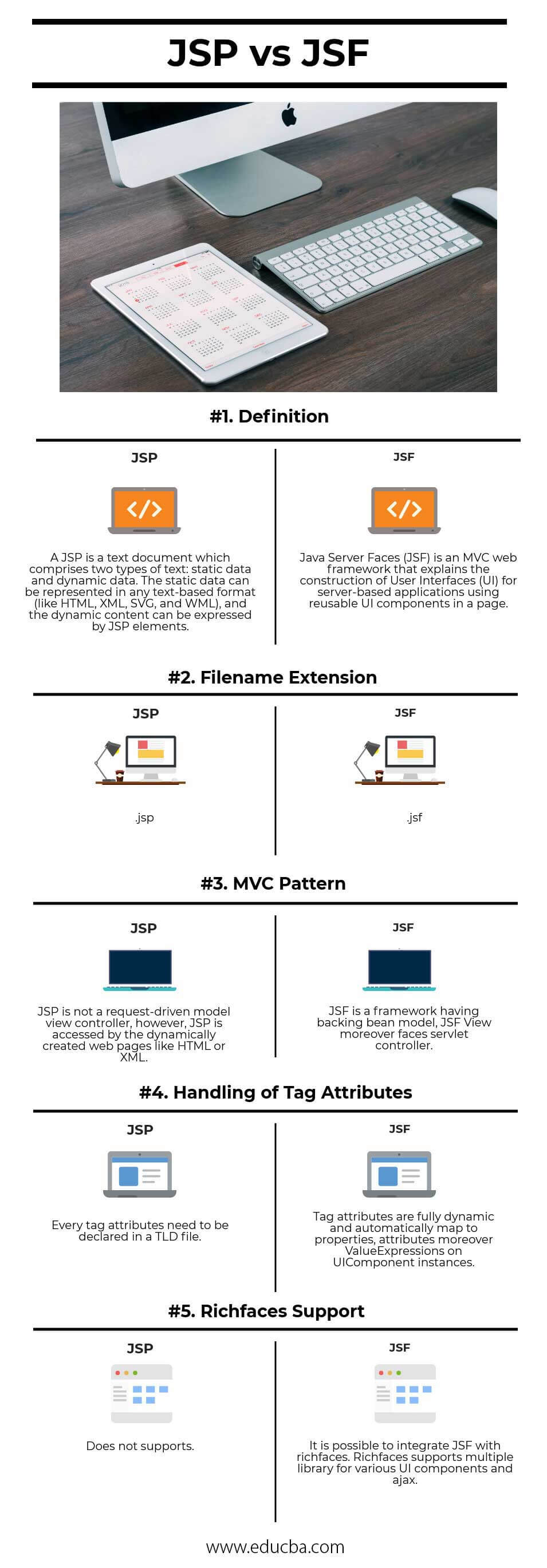
Key Differences Between JSP and JSF
Both are popular choices in the market; let us discuss some of the major difference:
- JSF is a web-based application that is used to simplify the development integration of web-based user interfaces. While JSP is a Java-based technology used respectively in order to support software developers create dynamic web pages.
- JSP must be compiled in Java bytecode in order to work properly. Whereas JSF comprises various core features, including, but not limited to, Managed Beans, a template-based component system, and two XML based tag libraries.
- JSP is not a request-driven model view controller; however, JSP is accessed by the dynamically created web pages like HTML or XML. In contrast, JSF is a framework having a backing bean model; JSF View moreover faces a servlet controller.
- JSF supports validator plus conversion, ajax. But, JSP does not.
- It is possible to integrate JSF with richfaces. Richfaces supports multiple libraries for various UI components and ajax. However, JSP does not.
JSP vs JSF Comparison Table
Below is the topmost comparison among JSP vs JSF:
| The basis of comparison |
JSP |
JSF |
| Definition | A JSP is a text document that comprises two types of text: static data and dynamic data. The static data can be represented in any text-based format (like HTML, XML, SVG, and WML), and the dynamic content can be expressed by JSP elements. | Java Server Faces (JSF) is an MVC web framework that explains the construction of User Interfaces (UI) for server-based applications using reusable UI components on a page. |
| Filename extension | .jsp |
.jsf |
| MVC Pattern | JSP is not a request-driven model view controller; however, JSP is accessed by the dynamically created web pages like HTML or XML | JSF is a framework having backing bean model, JSF View moreover faces servlet controller |
| Handling of tag attributes | Every tag attributes need to be declared in a TLD file. | Tag attributes are fully dynamic and automatically map to properties, attributes moreover Value Expressions on.
UIComponent instances |
| Richfaces support | Does not supports | It is possible to integrate JSF with richfaces. Richfaces supports multiple libraries for various UI components and ajax. |
Conclusion
Conclusively, JSF (PrimeFaces, IceFaces, OpenFaces, RichFaces, Tomahawk, etc.) provides a lot of rich components and extensions to implement in JSP. When it comes to lots of JS and HTML binding, JSF comes useful. Moreover, JSF allows developing tools that simplify coding web-based Java applications.
Recommended Article
This has been a guide to JSP vs JSF. Here we additionally consider the JSP vs JSF key differentiation by infographics and comparison table. You may further have a look at the coming JSP vs JSF sections to discover deeper –

