


Introduction to Adobe Editing Software
Adobe offers a wide range of creative and editing tools designed for photography, graphic design, video production, animation, audio editing, document management, and web development. These Adobe editing software tools help beginners, professionals, designers, photographers, marketers, content creators, and businesses create and manage digital content efficiently.
From editing photos in Photoshop and Lightroom to producing videos in Premiere Pro and creating motion graphics with After Effects, Adobe provides specialized software for different creative needs. The application’s features and uses help users choose the right tool for their projects.
Table of Contents
- Introduction
- What is Adobe?
- List of Adobe Editing Softwares
- Types of Adobe Editing Software
- Adobe Editing Software Comparison
- Benefits of Using Adobe Editing Software
What is Adobe?
Adobe is a global software company based in the United States that creates various tools for digital media, creative design, and multimedia production.
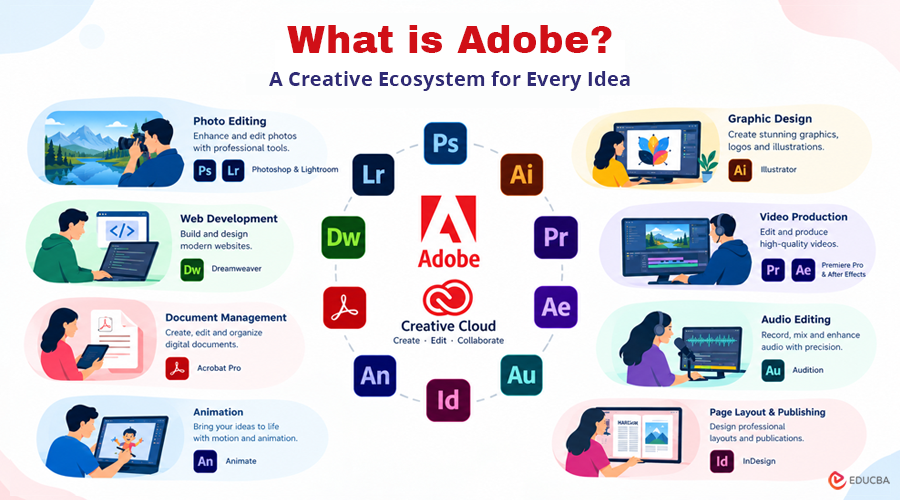
The company was established in December 1982 and has grown into one of the leading names in creative software. In 2003, Adobe brought its major creative applications together under a unified product family called Adobe Creative Suite (CS), with the individual applications adopting the CS naming system.
Later, in 2011, Adobe introduced Adobe Creative Cloud, bringing its creative applications together through a cloud-based subscription platform. The Creative Cloud application provides users with a central platform to download and install Adobe’s creative tools.
List of Adobe Editing Softwares
Here are some of the leading editing applications available in Adobe’s software ecosystem:
1. Adobe Photoshop
- Adobe Photoshop is a widely used graphics editing application developed by Adobe Inc. for editing, enhancing, and manipulating digital images. Photoshop has been around since 1988; Thomas and John Knoll created it, and it runs on Windows and Mac. Over time, Photoshop became the standard photo-editing software for the printing and digital industries.
- Photoshop was first released 29 years ago, on February 19, 1999; it started as a raster image editor, later expanded to vector and digital graphics, and the company has developed it as the world adopted the software. The software is available in 26 languages and was originally developed for Windows x86-64 systems. It now runs on both 32-bit and 64-bit Windows platforms and supports versions through Windows 10.
- Adobe has used different naming conventions for each Photoshop version. Beginning in October 2002, the software adopted the CS (Creative Suite) naming system, followed by a version number. This led to releases such as Photoshop CS2, CS3, and CS6, with some editions offered as separate standard versions. After Adobe introduced the Creative Cloud platform in June 2013, Photoshop shifted from the CS naming system to CC, which stands for Creative Cloud.
- Adobe Photoshop includes a companion application called ImageReady, which you can access through a button at the end of the toolbar. It allows users to transfer Photoshop projects directly for web-focused editing and export. ImageReady supports creating animated GIFs, preparing web-ready graphics, and exporting designs as HTML files. Photoshop commonly works with formats such as PSD, PNG, JPEG, Targa, and TIFF, with PSD serving as its native file format. If we import a PSD file into editing software like Premiere Pro, we can access all individual layers as saved in Photoshop.
2. Adobe Lightroom
- Adobe Lightroom, formerly known as Photoshop Lightroom, is a digital photography application that helps users organize, manage, and improve their photos with various editing tools. Originally launched on February 19, 2007, it is available in versions such as Lightroom and Lightroom Classic. Users can use the software to view, edit, organize, publish, and tag their photos. Lightroom supports Windows and macOS, as well as mobile platforms including Android and iOS, enabling users to manage and edit images across multiple devices.
- Lightroom provides a range of photo-editing features, although its capabilities are more limited than Photoshop for advanced image manipulation. The software uses non-destructive editing, so adjustments do not change the original image file. Edited versions can be saved separately while preserving the original. Lightroom also lets users create slideshows from multiple photos and add music. In addition, Lightroom 4 introduced options for creating photobooks, along with various templates and layouts for designing web galleries.
- Adobe Lightroom 3.0 introduced several enhancements, including chromatic noise reduction, improved sharpening controls, and watermarking features. In 2016, Lightroom became available on Apple TV, allowing users to display and view their Lightroom photo collections on a larger screen. Later, Adobe introduced Lightroom Classic CC and Lightroom CC as part of its updated Lightroom lineup.
3. Adobe Illustrator
- A professional graphic design tool from Adobe that specializes in creating and editing vector artwork. First introduced in 1987, it has become a key tool in Adobe’s creative software ecosystem. In its early years, Illustrator was widely used for logo design, and its applications later expanded to include magazine layouts, commercial advertising, illustrations, and cartoon character creation. Illustrator 1.7, released in 1988, introduced several new tools and features that expanded its design capabilities.
- In October 2003, Adobe introduced Illustrator CS, also known as version 11. This release introduced 3D capabilities, allowing users to create three-dimensional shapes and effects. The software also supported a wide range of creative tasks, including drawing, cutting and slicing, typography, painting, reshaping, and symbol creation. Key tools included the Paintbrush, Pen, and Pencil tools, which gave designers greater flexibility and control over their artwork.
4. Adobe Premiere Pro
- Adobe Premiere Pro was among the earliest professional computer-based non-linear video editing applications. As a timeline-based editor, it was originally introduced for Mac in 1991. It remained available on the platform through Premiere 6.0 before Adobe later brought it back to Mac with Premiere Pro 2.0 (CS2).
- In 2003, Adobe renamed Premiere as Premiere Pro and introduced it as part of the Creative Suite (CS) product family. The software later became Premiere Pro CC under Adobe Creative Cloud. Earlier versions primarily supported the standard DV format, which limited its use for high-definition projects. Adobe expanded its capabilities to handle HD video formats, and Premiere Pro CS3 added HD editing support. This update helped restore its popularity among professional editors, and many broadcasting organizations began adopting the software for their video production workflows.
- Professionals across broadcasting, filmmaking, and digital media production use Premiere Pro for video editing. Editors use it for projects such as weddings, advertisements, corporate videos, television content, and feature films. Several major productions, including Deadpool and Terminator: Dark Fate, have used Premiere Pro in their editing workflows. The software supports exporting videos in various formats, including AVI, MP4 (H.264), and QuickTime (.MOV). QuickTime format (.mov) is a Mac-supported format. When using Premiere Pro on Windows, you need to install QuickTime Player; only then will Premiere support the QuickTime format.
5. Adobe After Effects
- A professional software tool from Adobe designed for creating motion graphics, animations, and visual effects. It is widely used to create animations, cinematic effects, title sequences, transitions, and compositing for videos and other digital content. The Company of Science and Art (CoSA) originally developed the software, and it was first released in 1993. Adobe later acquired After Effects and incorporated it into its growing range of creative applications.
- After Effects allows designers and video editors to combine multiple visual elements, animate text and graphics, and apply effects to video footage. Its layer-based workflow gives users precise control over individual elements within a composition. The software also supports keyframe animation, masking, tracking, rotoscoping, chroma keying, and 3D design features.
- Professionals use After Effects for film and television production, advertisements, social media videos, presentations, and motion graphics. It works closely with other Adobe applications, including Photoshop, Illustrator, and Premiere Pro. Users can import layered Photoshop and Illustrator files and animate individual elements without rebuilding the artwork.
6. Adobe Audition
- Adobe Audition is a professional audio production and editing tool used for recording, refining, mixing, and restoring sound. It provides tools for working with individual audio files and multitrack projects. Musicians, podcasters, video editors, broadcasters, and sound professionals commonly use the software.
- Audition includes features for noise reduction, audio restoration, equalization, compression, effects, and waveform editing. Its multitrack environment allows users to combine voice recordings, music, sound effects, and other audio elements on separate tracks and adjust them independently.
- The software integrates with Adobe Premiere Pro, making it useful for video-production workflows that require detailed audio editing. Users can move audio projects between the two applications, improve sound quality, remove unwanted noise, and prepare finished audio for different types of digital content.
7. Adobe InDesign
- Adobe InDesign is a professional page-layout and desktop publishing application developed by Adobe. It is designed for creating documents that combine text, images, graphics, and other visual elements. Designers commonly use InDesign to create brochures, magazines, newspapers, books, reports, catalogs, newsletters, and other print or digital publications.
- InDesign provides precise controls for typography, page layouts, columns, margins, grids, images, and object placement. Users can create multi-page documents and keep design elements consistent throughout a project. Its support for master pages, paragraph styles, character styles, and other layout features helps designers manage large publications efficiently.
- The software integrates with other Adobe applications such as Photoshop and Illustrator. Designers can place Photoshop images and Illustrator artwork into InDesign layouts while maintaining links to the original files. Finished projects can be exported in formats such as PDF for printing, sharing, or digital distribution.
8. Adobe Express
- Adobe Express is a simplified creative application designed for creating graphics, social media posts, presentations, videos, flyers, posters, and other digital content. It provides ready-made templates and easy-to-use editing tools, making it suitable for users who want to create professional-looking content without advanced design experience.
- Adobe Express includes tools to add and edit text, images, shapes, animations, backgrounds, and other design elements. Users can also resize content for different platforms and create design variations for social media and marketing.
- The application supports quick content creation and works across different devices. Its integration with Adobe’s broader creative ecosystem allows users to access Adobe assets and creative resources while creating content. It is particularly useful for small businesses, marketers, educators, content creators, and individuals.
9. Adobe Animate
- Adobe Animate is a multimedia and animation application for creating 2D animations, interactive graphics, cartoons, advertisements, and web-based content. It evolved from Adobe Flash and provides tools for creating animated characters, objects, illustrations, and interactive experiences.
- Animate uses a timeline-based workflow that allows users to control the movement and appearance of individual elements. Designers can work with vector graphics, symbols, layers, frames, and keyframes to build detailed animations. The software also includes tools for drawing, character animation, rigging, and motion effects.
- Adobe Animate supports publishing content for multiple platforms and formats. It supports web animations, games, educational content, advertisements, animated videos, and interactive projects. Its vector-based workflow keeps artwork sharp when scaled to different sizes.
10. Adobe Acrobat Pro
- A comprehensive PDF and document management tool that enables users to create, modify, convert, organize, sign, and share digital documents. Businesses, educational institutions, government organizations, and professional environments widely use it for digital documents.
- Acrobat Pro provides tools to edit text and images in PDF files, add comments, insert pages, combine documents, create forms, and protect files with passwords or permissions. Users can also convert documents from formats including Microsoft Word, Excel, and PowerPoint into PDF files.
- The software supports electronic signatures and document collaboration, making it useful for digital workflows. Users can also compare PDF documents, redact sensitive information, add annotations, and optimize files for sharing or printing.
11. Adobe Fresco
- Adobe Fresco is a digital art application designed to help artists and illustrators create drawings, paintings, and other creative artwork. It combines vector and raster brushes, allowing users to create detailed artwork, sketches, illustrations, paintings, and other digital designs.
- Fresco includes different brush categories, including pixel brushes, live brushes, and vector brushes. Live brushes recreate the appearance and behavior of traditional media such as watercolor and oil paint. Users can work with layers, masks, selections, and other digital drawing tools.
- The application is especially well-suited to touchscreen and stylus-based workflows. Artists can create illustrations directly on compatible devices and continue developing their artwork within Adobe’s creative ecosystem.
12. Adobe Bridge
- A digital asset management tool that helps users organize, explore, preview, and manage creative content efficiently. It can handle images, videos, audio files, documents, and other media stored on a computer or connected storage device.
- Bridge allows users to create folders, rename multiple files, add keywords, apply ratings, and organize assets using metadata. Its thumbnail and preview features make it easier to identify files without opening them individually in their respective applications.
- The software works with other Adobe Creative Cloud applications and helps manage large collections of creative assets. Photographers, designers, and content creators can use Bridge to organize files before opening them in applications such as Photoshop, Illustrator, or InDesign.
13. Adobe Character Animator
- Adobe Character Animator is an animation application that brings illustrated characters to life. It combines artwork with facial expressions, body movements, voice recordings, and other performance inputs to create animated characters.
- Users can create characters in applications such as Photoshop or Illustrator and then import the artwork into Character Animator. The software can use a webcam and microphone to capture facial movements and voice, allowing the character to respond to the user’s performance in real time.
- Character Animator is useful for animated videos, live broadcasts, educational content, presentations, and entertainment projects. Its real-time animation capabilities make it easier to produce character-based content without manually animating every movement.
14. Adobe Media Encoder
- Adobe Media Encoder is a media-processing application used to encode, convert, compress, and export video and audio files. It works alongside applications such as Premiere Pro and After Effects and helps users prepare media for different devices, platforms, and delivery requirements.
- Media Encoder supports multiple formats and provides presets for common output requirements. Before exporting a project, users can customize parameters such as resolution, frame rate, bitrate, audio settings, and output format.
- One useful feature is batch processing, which lets you add multiple files or sequences to a queue and process them automatically. This helps editors continue working in other Adobe applications while Media Encoder handles exports in the background.
15. Adobe Dreamweaver
- Adobe Dreamweaver is a website development and design tool that enables users to build, edit, and manage websites. It combines visual design tools and code-editing features, allowing users to work with technologies such as HTML, CSS, JavaScript, and other web development languages.
- Dreamweaver includes a code editor with features such as syntax highlighting, code suggestions, and error-checking support. Users can also use a visual interface to design web pages and preview how their websites appear in browsers and across different screen sizes.
- The software helps create responsive websites, edit existing web pages, and manage website files. Its integration with other Adobe tools can also help designers combine graphics, images, and other creative assets with web projects.
Types of Adobe Editing Software
Adobe offers editing tools for a range of creative and professional needs.
The major categories include:
- Photo Editing: Photoshop, Lightroom
- Graphic Design: Illustrator, InDesign, Fresco
- Video Editing: Premiere Pro, After Effects
- Audio Editing: Audition
- Animation: Animate, Character Animator
- Document Editing: Acrobat Pro
- Content Creation: Adobe Express
- Digital Asset Management: Adobe Bridge
- Media Processing: Media Encoder
- Web Design: Dreamweaver
Adobe Editing Software Comparison
| Software | Primary Use | Best For |
| Adobe Photoshop | Image Editing | Photographers and designers |
| Adobe Lightroom | Photo Management & Editing | Photographers |
| Adobe Illustrator | Vector Design | Logo and graphic designers |
| Adobe Premiere Pro | Video Editing | Video editors |
| Adobe After Effects | Motion Graphics | VFX and motion designers |
| Adobe Audition | Audio Editing | Audio professionals |
| Adobe InDesign | Page Layout | Publishers and designers |
| Adobe Express | Content Creation | Beginners and marketers |
| Adobe Animate | 2D Animation | Animators |
| Adobe Acrobat Pro | PDF Editing | Professionals and businesses |
| Adobe Fresco | Digital Drawing | Artists and illustrators |
| Adobe Bridge | Asset Management | Creative professionals |
| Adobe Character Animator | Character Animation | Content creators |
| Adobe Media Encoder | Media Processing | Video professionals |
| Adobe Dreamweaver | Web Development | Web designers |
Benefits of Using Adobe Editing Software
Adobe applications offer several benefits for creative and professional workflows:
- Specialized tools: Each application focuses on a specific creative or production requirement.
- Professional features: Many Adobe applications provide advanced tools for professional projects.
- Integrated workflows: Multiple applications can work together in a connected creative workflow.
- Wide range of uses: Adobe supports photography, design, video, audio, animation, publishing, and document management.
- Creative flexibility: Users can choose applications according to their skills, projects, and professional goals.
- Industry adoption: Adobe applications are widely used across creative and digital industries.
Final Thoughts
Adobe offers a diverse range of editing software for photography, graphic design, video production, audio editing, animation, document management, and web development. From Photoshop and Illustrator to Premiere Pro and After Effects, each tool serves specific creative needs and helps users develop professional-quality digital content. Choosing the right Adobe editing software depends on the project type, required features, and your editing experience.
Frequently Asked Questions (FAQs)
Q1. What is Adobe editing software?
Answer: Adobe editing software refers to a range of applications Adobe develops for editing and creating photos, graphics, videos, audio, animations, documents, and other digital content.
Q2. Which Adobe software is best for photo editing?
Answer: Adobe Photoshop is one of the most versatile options for detailed photo editing, while Lightroom is particularly useful for photo organization, enhancement, and non-destructive editing.
Q3. Is Adobe Photoshop better than Lightroom?
Answer: Photoshop offers more advanced image manipulation and compositing, while Lightroom focuses more on photo organization, adjustments, and efficient editing workflows. The better option depends on the user’s requirements.
Q4. Which Adobe tool is most suitable for graphic design?
Answer: Adobe Illustrator is generally considered the best Adobe tool for graphic design because it specializes in creating vector-based graphics, logos, icons, illustrations, typography, and branding materials. Photoshop is also useful for image editing and raster-based designs, while InDesign is better suited for layouts such as brochures, magazines, and books.
Q5. Are all Adobe editing software applications the same?
Answer: No. Each Adobe application is designed for specific creative or professional tasks. Photoshop focuses on image editing, Premiere Pro on video editing, Illustrator on vector graphics, and Audition on audio production.
Recommended Articles
We hope this detailed guide to Adobe editing software helps you select the right tools to bring your creative ideas to life. Check out these recommended articles for more insights and practical tips to enhance your editing and design skills.

