


What is Topic Clustering?
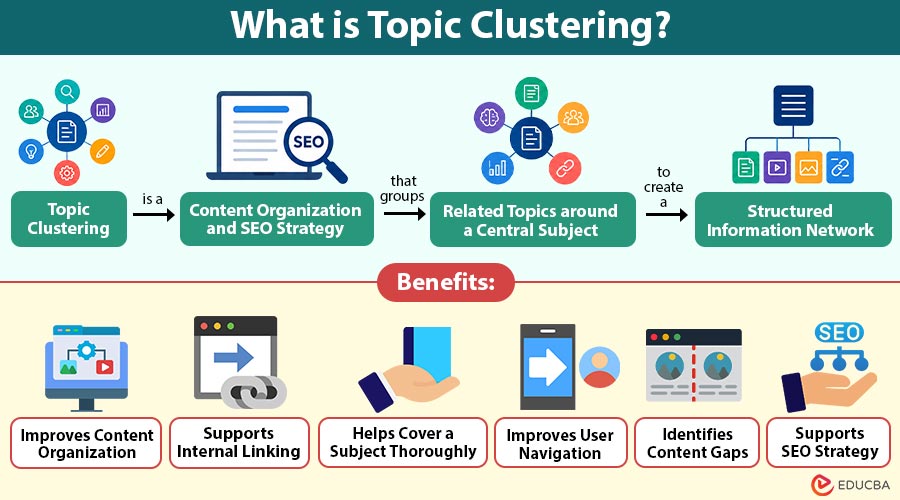
Topic clustering is a content organization and SEO strategy that groups related topics around a central subject to create a structured information network. It typically uses a pillar page covering a broad topic and several cluster pages addressing specific subtopics. Internal links connect these pages, helping users navigate related information and helping search engines understand relationships between content.
For example, a website about digital marketing can build a central page covering the subject broadly and connect it with supporting pages about SEO, email campaigns, social media strategies, content creation, and online advertising.
Table of Contents:
- Meaning
- Working
- Types
- Key Components
- How to Create a Topic Cluster?
- Example
- Benefits
- Challenges
- Applications
- Difference
Key Takeaways:
- Topic clustering organizes related content around central subjects, creating structured and connected information networks.
- Pillar pages, cluster content, and internal links establish meaningful relationships between broad and specific topics.
- Topic clusters help content teams identify gaps, improve navigation, strengthen planning, and expand subject coverage.
- Effective clustering requires relevant topics, clear search intent, thoughtful linking, regular updates, and content differentiation.
How Does Topic Clustering Work?
Topic clustering generally follows a structured process:
1. Select a Core Topic
The process starts with a broad subject that is relevant to the website, audience, and business objectives. The subject should be broad enough to support multiple related subtopics.
2. Identify Subtopics
The core topic is divided into narrower subjects. These can include concepts, processes, types, applications, benefits, challenges, tools, or related questions.
3. Create a Pillar Page
A pillar page provides comprehensive information about the central topic. It introduces major areas without attempting to explain every subtopic in extreme detail.
4. Develop Cluster Content
Individual pages are created for important subtopics. Each page provides deeper information about one specific area.
5. Add Internal Links
The pillar page links to relevant cluster pages, while cluster pages can link back to the pillar and to other closely related pages. This creates a connected content structure.
6. Review and Expand
Monitor the cluster over time. New audience questions, industry developments, and content gaps can provide opportunities for additional cluster pages.
Types of Topic Clustering
Topic clusters can be organized in different ways depending on the subject and content strategy.
1. Hierarchical Clustering
Hierarchical clustering organizes related content into levels, moving from broad subjects to narrower subtopics through a structured information hierarchy.
2. Hub-and-Spoke Clustering
Hub-and-spoke clustering uses one central page as the main topic while connecting multiple supporting pages covering closely related subjects.
3. Intent-Based Clustering
Intent-based clustering groups content according to users’ search purposes, addressing informational, comparison, transactional, navigational, or problem-solving needs.
4. Semantic Clustering
Semantic clustering groups conceptually connected subjects by meaning and relationships, even when keywords differ significantly.
Key Components of Topic Clustering
A topic cluster generally contains several important components.
1. Pillar Content
A comprehensive central page that broadly covers the main subject and connects readers to detailed information across related subtopics.
2. Cluster Content
Supporting pages that provide detailed information about specific subtopics while remaining closely connected to the central pillar content.
3. Internal Links
Relevant links connecting pillar and cluster pages, helping users navigate related information while establishing meaningful relationships across the website.
4. Search Intent
The underlying purpose behind a user’s search, such as seeking information, comparing options, evaluating solutions, or completing an action.
5. Content Hierarchy
A structured arrangement of information that moves from broad concepts to narrower subjects, creating a logical, navigable content structure.
6. Content Gaps
Missing questions, subjects, or information within existing content that can reveal opportunities for creating useful and comprehensive supporting pages.
How to Create a Topic Cluster?
Below are the main steps for creating an effective topic cluster.
Step 1: Choose a Broad Topic
Select a broad subject that matches the website’s expertise, audience interests, business objectives, and available content opportunities.
Step 2: Research Related Subjects
Research related subjects using search results, customer questions, industry resources, analytics, competitor content, and keyword research to identify opportunities.
Step 3: Group Related Ideas
Organize closely connected ideas into logical groups based on their relationships, relevance, search intent, and usefulness to readers.
Step 4: Define the Pillar Page
Choose the central subject for the pillar page, ensuring it provides broad coverage and connects naturally with supporting subtopics.
Step 5: Create Supporting Content
Develop focused pages that answer specific questions, explain individual subtopics, address user needs, and provide valuable supporting information.
Step 6: Build Internal Links
Connect relevant pillar and cluster pages using descriptive anchor text, helping readers navigate related information and understand content relationships.
Step 7: Identify Content Gaps
Review existing cluster content to find missing subtopics, unanswered questions, weak coverage, and user intents requiring additional content.
Step 8: Update the Cluster
Regularly refresh outdated information, improve existing pages, strengthen internal links, and add supporting content when the subject expands.
Example
Consider a website that publishes content about Excel.
The pillar topic could be Microsoft Excel.
Related cluster pages could include:
- Excel Formulas
- Excel Functions
- Pivot Tables
- Excel Charts
- Conditional Formatting
- Data Validation
- Excel Macros
- Power Query
- Excel Dashboards
The pillar page introduces Excel broadly, while each cluster page explains one specialized area in greater detail. Internal links connect the pages and create a structured information network.
Benefits of Topic Clustering
Topic clustering can provide several benefits for websites and content teams.
1. Improves Content Organization
A cluster creates a logical structure for related articles. This makes it easier for both users and content teams to understand how individual pages relate to a broader subject.
2. Supports Internal Linking
Because cluster pages are intentionally connected, topic clustering provides a systematic approach to internal linking rather than relying on random links between articles.
3. Helps Cover a Subject Thoroughly
A broad topic can be divided into multiple focused pages. This allows a website to address different questions without forcing every detail into one long article.
4. Improves User Navigation
Readers can move from introductory information to more specific subjects through relevant internal links. This can make large content libraries easier to navigate.
5. Identifies Content Gaps
Mapping a topic often reveals missing subtopics. Content teams can use these gaps to plan future articles.
6. Supports SEO Strategy
A well-structured cluster can make relationships between related content clearer to search engines. It also helps content teams build topical depth around subjects relevant to their audience.
Challenges of Topic Clustering
Despite its benefits, topic clustering requires careful planning.
1. Content Overlap
Multiple cluster pages may target similar subjects, causing duplication, competing pages, unclear differentiation, and potential reader confusion.
2. Weak Internal Linking
Poor connections between related pages can weaken content structure, reduce navigation opportunities, and make important information harder for users.
3. Poor Topic Selection
Choosing irrelevant or overly broad subjects can produce numerous pages that provide limited value and fail to address audience needs.
4. Excessive Content Creation
Creating unnecessary articles just to expand a cluster can lead to repetitive information, thin content, and inefficient use of resources.
5. Changing Search Intent
Changes in user expectations and search behavior may require teams to review existing content and adjust topics accordingly.
6. Maintenance Requirements
Large topic clusters require regular reviews, updates, link improvements, and content revisions to stay accurate, relevant, and useful.
Applications of Topic Clustering
Topic clustering supports several digital content activities.
1. SEO
Marketers organize related web pages into connected topic groups to strengthen topical coverage, internal linking, search visibility, and content relevance.
2. Content Marketing
Content teams use topic clusters to develop organized editorial calendars, maintain consistency, and prevent disconnected or repetitive content.
3. Educational Websites
Educational websites organize related learning resources into structured clusters, helping learners progress systematically from basic concepts to advanced subjects.
4. E-commerce
E-commerce websites organize content around products, categories, features, comparisons, maintenance, and buying considerations to support informed purchasing decisions.
5. Knowledge Bases
Organizations group documentation into topic clusters covering products, services, processes, troubleshooting guidance, and FAQs for easier access.
6. B2B Marketing
B2B companies create topic clusters around industry challenges, solutions, technologies, applications, and business use cases to attract relevant audiences.
Difference Between Topic Clustering and Keyword Clustering
The table below highlights the key differences between the two:
| Basis | Topic Clustering | Keyword Clustering |
| Main focus | Broader subjects and relationships | Related search terms |
| Organization | Pillar and supporting content | Groups of similar keywords |
| Purpose | Build structured topical coverage | Organize keywords for content or SEO |
| Search intent | Often central to grouping | May or may not be central |
| Content relationship | Strong connections between pages | Keywords can be grouped for one or multiple pages |
| Example | Digital Marketing → SEO → Technical SEO | SEO, search engine optimization, SEO strategy |
Final Thoughts
Topic clustering provides a structured way to organize related content around a central subject. By combining pillar pages, focused cluster content, relevant internal links, and search intent, websites can create a more connected information structure. It also helps content teams plan articles, identify gaps, improve navigation, and develop deeper coverage of important subjects.
Frequently Asked Questions (FAQs)
Q1. Can topic clustering be used for a small website?
Answer: Yes, small websites can use topic clustering to organize limited content into meaningful groups and establish a clear structure as the website grows.
Q2. How does topic clustering affect website architecture?
Answer: Topic clustering can create a more logical website architecture by establishing relationships between broad subjects, specialized information, and related resources.
Q3. Can old articles be included in a topic cluster?
Answer: Yes, existing articles can become part of a cluster when their subjects are relevant, and their content meets the needs of the intended audience.
Q4. Does topic clustering require specialized software?
Answer: No, topic clustering can be planned with spreadsheets, content management systems, keyword research platforms, or specialized SEO tools.
Recommended Articles
We hope that this EDUCBA information on “Topic Clustering” was beneficial to you. You can view EDUCBA’s recommended articles for more information.


