

Updated March 14, 2023
Introduction to SVG
Scalable Vector Graphics, abbreviated as SVG, can be defined as a type of image that is created from XML or HTML codes. Unlike other formats of images, SVG are completely formed from the codes, and so the images can be edited or updated by altering the coding. For someone to create SVG format images, it is crucial to have a working knowledge of web development coding languages like XML and HTML, as without knowing XML and HTML, it is not possible to create or edit formatted images.
How does SVG make Working so Easy?
There are several points where SVG actually makes things very easy. As we discussed earlier, it is very useful when it comes to designing a web application that is supposed to have an amazing outlook. The graphics created with the SVG format makes it very interactive for the user to work with the application. It is very useful when you are required to use the graphical component anywhere on the web application. With the HTML codes, one has to write the SVG tag to bring its functionality to the web page. If one wants to draw the simple interface, it could be done in few numbers of the line, but if the graphics are supposed to be a bit complex, it will demand a long HTML or XML code to be written. By integrating the simpler graphical components like a circle, square, rectangle, and so on, one can design complex graphics.
Working with SVG
To learn how to work with SVG, we will be going through the line of codes that has to be written to develop the SVG graphics. We will be considering an example, where we will be designing a simple circle with a red color filled in it and with a black border. We will be writing codes in HTML and will be using the SVG tag to introduce the graphics on the web page.
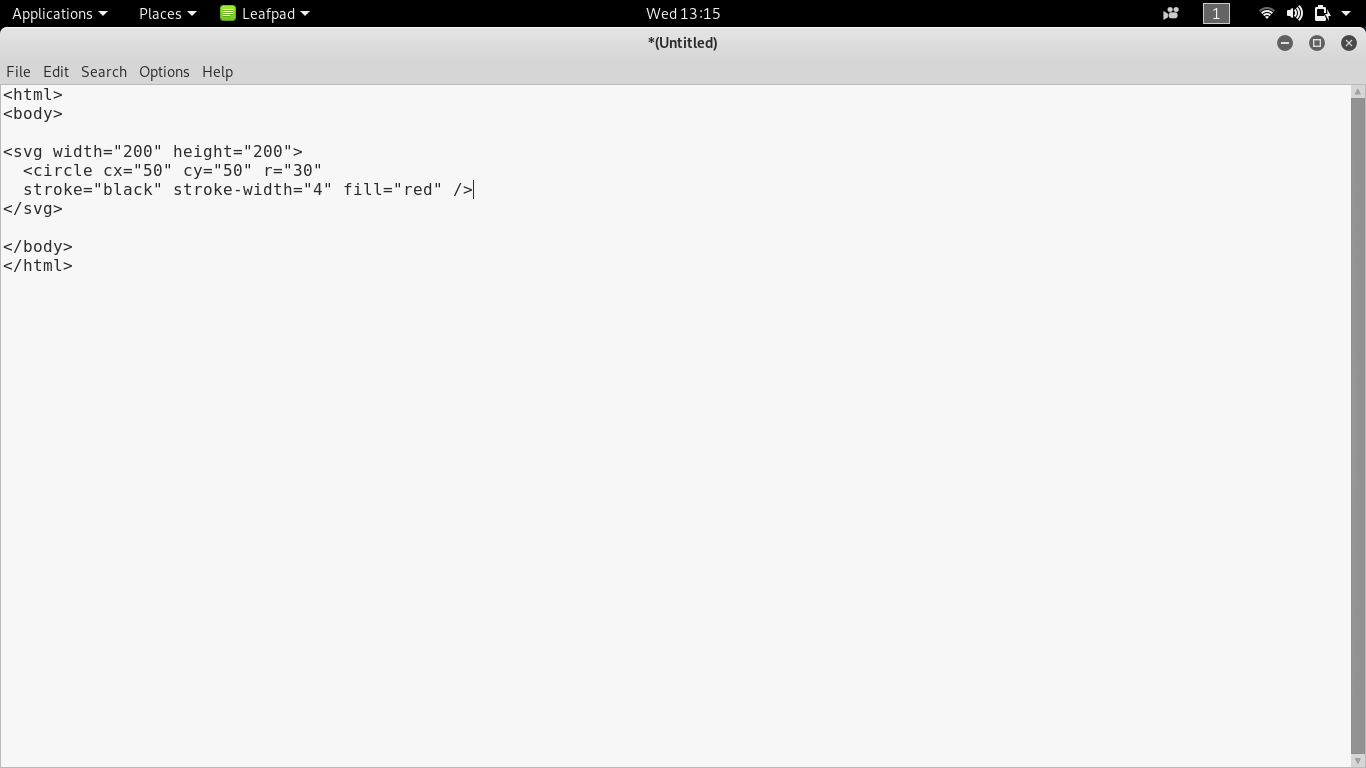
We have written the SVG graphics using the SVG tag and its important attributes in the above code. In the first line with the SVG tag, we have mentioned the circle’s width and height. In the second line, we have used the circle tag, which can be used as the subtag under the SVG tag. Cx is the circle tag attribute that is used to define how many pixels that circle has to cover in the x-axis. Cy is the circle tag attribute that is used to define how many pixels that circle has to cover in the y-axis. Finally, the attribute r defines the radius of the circle.
Stroke defines the color of the border, which is black in our case. The next attribute, stroke-width, defines the width of the circle that one can provide in pixels. The last attribute of the circle tag is filled that is used to define which color has to be filled in the circle. We have chosen red, so in the output, you will be able to see that the circle has the red color filled in it. If you want to work with the SVG code, you can just copy the code from the above image, save it with HTML extension and see what you find as output. You can keep them modifying to learn or explore more.
Required Skills
In order to work with, you should know how to work with the HTML tags. In HTML, it is implemented using the SVG tag, which further has the subtags that can be used under the SVG tag in order to design the graphics. If you have already worked as a web application designer, you may find it easy to work. Though it is not all about giving structure to the page to changing the HTML elements’ look, you will need a bit of practice before you can start working with SVG. However, if you have a good idea of graphics designing, it will add an edge to make you work with or learn in a short span of time.
Conclusion
Scalable Vector Graphics are the special format of images that has two-dimensional graphics. Based on the requirement, one can use images with any of the formats, but using SVG, will be a bit different as it is developed using the lines of codes rather than using graphic designing tools. It is mainly used in web applications as it has to be written using the XML or the HTML tag. One can make use of it to make the web application pretty interactive to enhance the users’ experience.
Recommended Articles
This is a guide to What is SVG? Here we discuss the definition, concepts, working, and how SVG makes work easy respectively. You can also go through our other suggested articles to learn more –

