

Updated July 3, 2023
Introduction to GTM
If you have ever dipped your toes into HTML, I am sure you are familiar with Tags; HTML tags are important as they make the World Wide Web work. For a marketer, however, tags are important for a different reason – instead of using them to design web pages, marketers use them to add tracking codes and snippets. This post will discuss what it is, how it works, and how to use it. To keep in mind that most marketers are not web developers, and managing multiple tags across many client sites can easily become a pain, GTM tries to solve this issue.
What is GTM?
Wikipedia describes Tag Manager as a tool to manage JavaScript and HTML Tags on web pages. These HTML and JavaScript tags are used for tracking and analytics. With GTM, you can easily add and remove code snippets without getting your hands dirty with code. Google Launched it in the year 2012, and it is available for free.
Generally, marketers use GTM to add the following types of codes:
- DoubleClick Floodlight Sales
- Google Ads for Search Conversation Tracking
- DoubleClick Floodlight Counter
- Google Display Network Remarketing
- Google Analytics
- Custom HTML and Image Tags etc.
Triggers and Events in GTM
Tags, Triggers, and events are the 3 building blocks of GTM; you are already familiar with Tags.
- Triggers in GTM: Triggers are used to decide if a tag is fired or not in the Tag Manager. In simpler words, these are rules to decide actions in a tag.
- Events in GTM: When an action is performed on the page, it can be called an event; for example, someone clicking on the email subscribes button or clicking on your contact number is an event. Tag Manager can denote an event and have it fired on your choice’s Analytics suite (Google Analytics, as an example). Events in Tag Manager make it easy to measure and monitor user actions that may be important to analyze.
Uses of GTM
- Marketers must use tracking and analytics tools to see and analyze how their site performs, where the users are coming from, and what can be done to improve campaign performance.
- Once you begin digging into analytics tools, you will find that one tool doesn’t have all the required features. Now, adding multiple tracking codes and tags to your site will soon become tedious; add to this that websites keep changing without code revisions and theme updates, and soon, you will be juggling dozens of tracking codes across multiple sites.
- GTM becomes a godsend in this situation. After signing up, you only have to add one simple tracking code to the site pages. Once done, you will add and manage all the tags you want on the GTM. With GTM, you can add multiple analytics tags, tracking codes, etc., without slowing down the site.
Advantages of GTM
GTM is a great tool for digital marketers.
Following are some advantages of using it on your sites:
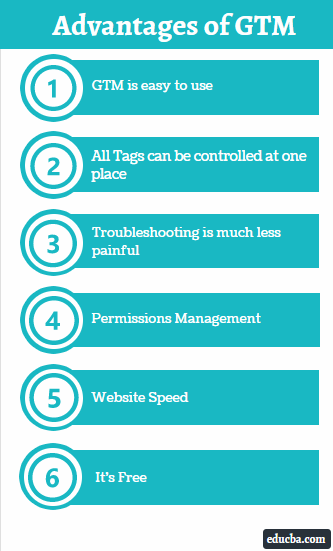
- GTM is easy to use: The Tag Manager makes it easy to see, add and edit tags across many websites. You can do it using one responsive dashboard instead of getting your hands dirty in code.
- All Tags can be controlled in one place: This prevents having duplicate tags on the same page and updating tags by using FTP or logging in to the server file management system.
- Troubleshooting is much less painful: GTM has built-in tools to troubleshoot and correct tag errors. The GTM has a Preview and debugs mode that can show which tags are working on a page and which are not.
- Permissions Management: GTM has a robust option to add users and restrict tag management and editing access. You will set permissions for each user on your team to ensure no mistakes occur by inexperienced users.
- Website Speed: While it is not that much of an impact, using a tag manager does positively helps a website’s loading speed as it minifies the code of the main page and offloads it to Google Servers.
- It’s Free: GTM has a paid version under Google Analytics 360 Suite, but you will find that the free version has all the features you may need.
Career Benefits of GTM
- As analytics become increasingly important for digital marketing and online business and tracking codes and tags become more complicated daily, GTM can be a great weapon in a digital marketer’s arsenal.
- Someone who wants to become a digital marketing professional, such as a digital marketing manager or digital marketing analyst, must know of deploying and using Google Tags Manager.
- This is especially important when dealing with more than one client at once, as you will probably have many sites to track and analyze at once, and you will want to save as much time as possible to get real work done.
Conclusion
Now that we have seen how useful and powerful GTM is and how marketers use it, you will understand its importance, and with a little practice, you will be able to use it efficiently. Managing tags across multiple sites and projects can become tedious; I am sure you will thank GTM now and then.
Recommended Articles
This has been a guide to What is GTM? Here we discuss the uses, advantages, and career benefits of GTM with triggers and events. You can also go through our other suggested articles to learn more –

