


Updated July 8, 2023
Definition of TypeScript Set Method
In TypeScript, a novel data structure has been added to ES6 JavaScript version known as set. This helps in storing data of distinct values that occur only once into a list that is available in different programming languages like C#, Java, etc. Even though this data structure is almost similar to maps, it cannot store pairs of key values, but only keys. As the objects of the set are a group of values, it can be iterated through those items in a particular order. In this article, we will be discussing the different aspects of set in typescript.
Syntax:
Below is the syntax of the typescript set.
let setobj = new Set();Methods of TypeScript Set
Following are the different methods of set in Typescript.
- Method:
add(val)
Description: This method helps in adding values to the set.
- Method:
has(val)
Description: This method checks whether the value passed in the method is present in the set or not. If it is present, true will be returned. Else, false will be returned.
- Method:
delete()
Description: This method helps in removing values from the set.
- Method:
size()
Description: This method helps in returning the size of the set.
- Method:
clear()
Description: This method helps in removing all values from the set.
Examples
Let us discuss Examples of TypeScript Set.
Example #1: Program that creates a set and add values to it.
Code:
//create a set with marks as object
let marks = new Set();
//Add marks to the set
marks.add(21);
marks.add(23);
marks.add(13);
console.log("The marks in the Set are:");
console.log(marks);
Sample Output:
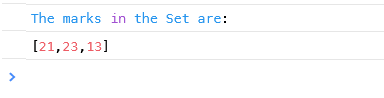
In this program, a set is created with marks as an object. Then, elements such as 21, 23, and 13 are added to it.
Example #2: Program that creates a set and add values to it using add() method chaining
Code:
//create a set with marks as object
let marks = new Set();
//Add marks to the set
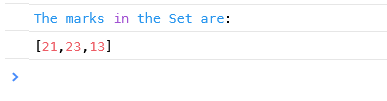
marks.add(21).add(23).add(13);
console.log("The marks in the Set are:");
console.log(marks);
Sample Output:
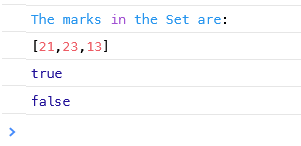
Example #3: Program that creates a set and checks whether a particular value is present in it.
Code:
//create a set with marks as object
let marks = new Set();
//Add marks to the set
marks.add(21).add(23).add(13);
console.log("The marks in the Set are:");
console.log(marks);
//Check whether the value 21 and 34 is present in the set or not
console.log(marks.has(21));
console.log(marks.has(34));
Sample Output:
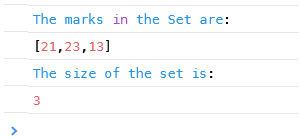
Example #4: Program that creates a set and finds the size of the set.
Code:
//create a set with marks as object
let marks = new Set();
//Add marks to the set
marks.add(21).add(23).add(13);
console.log("The marks in the Set are:");
console.log(marks);
//returns the size of the set
console.log("The size of the set is:");
console.log(marks.size);
Sample Output:
Example #5: Program that creates a set and removes a particular element from it.
Code:
//create a set with marks as object
let marks = new Set();
//Add marks to the set
marks.add(21).add(23).add(13) ;
console.log("The marks in the Set are:") ;
console.log(marks);
//returns the size of the set
console.log("The size of the set is:");
console.log(marks.size) ;
//deletes an element from the set
console.log(marks.delete(23) ) ;
console.log("The updated size of the set is:") ;
console.log(marks.size) ;
console.log("The updates elements in the Set are:");
console.log(marks);
Sample Output:

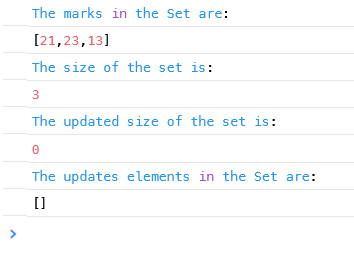
Example #6: Typescript program that creates a set and removes all the elements from it.
Code:
//create a set with marks as object
let marks = new Set();
//Add marks to the set
marks.add(21).add(23).add(13);
console.log("The marks in the Set are:");
console.log(marks) ;
//returns the size of the set
console.log("The size of the set is:") ;
console.log(marks.size) ;
//clears all elements from the set
marks.clear() ;
console.log("The updated size of the set is:") ;
console.log(marks.size) ;
console.log("The updates elements in the Set are:") ;
console.log(marks) ;
Sample Output:
Conclusion
A data structure known as a set has been added to ES6 JavaScript that helps in storing data of distinct values that occur only once into a list that is available in different programming languages like C#, Java, etc.
Recommended Articles
We hope that this EDUCBA information on “TypeScript Set” was beneficial to you. You can view EDUCBA’s recommended articles for more information.

