


What Is a Trust Seal?
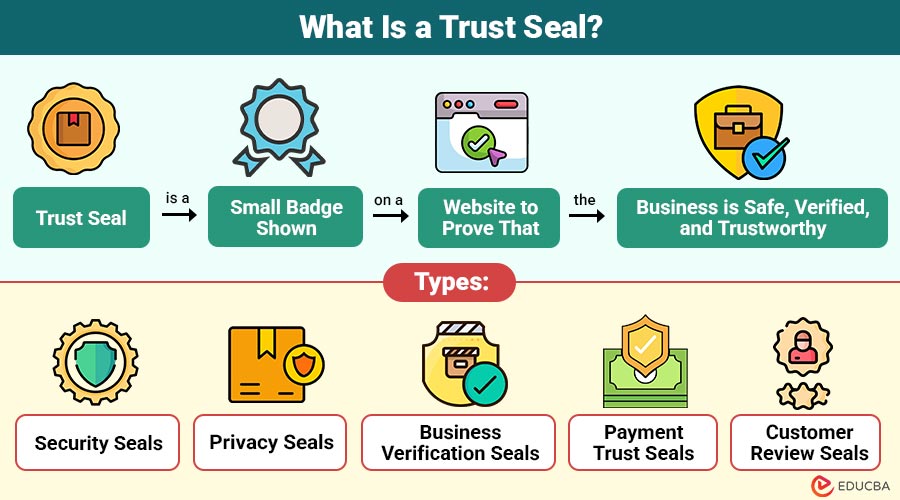
A trust seal is a small badge shown on a website to prove that the business is safe, verified, and trustworthy. It tells visitors that the site follows security standards, protects data, and is run by a real, reliable company.
For example, when you see an SSL padlock or a Norton Secured badge on a checkout page, it assures you that your payment details are protected and the site is genuine.
Table of Content:
- What Is a Trust Seal?
- Types
- How it Works
- Benefits
- Top Trust Seal Providers
- Case Study
- Best Practices
Key Takeaways
- It builds customer confidence by showing a website is secure, verified, and trustworthy.
- Using well-known and strategically placed trust seals can increase conversions and reduce cart abandonment.
- Choosing the right provider and keeping seals up-to-date ensures credibility and maintains user trust.
- Combining trust seals with social proof, reviews, or testimonials further strengthens brand reputation and encourages purchases.
Types
Here are the main types of trust seals used on websites:
- Security Seals: These seals indicate that the website uses SSL or encryption to protect sensitive data, such as passwords and payment details. They help users feel safe while entering information.
- Privacy Seals: These badges confirm that a website follows privacy rules and protects customer data. They show that the business does not misuse or sell personal information.
- Business Verification Seals: These seals prove that the company is real and legally registered. They build confidence by showing that the business identity has been checked and verified.
- Payment Trust Seals: These seals are shown during checkout to confirm that the payment process is secure. They help reduce the fear of fraud during online transactions.
- Customer Review Seals: These seals display ratings or reviews from real customers. They show social proof and help build trust through positive feedback.
How Trust Seals Work?
It uses verification and security checks to show users that a website is safe and reliable. Here is how they work:
- Website Verification: The trust seal provider checks the business details, website ownership, and security setup to ensure everything is valid and authentic.
- Security Scanning: Some trust seals perform regular scans to detect malware, vulnerabilities, or unsafe activities. This helps keep the website secure.
- Data Encryption Check: Security trust seals confirm that the website uses SSL or encryption to protect user information during login or checkout.
- Badge Display on Website: After verification, the provider gives a seal or badge that the website owner can place on pages like the homepage or checkout page.
- Real-Time Validation: When users click the seal, they can view a verification page showing that the site is actively monitored and safe to use.
Benefits of Adding Trust Seals to Your Website
Here are the main benefits of using it on your website, explained in simple language:
- Builds Customer Confidence: It immediately shows visitors that your website is safe, secure, and verified. This helps them feel more comfortable sharing personal or payment information.
- Increases Conversion Rates: When people trust your website, they are more likely to complete a purchase or sign up, resulting in higher conversions.
- Reduces Cart Abandonment: Many users leave during checkout due to security worries. A trust seal reassures users by protecting their payment details, which reduces drop-offs.
- Creates Strong Brand Credibility: Displaying well-known trust badges makes your business look more professional and reliable.
- Protects Customer Data: Security trust seals show that your website follows safety standards and encrypts sensitive information.
- Boosts First-Time Buyer Trust: First-time visitors are more inclined to trust and make purchases from a website that prominently displays security and verification badges.
Top Trust Seal Providers
Here are some of the most popular and reliable trust seal providers, explained in simple language:
- Norton Secured (formerly VeriSign): One of the most recognized security seals. It shows that the website is scanned for threats and uses strong protection. Many users trust it instantly.
- McAfee Secure: This seal confirms that your website is free from malware and harmful activities. It also updates daily, giving visitors extra confidence.
- Trustpilot: Trustpilot offers review-based trust badges that display real customer feedback. These seals help build social proof and credibility.
- BBB Accreditation (Better Business Bureau): This seal shows that your business is trustworthy, follows ethical practices, and handles customer complaints properly.
- SSL Certificate Providers (e.g., Let’s Encrypt, DigiCert): These providers offer SSL seals that confirm your website encrypts data and protects user information.
- SiteLock: SiteLock provides seals that show your website is monitored, scanned for vulnerabilities, and kept secure.
Case Study
Here are two simple case studies showing how it improved website performance:
1. The Trademark Company
- The Trademark Company added a VeriSign Trust Seal to its website.
- Within a month, their conversion rate increased by 15%.
- Their sales for key service packages jumped 40% after displaying the seal.
- The firm also said that after using the seal, no more potential clients emailed to question their legitimacy — the seal built visible trust.
2. Home Plans Marketplace
- This e‑commerce business sells high-value digital home design plans.
- They ran an A/B test, placing a Norton trust badge beside their existing security indicators.
- As a result, they saw a 12.2% rise in conversion rate, 14.3% more transactions, and a 16.6% increase in revenue during the test.
- The test proved that adding a well-known trust badge at checkout can reduce friction and boost buyer confidence. ConversionTeam CRO Agency
These examples show how adding trust seals can improve user confidence and business performance.
Best Practices for Maximizing Trust Seal Impact
Here are simple tips to make the most of it on your website:
- Use Recognizable Seals: Display well-known, trusted badges such as Norton, McAfee, or BBB. Users feel more confident with familiar logos.
- Place Seals Strategically: Place trust seals prominently on important pages, including the homepage, product pages, and especially the checkout or payment sections.
- Avoid Overcrowding: Do not display too many badges. Too many seals can confuse visitors or reduce credibility.
- Ensure Seal Validity: Always use up-to-date and verified seals. Expired or fake badges can undermine trust rather than build it.
- Combine With Social Proof: Pair trust seals with reviews, testimonials, or ratings to enhance credibility.
- Clickable Verification: Provide seals that users can click to view verification details, demonstrating that your website is actively monitored and secure.
- Regular Monitoring: Check seals periodically to ensure they work and continue to provide the intended trust signals.
Final Thoughts
It plays an essential role in building online credibility and boosting user confidence. By showing that your website is secure, verified, and reliable, they help increase conversions, reduce cart abandonment, and strengthen brand reputation. Choosing the right seals and placing them strategically ensures visitors feel safe, ultimately driving better engagement and long-term business growth.
Frequently Asked Questions
1. Can a trust seal improve mobile website conversions?
Answer:- Yes, displaying trust seals on mobile sites can increase user confidence and boost mobile conversions.
2. Do trust seals affect SEO rankings?
Answer:- Indirectly, they can improve user engagement and trust signals, which may positively influence SEO.
3. Are free trust seals reliable?
Answer:- Some free seals are trustworthy, but widely recognized paid seals often offer stronger credibility and verification.
4. How often should trust seals be updated?
Answer:- It should be checked and renewed regularly to ensure they remain valid and functional.
Recommended Articles
We hope this guide on trust seal benefits helped you improve website security. For more insights, explore these related articles below:


