

Updated March 27, 2023
Introduction to SQL Set Operators
SQL set operators are used to combine the results obtained from two or more queries into a single result. The queries which contain two or more subqueries are known as compounded queries.
There are four major types of SQL operators, namely:
- Union
- Union all
- Intersect
- Minus
Here is an abstract table for whatever we will be learning in this article.
|
SQL Set Operator |
Function |
| Union | Combines distinct results of two or more SELECT statements. |
| Union All | Combines all results of two or more SELECT statements, including duplicates. |
| Intersect | Returns only the common records obtained from two or more SELECT statements. |
| Minus | Returns only those records which are exclusive to the first table. |
Syntax and Parameters of SQL Set Operators
The generic syntax for working with SQL set operators is as follows:
Syntax:
SELECT column_name
FROM table_name_1
SET OPERATOR
SELECT column_name
FROM table_name_2
SET OPERATOR
SELECT column_name
FROM table_name_3
.
.
.
Parameters:
The different parameters used in the syntax are :
- SET OPERATOR: Mention the type of set operation you want to perform from { Union, Union all, Intersect, Minus}
- column_name: Mention the column name on which you want to perform the set operation and want in the result set
- FROM table_name_1: Mention the first table name from which the column has to be fetched
- FROM table_name_2: Mention the second table name from which the column has to be fetched
From the above-mentioned parameters, all the parameters are mandatory. You may use WHERE GROUP BY and HAVING clauses based on your requirements.
Working
Here is a list of few points which we should be kept in mind while working with SQL set operators:
- The number of columns in the SELECT statement on which we have applied SQL set operators must be the same.
- The selected columns must have the same data type.
- The order of the columns must be in the same order as mentioned in the SELECT statement.
Going ahead we will be discussing the above-mentioned functions in great detail.
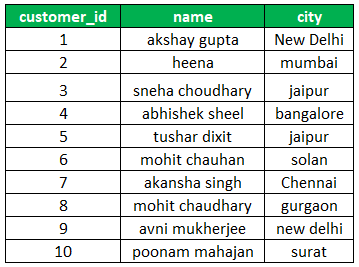
- In order to demonstrate and explain the set operators in SQL effectively, we will be using the following tables. These sample tables are “customers_jan” and “customers_dec”. These tables contain 10 records each with the customer’s id, name, city, and the country.
- Let’s have a look at the records in the customers_jan and customers_dec table. So that later, we can understand how set operations are helpful.
A schema for the discussed tables is as follows:
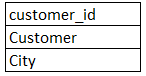
customers_jan:
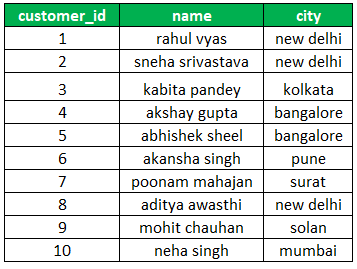
customers_dec:
Types of SQL Set Operators with Examples
Here we discuss the SQL set operators with examples:
1. Union Set Operator
The UNION set operator is used to combine the results obtained from two or more SELECT statements. Here is an example to illustrate the use of the UNION Operator.
Example:
Find the name of all the customers
SELECT name FROM customers_dec
UNION
SELECT name FROM customers_jan;You will notice that there are two customers named Akshay Gupta, one is from Delhi and another one from Bangalore. But the Union operator returned only one customer name. Similarly for Akansha Singh. In order to solve the above-mentioned problem, we can use UNION ALL operator.
2. Union All Set Operator
The UNION set operator is used to combine all the results obtained from two or more SELECT statements. Unlike the Union operator, it considers duplicate values and includes them in the final result.
Here is an example to illustrate the use of UNION ALL Operator.
Example:
Find the names of all the customers who registered in December or January.
SELECT name FROM customers_dec
UNION ALL
SELECT name FROM customers_jan;
You will notice that there are two distinct customers named Akshay Gupta, one is from Delhi and another one from Bangalore. Union ALL operator too both into consideration and returned Akshay Gupta twice. The same is the case for Akansha Singh.
3. Intersect Set Operator
The intersect set operator used to combine all the results of two SELECT statements. But returns only those records that are common to both the SELECT statements.
Here is an example to illustrate the use of the INTERSECT Operator.
Example:
Find the details of customers who shopped in December and January.
SELECT name, city FROM customers_dec
INTERSECT
SELECT name, city FROM customers_jan;
4. Minus Set Operator
The MINUS set operator used to combine all the results of two or more SELECT statements. But returns only those records that are present exclusively in the first table.
Here is an example to illustrate the use of the EXCEPT Operator.
Example:
Find the details of customers who shopped only in December but not January.
SELECT name, city FROM customers_dec
EXCEPT
SELECT name, city FROM customers_jan;
Recommended Articles
We hope that this EDUCBA information on “SQL Set Operators” was beneficial to you. You can view EDUCBA’s recommended articles for more information.

