

Updated May 31, 2023

Introduction to Sort Command in Unix
The SORT command in Unix helps us to sort or arrange the contents in a file in the system, arrange the data in a sorted manner, and redirect the output in a stdout format. The sort command, by default helps to sort the file having the contents present in an ASCII manner. By using the options with the sort command, we can also sort the contents in a numeric way or in many other ways.
Following are the features of the sort command:
SORT command in Unix helps arrange or sort a file’s data by line-by-line. The sort command sorts lines of text files and functions as a command line utility. This command helps in sorting the contents in an alphabetical or by month or by number or in reverse order and also helps in removing duplicates from the files.
By default, blank space is taken as the field separator. Unix sorting typically relies on extracting one or more keys from the input contents to perform the sorting.
What Can We Do From Sort Command?
Below are some of the list of options that are generally used by sort are listed below:
- sort -b: It ignores the blank spaces at the start of the data in the file.
- sort -r: It reverses the contents of files and sorts the order.
- sort -o: It specifies and prints the output file in a sorted way.
- sort -n: It is used to sort the numerical value in ascending order.
- sort -M: It helps to sort the contents as per the calendar month.
- sort -u: It helps to remove the duplicates in the file and return the output in a sorted way.
Sort Syntax:
In Unix, you write the sort command with the options explained above, along with the file on which you want to apply the sort operation. The basic syntax of the sort command is given below:
sort [options] [files]Examples of Using Sort Command in Unix
Let us suppose we have created a filename called testing.sh and have written few contents in it as below:
We can list the contents in the file by using ‘cat’ command as shown below:
cat testing.sh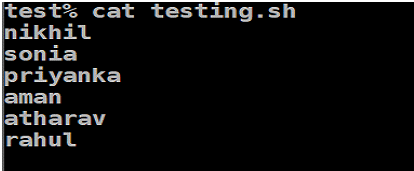
Now with the help of the sort command, we will sort the data in the file.
Syntax:
sort file_name.shExample:
Here we can see that the files have been sort in alphabetical order. By using sort command.
sort testing.sh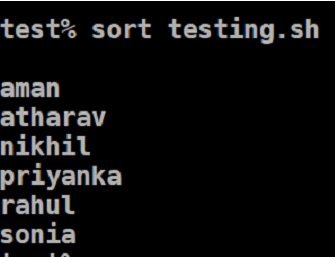
If we have data in the files both in upper and lower case, by default, the sort command will sort the data first in upper case and then to lower case as shown below:
Example:
The sort command first sorts all the uppercase data, followed by the lowercase data.
sort testing.sh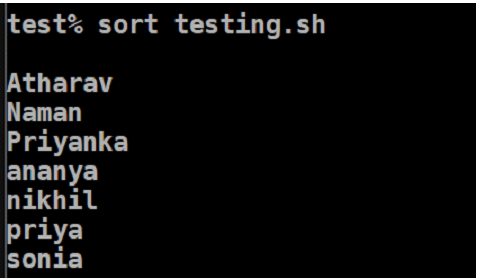
Options with Sort Command
You can use the sort command with options in several ways. A few of the options for sort are listed below with examples:
1. Option -o
Sort when used with the option ‘o’ helps you to sort the contents into a new file and redirects the output in a sorted form. With the help of option ‘o’, it helps in redirecting the contents to the output file in a sorted form. An example is shown below:
sort testing.sh > outputsh
sort -o output.sh testing.sh
cat output.sh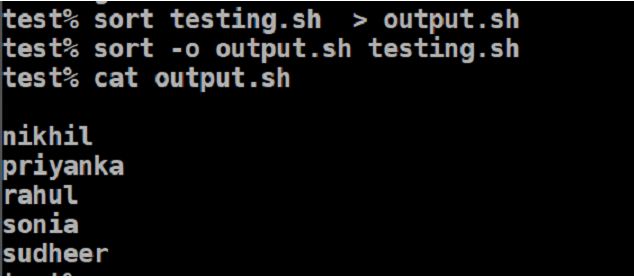
2. Option -r
In Unix, sort command with ‘r’ option gives you to sort the contents in reverse order. This option sorts the given input in a reverse way which is by default in descending order.
Syntax:
sort -r file_name.shExample:
sort -r testing.sh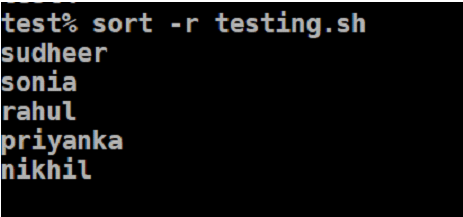
3. Option -n
In Unix, when you try to sort a file in a numeric way, you can use the option ‘-n’ with the sort command. This command is used to sort the numeric contents present in the file. Be default, it sorts in ascending order.
Syntax:
sort -r file_name.shExample:
cat number.txt
sort -n number.txt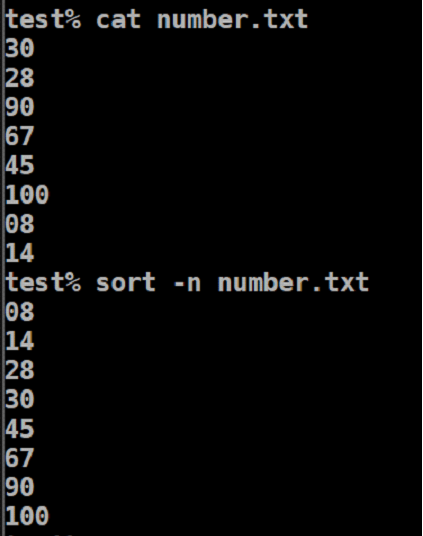
4. Option -nr
This option in sort helps to sort the numeric contents in the file in reverse order. By default, the numeric data in reverse order gives the contents in descending order.
Syntax:
sort -nr file_name.txtExample:
sort -nr number.txt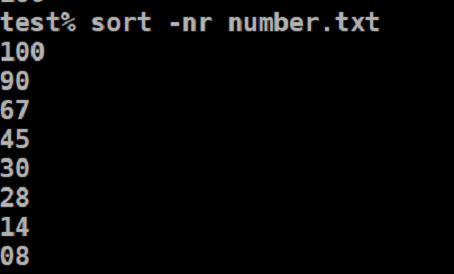
5. Option -k
The option -k, gives us the option to sort a table on the order of column number. You can give the column number with ‘-k’ to sort the particular column.
Syntax:
sort -k file_name.txtExample:
cat file1.txt
sort -k2 file1.txt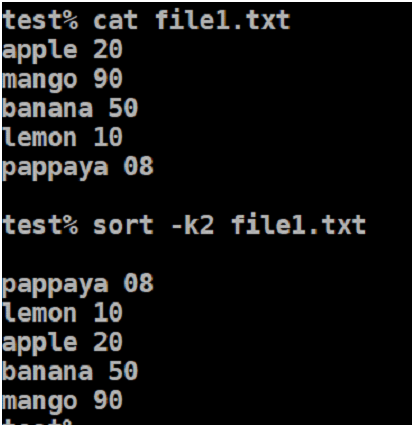
6. Option -c
The ‘-c’ option checks if the contents in the files are sorted or not and outputs the result if they are not sorted. If there is no output, that means the contents in the files are already sorted. Additionally, it will provide the line number where the content is not sorted.
Syntax:
sort -c file_name.txtExample:
sort -c testing.sh
cat testing.sh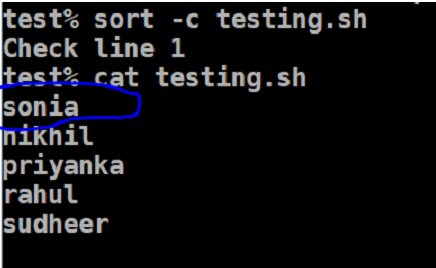
7. Option -u
This option when used with sort, helps to remove duplicates and sort the contents in the file. The output produced in the file will give no duplicates and sorted in ascending order by default.
Syntax:
sort -u file_name.txtExample:
cat fruits.txt
sort -u fruits.txt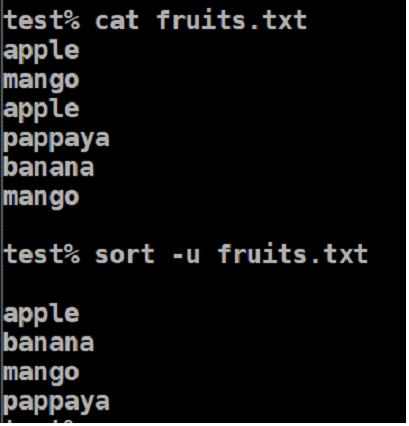
8. Option -M
Unix also provides us the feature to sort the months in the file. The output will give the months in a sorted form.
Syntax:
sort -M file_name.txtExample:
cat month_list.txt
sort -M month_list.txt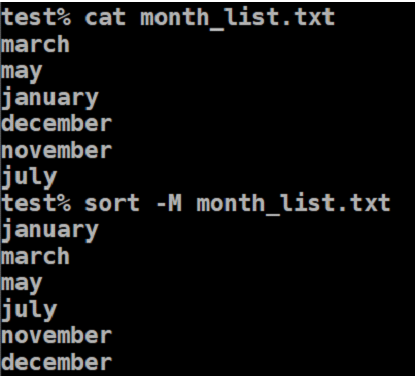
Conclusion
Sort command in Unix is a very useful and most used command in shell scripting to filter the input contents and to print the output to stdout format. Sort command also helps to sort the contents in alphabetical order, numeric way, reverse order, month wise order, or reverse order. With the combination of the above-mentioned options, you can use the sort command in multiple ways as required by the output. Note that in Unix, a blank space is considered a field separator.
Recommended Articles
We hope that this EDUCBA information on “Sort Command in Unix” was beneficial to you. You can view EDUCBA’s recommended articles for more information.

