

Updated March 20, 2023
Introduction to RDD in Spark
An RDD, which stands for Resilient Distributed Dataset, is one of the most important concepts in Spark. It is a read-only collection of records which is partitioned and distributed across the nodes in a cluster. It can be transformed into some other RDD through operations, and once an RDD is created, it cannot be changed; rather, a new RDD will be created.
One important feature through which Spark overcame the limitations of Hadoop is via RDD because rather than replicating the data, Resilient Distributed Datasets (RDD) maintains the data across the nodes in a cluster and will recover back the data with the help of a lineage graph. In Hadoop, the data was redundantly stored among the machines, which provided the property of fault tolerance. Thus an RDD is a fundamental abstraction provided by Spark for distributed data and computation.
The different ways of creating an RDD are
- Loading an external data set
- Passing the data through Parallelize method
- By transforming an existing RDD
Let’s discuss each of them in detail, but before that, we need to set up a spark-shell which is the driver program of spark. In this article, we have included the lines of code in scala. RDD’s can have any type of Python, Java or Scala objects, including user-defined classes. Thus below are the steps to be followed to launch spark-shell.
Launching Spark-Shell
Step 1: Download & unzip spark. Download the current version of spark from the official website. Unzip the downloaded file to any location in your system.
Step 2: Setup Scala
- Download scala from scala lang.org
- Install scala
- Set SCALA_HOME environment variable & set the PATH variable to the bin directory of scala.
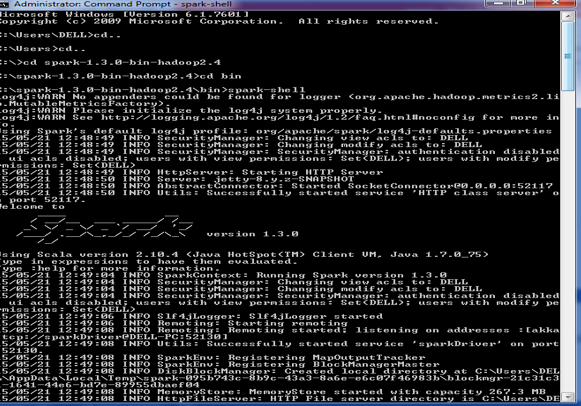
Step3: Start the spark shell. Open the command prompt and navigate to the bin folder of spark. Execute- spark-shell.
Ways to Create RDD in Spark
Below are the different ways to create RDD in Spark:
1. Loading an external data set
SparkContext’s textFile method is used for loading up the data from any source, which in turn creates an RDD. Spark supports a wide range of sources from which the data can be pulled, such as Hadoop, HBase, Amazon S3, etc. One data source is a text file that we have discussed here. Apart from text files, spark’s scala API also supports other data formats such as wholeTextFiles, sequence file, Hadoop RDF and many more.
Example
val file = sc.textFile("https://cdn.educba.com/path/textFile.txt"") // relative path
The variable called file is an RDD, created from a text file on the local system. In spark-shell, spark context object (sc) has already been created and is used to access spark. TextFile is a method of an org.apache.spark.SparkContext class that reads a text file from HDFS, a local file system or any Hadoop-supported file system URI and return it as an RDD of Strings. Thus the input for this method is a URI and partitions the data across the nodes.
2. Passing the data through Parallelize method
Another way of creating RDDs is by taking an existing in-memory collection and passing it to parallelize the method of SparkContext. While learning spark, this way of creating RDDs is quite useful as we can create the RDDs in the shell and perform operations as well. It is hardly used outside testing and prototyping as it requires the entire data to be available on the local machine. One important point about parallelizing is the number of partitions the collection is broken into. We can pass the number (partitions) as a second parameter in the parallelize method, and if the number is not specified, Spark will decide based on the cluster.
- Without a number of partitions:
val sample = sc.parallelize(Array(1,2,3,4,5))
- With a number of partitions:
val sample = sc.parallelize(List(1,2,3,4,5),3)
3. By transforming an existing RDD
There are two kinds of operations that are performed over RDD.
- Transformations
- Actions
Transformations are operations on RDD that result in the creation of another RDD, whereas actions are the operations that return a final value to the driver program or write data to an external storage system. Map and filter are some transformation operations. Consider an example of filtering out some lines from a text file. Initially, an RDD is created by loading the text file. Then we apply a filter function that will filter out a set of lines from the text file. The result will also be an RDD. The filter operation does not change the existing input RDD. Instead, it returns a pointer to an entirely new RDD which is the errors red. We can still use the input RDD for other computations.
val inputRDD = sc.textFile("log.txt")val errorsRDD = inputRDD.filter(line => line.contains("error"))
The below example shows the same transformation concept for a map function. The result is the RDD that has been generated due to the Map function. In the map operation, the logic will be defined, and that particular logic will be applied to all the elements of the dataset.
val inputRDD = sc.parallelize(List(10,9,8,7,6,5))val resultRDD = inputRDD.map(y => y * y)println(resultRDD.collect().mkString(","))
Important points to remember
- Among all the frameworks which are currently available, Apache spark is the latest one and is gaining popularity because of its unique features and simple approach. It eliminates all the disadvantages being posed by Hadoop as well as maintaining the fault-tolerance and scalability property of MapReduce. To achieve these goals spark platform introduces the concept of RDD.
- There are mainly three ways in which an RDD can be created where; the most basic one is when we load the dataset.
- The parallelize method is widely only for testing and learning purposes.
- A transformation operation would result in an RDD.
Recommended Articles
This has been a guide to RDD in Spark. Here we have also discussed different ways of Creating RDD, how to Launch Spark-Shell with important points. You can also go through our given articles to learn more-

