

Difference Between Raspberry Pi 3 vs BeagleBone Black
In the realm of computer enthusiasts, Beaglebone is not any Beagle breed’s bone, just like Raspberry Pi is not a pie made from some delectable raspberries. The Raspberry Pi 3 line of single-board computers is compact. They are typically employed in robotics-related markets. Beaglebone Black, on the other hand, is a low-power open-source single-board software. It is not a complete development platform, as onboard support cannot access many features. Though both Raspberry Pi 3 vs BeagleBone Black are single-board computers, they have differences.
Head to Head Comparison Between Raspberry Pi 3 vs BeagleBone Black (Infographics)
Below is the top 4 difference between Raspberry Pi 3 vs BeagleBone Black.
Key Differences between Raspberry Pi 3 and BeagleBone Black
Both Raspberry Pi 3 vs BeagleBone Black are single-board computer systems.
- Ease of Setup: Raspberry Pi does not have a micro USB cable and also does not have a pre-installed operating system. An SD card needs to be obtained to boot the system. On the other hand, Beagle comes with a mini cable that helps supply power to the system. It can boot from the onboard storage.
- Connections: Raspberry Pi provides 26 points for various interfaces, while Beagle offers 92 points.
- Processor: Beagle has a 1 GHz processor, while Raspberry has a 700MHz processor. The architecture of Raspberry is ARMv6, an older version, while Beagle uses ARMv7.
Raspberry Pi 3 vs BeagleBone Black Comparison Table
The primary Comparison are discussed below.
| The basis of comparison | Raspberry Pi 3 | Beaglebone Black |
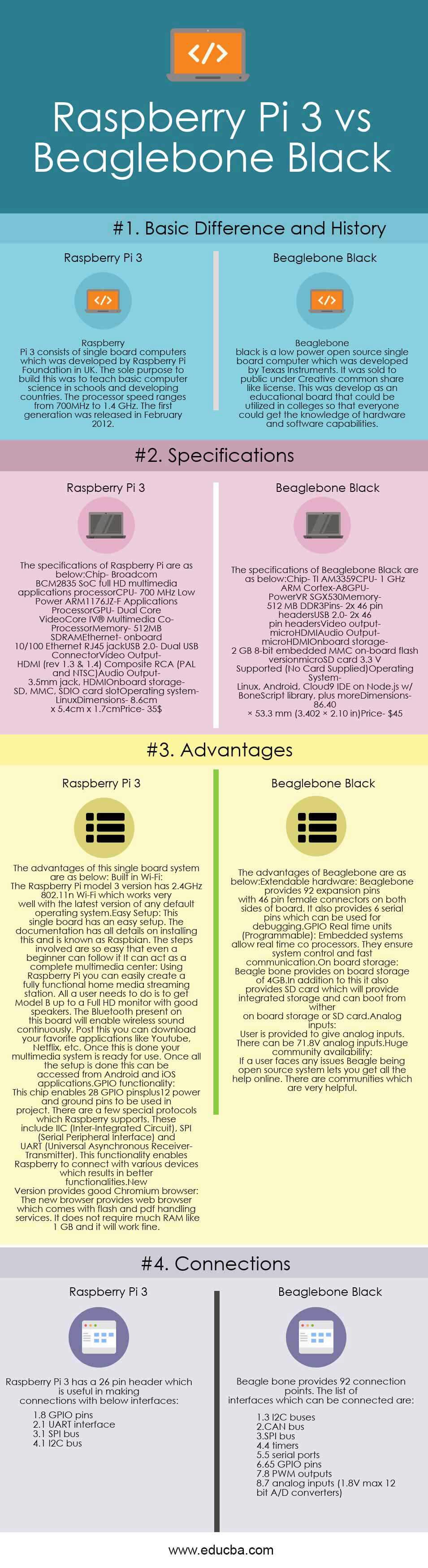
| Basic differences and history | Raspberry Pi 3 consists of single-board computers, which were developed by the Raspberry Pi Foundation in the UK. The sole purpose of building this was to teach basic computer science in schools and developing countries. The processor speed ranges from 700MHz to 1.4 GHz. The first generation was released in February 2012. | Texas Instruments created the open-source, low-power Beaglebone Black single-board computer. It was made available to the public under a license resembling Creative Common Share. To educate everyone about the capabilities of the hardware and software, this was developed as a teaching tool that could be used in academic settings. |
| Specifications | The specifications of Raspberry Pi are as below: Chip– Broadcom BCM2835 SoC full HD multimedia applications processor CPU– 700 MHz Low Power ARM1176JZ-F Applications Processor GPU– Dual Core VideoCore IV® Multimedia Co-Processor Memory– 512MB SDRAM Ethernet– onboard 10/100 Ethernet RJ45 jack USB 2.0– Dual USB Connector Video Output– HDMI (rev 1.3 & 1.4) Composite RCA (PAL and NTSC) Audio Output– 3.5mm jack, HDMI Onboard storage– SD, MMC, SDIO card slot Operating system– Linux Dimensions– 8.6cm x 5.4cm x 1.7cm Price– 35$ |
The specifications of Beaglebone Black are as below: Chip– TI AM3359 CPU– 1 GHz ARM Cortex-A8 GPU– PowerVR SGX530 Memory– 512 MB DDR3 Pins– 2x 46 pin headers USB 2.0– 2x 46 pin headers Video output– microHDMI Audio Output– microHDMI Onboard storage– 2 GB 8-bit embedded MMC on-board flash versionmicroSD card 3.3 V Supported (No Card Supplied) Operating System– Linux, Android, Cloud9 IDE on Node.js w/ BoneScript library, plus more Dimensions- 86.40 × 53.3 mm (3.402 × 2.10 in) Price– $45 |
| Advantages | The advantages of this single-board system are as below: Built-in Wi-Fi: The Raspberry Pi model 3 version has 2.4GHz 802.11n Wi-Fi, which works very well with the latest version of any default operating system. Easy Setup: This single board has an easy setup. The instructions for installing this, which is referred to as Raspbian, are provided in the manual. The steps involved are so easy that even a beginner can follow them. It can act as a complete multimedia center: Using Raspberry Pi, you can easily create a fully functional home media streaming station. All a user needs to do is to get Model B up to a Full HD monitor with good speakers. The Bluetooth present on this board will enable wireless sound continuously. Post this; you can download your favorite applications like Youtube, Netflix, etc. Your multimedia system is now ready for use once this is finished. This can be accessed from Android and iOS applications once the necessary setup has been completed. GPIO functionality: This chip enables 28 GPIO pins plus 12 power and ground pins to be used in a project. There are a few special protocols that Raspberry supports. These include IIC (Inter-Integrated Circuit), SPI (Serial Peripheral Interface), and UART (Universal Asynchronous Receiver-Transmitter). This functionality enables Raspberry to connect with various devices, which results in better functionalities. |
The advantages of Beaglebone are as below: Extendable hardware: Beaglebone provides 92 expansion pins with 46-pin female connectors on both sides of a board. GPIO Real-time units (Programmable): Embedded systems allow real-time coprocessors. They ensure system control and fast communication. Onboard storage: Beagle Bone provides onboard storage of 4GB.In addition to this, it also provides an SD card, which will provide integrated storage and can boot from withering onboard storage or SD card. Analog inputs: The user is provided to give analog inputs. There can be 71.8V analog inputs. Huge community availability: If a user faces any issues, Beagle being an open-source system, lets you get all the help online. There are communities that are very helpful. |
| Connections | Raspberry Pi 3 has a 26-pin header which is useful in making connections with the below interfaces:
|
Beagle bone provides 92 connection points. The list of interfaces that can be connected are:
|
Conclusion
In this comparison of these two, the selection depends on the user. While Raspberry provides better documentation, Beagle enables users to choose their hardware. The decision depends on the usage an individual wants.
Recommended Article
We hope that this EDUCBA information on “Raspberry Pi 3 vs BeagleBone Black” was beneficial to you. You can view EDUCBA’s recommended articles for more information.

