
Introduction to Python 3 Threading
Python 3 threading is sometimes a lightweight process because it doesn’t use as much memory as processes and is less expensive. Using many threads is comparable to running multiple applications at the same time. In python 3 threading, multiple threads are processing the same data as the main thread, making it easier to share information and communicate than if they were independent processes.
What is python 3 threading?
- Python 3 thread has a start, middle, and end. It contains the pointer of instruction that tracks where it is presently running within its context.
- There are two types of threads available in python 3 as follows.
- Kernel thread
- User thread
- A kernel thread is a part of OS. Therefore, it will be executed on OS when running the kernel thread. At the same time, user-space threads are not part of the OS.
- Python 3 contains the two modules supporting the thread usage as follows.
- _thread
- Threading
- For a long period, the thread module was considered “deprecated.” Rather than using the threading module, users are urged to use it. As a result, the “thread” module no longer exists in Python 3. For backward compatibility in Python3, the thread’s name is renamed as _thread.
- Python 3 threading allows us to run many parts of our program simultaneously, making our design easier if we have worked with Python before and wish to use threads for faster code execution.
- A thread is a flow of execution distinct from the rest of the program. This implies that two things will be happening simultaneously in our software.
- It’s easy to imagine that python 3 threading contains more processors working simultaneously on our application, each doing its own thing. Unfortunately, that’s quite close to the mark. The threads may run on multiple processors, but only one of them will be active at any given time.
- Getting many jobs to run simultaneously necessitates utilizing a non-standard Python implementation and employing multiprocessing, which comes with a cost.
- Threading may not speed up all tasks due to how Python works. This is nothing but the interaction with GIL, which effectively limits the number of Python threads that can run simultaneously.
- Threading is an excellent fit for tasks that spend much time on external events. However, problems that demand a lot of CPU processing but have little time to wait for external events may not run quicker.
- At the time constructing a Thread, we give a set of arguments. For example, in this scenario, we instruct the Thread to call the thread function with argument one as a parameter.
When to use python 3 threading?
- It’s a great way to save time and improve an application’s speed. In addition, multithreading enables programmers to break down application tasks into smaller chunks and run them simultaneously.
- It also boosts the user’s willingness to use the software even if a section of it is too long or blocked.
- It allows us to execute numerous threads simultaneously by switching between them quickly with the help of a CPU called context switching.
- Furthermore, it allows it to share its storage space with the primary threads inside a process, making it easier for them to share information and communicate with other threads than standalone processes.
- Multithreading seeks to accomplish several activities simultaneously, improving program efficiency, speed, and rendering.
The below example shows when we can use python 3 threading. In the below example, we are using python 3 threading in the join method.
- Join method stops the main thread and waits for the thread object to finish its execution. The main thread in Python is started when an object of the thread is completed.
Code –
import threading
def print_hello(n):
    print("What is the Name of Student:- ",n)
Thread1 = threading.Thread (target = print_hello, args = ('ABC', ))
Thread1.start ()
Thread1.join ()
print ("Python 3 threading")
Output:

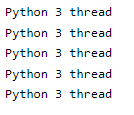
We can also use python 3 threading to create multiple thread objects.
Code –
import threading
def worker():
    	print ('Python 3 thread')
    	return
t1 = []
for i in range(5):
   	 t2 = threading.Thread(target=worker)
   	 t1.append(t2)
   	 t2.start()
Output:
Python 3 threading applications
- The threads can be operated concurrently; multithreaded programs can run quicker on computers with several CPUs.
- A program’s response to input can be maintained. This applies to both single and multi-processor systems.
- Global variables can be shared throughout threads in a process. If one thread modifies a global variable, the change affects all threads. Likewise, local variables may exist in a thread. For an operating system, thread management is easier than process management.
- A thread synchronization mechanism assures that no two threads in the application can access the same shared resources simultaneously. Critical sections could be used to describe the scenario.
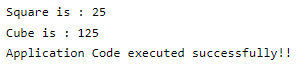
- The below example shows the threading application in python as follows.
Code –
import threading
def print_cube (num):
   	print("Cube is : {}".format(num * num * num))
def print_square(num):
    print("Square is : {}".format(num * num))
if __name__ == "__main__":
    t1 = threading.Thread (target=print_square, args=(5,))
    t2 = threading.Thread (target=print_cube, args=(5,))
    t1.start ()
    t2.start ()
    t1.join ()
    t2.join ()
    print ("Application Code executed successfully!!")
Output:
Python 3 threading program example
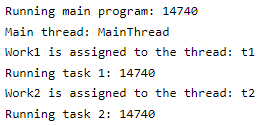
The below example shows python 3 threading as follows. We are printing the thread name as follows.
Code –
import threading
import os
def work1():
    print("Work1 is assigned to the thread: {}".format(threading.current_thread().name))
    print("Running task 1: {}".format(os.getpid()))
def work2():
    print("Work2 is assigned to the thread: {}".format(threading.current_thread().name))
    print("Running task 2: {}".format(os.getpid()))
if __name__ == "__main__":
    print("Running main program: {}".format(os.getpid()))
    print("Main thread: {}".format(threading.current_thread().name))
    t1 = threading.Thread(target=work1, name='t1')
    t2 = threading.Thread(target=work2, name='t2')
    t1.start()
    t2.start()
    t1.join()
    t2.join()
Output:
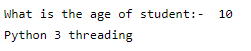
The below example shows the age of students using python 3 threadings.
Code –
import threading
def print_hello(n):
    	print ("What is the age of student:- ", n)
Thread1 = threading.Thread (target = print_hello, args = (10, ))
Thread1.start ()
Thread1.join ()
print ("Python 3 threading")
Output:
Conclusion
Python 3 thread has a start, middle, and end. It contains the pointer of instruction that tracks where it is presently running within its context. Threading enables threads to communicate with each other and share resources like files, data, and memory on the same processor.
Recommended Articles
This is a guide to Python 3 Threading. Here we discuss What is python 3 threading and Examples along with the codes and outputs. You may also look at the following articles to learn more –

