


Project Management Tools and Software
Top 10 Brilliant Project Management Tools and Software to Help You Manage Tasks at Work and Home
Is your drawing board completely covered in Post-it notes?
Oh! All those colors: blue for your house chores, green for your work, and red for those Saturday nights?
Are you in desperate need of getting out of the clutter?
If your answer to all the above questions is a simple, three-letter word, then “Yes”, you’ve reached the right place that will help you get out of that chain reaction and conquer the world of project planning and organization. You need simple yet effective Free Project Management Tools and Software to manage your daily tasks and operations, not a management tool to manage your management tool. That completely defeats the purpose and leaves you in circles, completely throwing you off track of your current and intended pace.
What is Project Management? At its core, it provides a fundamental way to organize and optimize tasks, enabling high-efficiency processes that can boost your productivity by 10x. Project Management Tools and software are now at the forefront, helping you cut the clutter to nothing.
These paid and free Project Management Software allow you to let go of those pens and papers and help you usher in a whole new approach to managing your tasks, both within the comforts of your home and the wild world out there in the workplace.
Using a brilliant tool can yield great results for you. And technology plays a vital role in all of these.
- Collaboration in Real-time – Communication is key in organizations or any form of work. Systematic Project Management Tools and Software will greatly benefit you through efficient partnerships and secure cloud collaboration.
- Management of Risks, Forecasting – Whether you’re a freelancer, an individual business, or a corporate manager, you will need all the help you can receive to mitigate your risks on projects and tasks, and allow enough time and space to create forecasts to subdue those risks. Providing project leaders with helpful content can further strengthen risk management strategies by delivering actionable insights and best practices.
- Task Prioritization – Enabling optimal task prioritization is essential for any setup. This way, you will know how many items are on the list, how many are completed, and how many remain.
- Swift Actions (one-click phenomenon) – You can indulge in swift cursor movements to save time while planning and organizing your tasks. Project Management Tools and Software are highly user-friendly and mostly rely on simple drag-and-drop.
- Completely Intuitive – With the latest technological advancement, smart task-keepers are smart and will find the best way out for you. Input—Process—great Output!
Leave your link and sheets behind; here are simple-to-use project management hack tools to get those engines blazing, both at work and at home:
Become a project planning engineer through our practical training. Learn to schedule the project in the most logical and cost-effective way. Understand the impact of the budget and cost.
Project Management Tools and Software to Help You Manage Tasks at Work
1. Asana
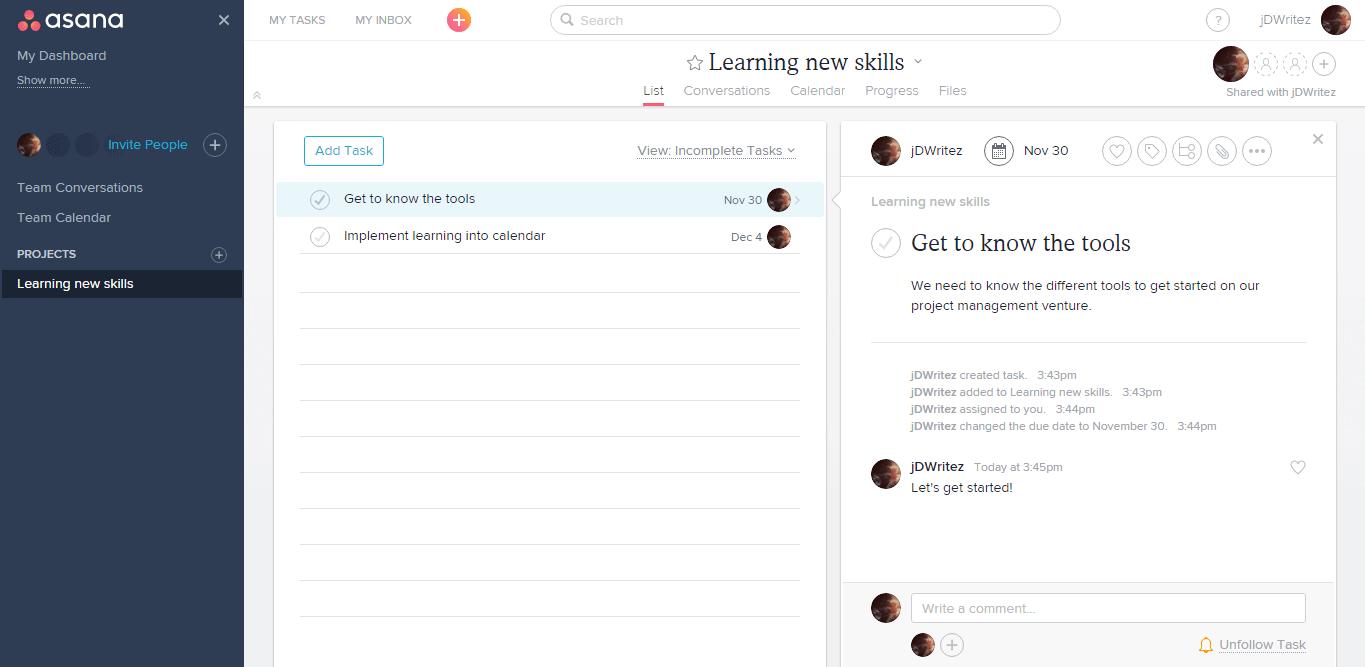
Built entirely on the “Keep it Simple, Silly” concept, Asana is an easygoing, real-time project management tool designed for efficient collaboration. It can house up to 30 users per project and has a clean, slate-like look and feel. You can feel de-cluttered with a single glance at this powerful Project Management Tool.
The strikethroughs and task priorities, along with the ability to break tasks into subtasks, give Asana a simple infrastructure and a detailed one-page view for all your needs and those of your project.
Asana, with its three main sections, provides an overview of your entire workspace, including all personal and collaborative projects, and an inbox that lets you forgo the back-and-forth of excessive, unnecessary emails with your team.
With due dates and assignees listed for your project and its tasks, Asana provides a holistic view of your project’s progress and next steps. Gain the freedom to add people, comment on tasks and subtasks, set reminders and frequencies to your studies, and make easy the process of follow-up.
2. Workstatus
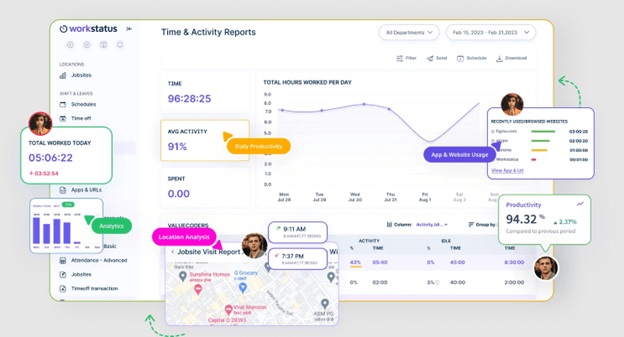
Workstatus is a leading project management software platform that emphasizes time tracking and team efficiency monitoring. It’s designed to provide real-time insights into project progress and team performance, making it particularly valuable for teams that need close oversight of time allocation and productivity.
Its user-friendly design supports task hierarchies, letting users break down larger projects into manageable subtasks, set priorities, and assign responsibilities. Real-time progress tracking ensures that teams remain aligned, while customizable workflows adapt seamlessly to unique project requirements.
Workstatus also centralizes communication, reducing the need for excessive back-and-forth emails. Teams can collaborate directly within the platform by assigning tasks, adding comments, and tracking updates—all in one unified workspace. Automated
3. Podium
As a perfect project management tool for agile project management, Podio allows users to manage projects without a programming background. Following the tradition of easy, user-friendly drag-and-drop, you can find your way through custom-made workspaces to tick off all those pending tasks. With state-of-the-art project management reporting tools tailored to your requirements, Podio will help you conduct your analysis efficiently.
Available on desktop, mobile, and your recent tab, this Project Management Tool is inching toward being a blockbuster! A great file-sharing tool, Podio even looks after your customer relationship woes by providing a bit of CRM to enhance how your business functions. Cool, eh?
Organize all your work and projects, and share information with your team through transparent communication channels in the app. A product by Citrix, Podio is the new sweet deal on the market to get your office online!
4. Flow
Ringing in a whole concept altogether, Flow has a software model that takes your chats with colleagues and team members and converts them into tasks, and those tasks into cohesive projects. The UI is fresh and bubbly; the fun doesn’t stop there. With the simplest of maneuvers, Flow, as the name suggests, goes with the flow. Upvote posts and ideas pitched in to get the fastest consensus in the history of working culture. You don’t need to rely on emails flying to and fro; you can just open your chats and watch magic strike through the air.
Incorporating the principles of the KANBAN board, this robust project management tool takes your chats. It allows you to assign deadlines, share files, allocate tasks, and elaborate on each item on month-long calendars.
By making chats actionable and getting alerts only when you’re mentioned in a chat or DM’ed, you will find all the great stuff to up your work life and have you “Flow” smoothly through your projects. One upvote from me on this brilliant idea!

5. KANBAN Tool
Joining the league is a supergiant KANBAN Tool that provides efficient online project management and KANBAN boards to organize and manage all your tasks and projects. Enter the world of this Japanese management control technique in the most disciplined and optimum way.
With the KANBAN Tool, envision your workflow and enable top management to make informed decisions that steer your business in the right direction. Gain A-to-Z control over your work and your team members’ work, and prepare forecasts based on the current workflow. Get a broad view of all workloads on your to-do list and make effective decisions to prevent bottlenecks.
This advances to the next level with business analytics based on your data and the information provided by the tool. Use all the charts to gain a comprehensive view of the project and set end deadlines based on the allocated tasks.
KANBAN is a visual project management tool that organizes all your tasks and documents, enabling real-time communication and time tracking. Things just got better with this tool!
6. Teamly
Do you manage a team that works in different parts of the world? Imagine your team members are in cities such as New York, Mumbai, and Singapore, working together on a project. That’s where Teamly can help. This all-in-one solution allows you to chat with your team in real time. You can also assign tasks to each member and track their progress. And if you want to train them on any complex task, you can simply record videos or audio clips to explain your ideas.
Moreover, its features, such as time tracking, ensure that everyone stays on schedule, regardless of location. Thus, this project management tool is like a virtual office, enabling everyone to work together easily. With the added benefit of a virtual business address, it further enhances team coordination and professional presence. If you are tired of the challenges of managing a global team, consider giving Teamly a try.
7. Freedcamp
Freedcamp is a budget-friendly project management tool, offering unlimited users and projects. With rich features to take your project management plan dreams to their limit, Freedcamp ensures you can choose KANBAN or simple task layouts.
Its long range of integrations and add-on components make it the best in its league. Upgrading also comes at a minimal cost to your business. Time tracking, project management tools, and techniques templates for customization, and invoicing are also handled alongside your everyday PM tasks.
8. ProofHub
If you want to bring order to your work life, ProofHub is the project management platform you need. It helps you bring all your projects and tasks into one place to manage them more effectively. With a super easy and simple-to-use interface, you can create a project in a few clicks, add tasks, assign one or more team members to each task, and track the progress in real time. Each task has a dedicated collaboration space where you can add files, mention people, and share all the task details. Thus, there will be no more chaos in your life, and you can keep Zen!
With ProofHub’s multiple project views, including Board and Table, you can visualize all the tasks at a glance. Moreover, you can use filters to sort the information you want to see on your board! This saves time and declutters and sorts data as you want. The standout feature of ProofHub is that it brings team collaboration and online proofing capabilities directly to your tasks. You can chat with team members, review and edit digital assets, share feedback, and create a dedicated space for project-level discussions. Only a few platforms offer these capabilities natively in a paid plan. ProofHub is a great deal for me.
9. Kanban Zone
Kanban Zone is a visual management tool that leverages Kanban to enhance productivity for individuals and organizations through process visualization, workflow optimization, and performance monitoring and adjustment. This platform provides a streamlined way to refine processes by minimizing waste, thereby increasing returns for marketers. Kanban Zone aims to facilitate smoother collaboration among teams. Its adaptive design functions seamlessly across any device, allowing team members to track their workflow and workload regardless of location or work mode. With its customizable board designer, team members can oversee tasks more effectively by creating a Kanban board tailored to their process flow. Using Kanban Zone’s board designer, teams can create boards tailored to their requirements.
Additionally, Kanban Zone includes a Kanban metrics feature that helps users monitor performance and visualize work more accurately using data from the following metrics: Allocation, Cycle Time, Flow Efficiency, Cumulative Flow, Arrival Rate, Throughput, and Abandoned Effort. This functionality simplifies generating custom productivity reports based on the specific data required. In addition to its software capabilities, Kanban Zone’s team provides professional assistance to help organizations kickstart their Kanban adoption and develop a strong Agile transformation for their operations. Experience Kanban Zone today and discover how to enhance your productivity and generate more output.
10. ProjectManager
ProjectManager is a comprehensive project planning platform built to balance power with simplicity. It enables teams of all sizes to structure their work, track performance, and meet deadlines without losing control of budgets or scope. Whether overseeing a single initiative or coordinating multiple projects across a portfolio, the platform centralizes planning, execution, and oversight in a single cohesive workspace.
Its strength lies in the flexibility it gives teams. Projects can be managed through Gantt charts, kanban boards, task lists, spreadsheets, or calendar views, allowing individuals to work in the format that fits their role and workflow. With real-time collaboration, customizable reporting, and robust resource management tools, ProjectManager helps teams remain connected, agile, and focused on delivering results—regardless of location.
11. MeisterTask
If you are after a project management tool that keeps things simple (without feeling “lightweight”), MeisterTask is a strong alternative to the usual suspects. It provides simple Kanban boards to plan projects, assign tasks, set deadlines, and track progress, so everyone knows what to do and who is responsible. Moreover, when you need more structure, timeline planning, and helpful automations, keep recurring work moving without constant manual follow-ups. Add built-in documentation (Notes) alongside your tasks, and you get a centralized hub for projects, tasks, and docs, hosted in Germany and designed to be easy to adopt, even for teams that prefer a low-learning-curve approach.
Project Management Tools and Software to Help You Manage Tasks at Home
1. HomeRoutines
Homemakers know that managing a home is not as simple as it seems. It goes deeper still, deep-rooted. Especially with children running free in your home amid the chaos, there’s a good chance you might miss something important. Now is your opportunity to manage your home chores like never before with the HomeRoutines app. Home chores don’t differ from day 1 to day 2. It’s routine, but a single error can quickly become catastrophic! But amid all these issues, stand out and make the Repeat process efficient!
You wouldn’t want to miss out on those routine tasks that will send your house chores for a good old walk in the park. Create daily, weekly, and monthly lists to cover everything you need during capture. Prepare Focus Zones for each list to ensure you dust every nook and cranny in your house.
Home management is indeed a task management tool. Earn a star for every accomplishment, and take pride in what you’ve done. And this idea is quite revolutionary, don’t you think?
2. Wunderlist
Do you find your home in a perpetual mess? You know where to start and where to end, but you aren’t quite composed as all these tasks are rattling. You pull out a pen and paper, and oops, the wind blows it away. You write it on your whiteboard, your little toddler is all over the place, and you forget about the board. One tool that comes to your rescue: Wunderlist!
Keeping a list of household chores is, in turn, a complex task. Wunderlist makes simple all your daily activities. For some, after work, there’s still work pending. With efficient note-taking and to-do list features, keep marking your to-do lists, and when you reach the end, heave a sigh of relief. A very intuitive app that plays parts with a single or double tap, Wunderlist also features specialized controls and works across multiple platforms (iOS, Android, Windows Phone).
Set reminders for particular dates and never find yourself
self-deviating from your project plan for the day. This is a useful app for your home and work tasks.
3. 2Do
Sometimes, in a brief moment, you have all the things you need to do at home in your mind. You stumble around looking for a pen and paper. But what you don’t realize is that your smartphone is a powerful tool, built specifically to keep pace with your quick mind. One moment passes, and you lose the thought, but before you do that, 2Do captures all of those thoughts for you.
Boost your to-do lists with a simple look and feel, keeping you on track for your day ahead! With rich features and a completely easy-to-use UI, 2Do was created with utmost thought given to every case scenario you would face at any point in your life. Take control of your workflows and organize all your tasks to the T by creating Focus options to segment tasks.
With automatic backups created for you, you need no longer wonder what was on that list.
4. You Need A Budget
This personal budget tool is one “must-have” management tool to manage your most important project Finances. You Need A Budget helps you stay in control of your monthly and yearly budgets and make the most of your vision for them. It is built upon a proven method of just four basic rules. This app promises to help millions gain control of their finances through best-in-class budgeting practices.
With meaningful categories for expenses and savings, you can draw the line to all your inputs and outputs from your wallet. This software saves you time and helps you manage your money, while delivering strong returns on your efforts. LifeHacker.com called it the “most popular personal finance software”.
5. Todoist
Get Things Done with Todoist! That’s what it says. Todoist uses the GTD project management methodology to make handling your tasks more fun and completely organized. This workflow follows the simple Collect-Process-Organize-Review workflow. There’s your brilliance! Named one of the best software products of the year, Todoist is a standout and helps you turn your tasks into actionable activities. This is a brilliant par tool for all your personal management woes.
Recommended Articles
This guide covers project management tools and software to manage your daily tasks and operations, so learn & gain expertise. The following external links are related to project management tools and software.

