



OpenVPN Alternatives with Static IP: Overview
Tired of CAPTCHA and constant allow-list edits every time your VPN rotates IPs? When workflows depend on a fixed endpoint, switching to OpenVPN alternatives with Static IP can eliminate unnecessary friction. After testing 28 WireGuard-ready VPN services in November 2025, the following guide highlights five providers that consistently deliver high-quality dedicated IPs with minimal setup effort. If you need datacenter and residential choices right away, TorGuard’s Dedicated IP plans offer a convenient starting point.
How OpenVPN Alternatives with Static IP Were Selected?
Each VPN service received a score based on six weighted factors that affect real-world performance when using a static IP:
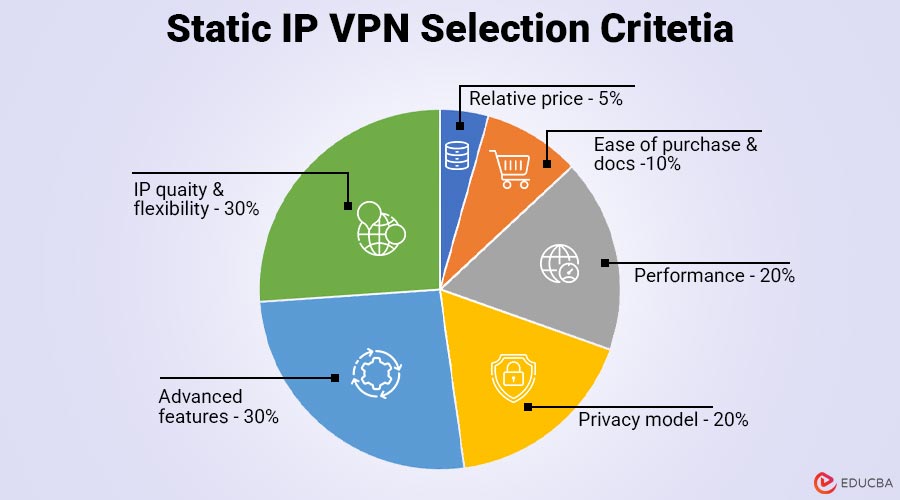
- IP quality and flexibility (30%): Dedicated addresses available in multiple regions rank higher than shared or single-country options. We add five bonus points if the provider sells residential IPs, since those ranges sit on fewer blocklists.
- Privacy model (20%): Can the vendor connect the IP to your personal details? Private Internet Access earns full marks for its burn-once token system, while NordVPN loses points because the IP address remains linked to your account email.
- Performance (20%): Static-IP servers must support WireGuard (or a proprietary variant) and deliver measurable gains. A 2025 MDPI study reported that WireGuard achieved about 90% higher TCP throughput than OpenVPN in VMware tests, reaching 210 Mbps versus 110 Mbps.
- Advanced features (15%): Built-in port forwarding, multi-device rules, and automation capabilities helped simplify self-hosting workflows.
- Ease of purchase and documentation (10%): A solid IP is useless if redemption feels like filing taxes. Clear checkout flows, step-by-step guides, and responsive support earn extra credit.
- Relative price (5 percent): IPv4 scarcity drives up prices, so the evaluation compared each static-IP add-on to its provider’s baseline plan rather than raw costs.
This weighted rubric lets you compare providers on the details that shape daily use, not on glossy marketing copy.
2026 Static-IP Scoreboard at a Glance
Need the facts in 30 seconds? The table below isolates the must-know specs for each static-IP VPN. Providers in italics are honorable mentions, not part of the top five.
| Provider | IP Type | Regions (≈) | Tokenised Purchase | Port Forwarding | Residential IPs |
| TorGuard | Dedicated/shared | 45+ | Yes | Yes | Yes |
| NordVPN | Dedicated | 20+ | No | No | No |
| Surfshark | Dedicated | 15+ | No | No | No |
| Private Internet Access | Dedicated | 10+ | Yes | Yes | No |
| CyberGhost | Dedicated | 10+ | Yes | No | No |
| ExpressVPN | Dedicated | 5 | Yes | No | No |
| OVPN | Dedicated | 3 | Yes | Yes | No |
| Windscribe | Shared static | 9 | No | Yes | Yes |
Tip:
Choose TorGuard or PIA if you host services behind your VPN; pick NordVPN for the largest city list and WireGuard-level speeds. Remember, Windscribe’s “static” address is shared, so strict compliance checks may still fail.
5 Best OpenVPN Alternatives with Static IP for 2026
Explore the top five VPN providers below, each offering dedicated static IPs, fast WireGuard connections, and practical features to simplify secure online access.
1. TorGuard: The Power User’s Playground
TorGuard stands out among OpenVPN alternatives with static IP addresses by treating dedicated IPs as flexible assets rather than fixed limitations. Users can choose datacenter IPs or upgrade to residential addresses that blend seamlessly with typical home traffic. When requirements shift such as moving a project from Frankfurt to Miami support can swap the IP for a small fee instead of requiring a new subscription.
Performance Strengths
In Tom’s Guide’s 2025 protocol comparison, TorGuard’s WireGuard tunnel reached 950 Mbps, while the same service on OpenVPN averaged 330 Mbps. This performance margin keeps game servers responsive and large Git operations fast. Port forwarding is included by default with every dedicated IP, enabling quick setup for SSH, media servers, and dashboard access.
Privacy and Usability
The dedicated IP links to account metadata, but TorGuard enforces a strict no-logs policy and accepts crypto and retail gift cards for pseudonymous payments. As with all static-IP setups, an individual IP address offers a strong reputation but less anonymity than shared VPN exits.
Pricing & Interface
Pricing follows a simple model: a base plan plus an IP add-on. Residential IPs cost more due to IPv4 scarcity. The interface focuses on functionality over flashiness, with every technical control placed exactly where advanced users expect.
Choose TorGuard When You Need:
- A personal IP that may be datacenter-based or residential
- Built-in port forwarding with no extra steps
- WireGuard performance approaching 1 Gbps
- A strong OpenVPN alternative with a static IP as a fallback
Skip TorGuard If:
A glossy dashboard is a priority if configuration settings are rarely adjusted.
2. NordVPN: Wide Coverage, Big Speeds, One Privacy Catch
NordVPN is an excellent choice for users needing OpenVPN alternatives with static IP addresses distributed across many locations. As of late 2025, Nord offers dedicated IPs in 30+ cities across multiple continents. The add-on is activated directly at checkout, eliminating manual configuration.
Speed and Protocols
Every dedicated IP runs on NordLynx, NordVPN’s WireGuard-based protocol. A 2025 MDPI study found that WireGuard achieved up to 90% higher TCP throughput than OpenVPN under identical testing conditions. This improvement results in faster downloads and more stable video calls, even when all traffic passes through one fixed endpoint.
Privacy Consideration
The primary trade-off is privacy. NordVPN ties each dedicated IP to the account email, making the address traceable within internal systems. This is generally acceptable for business workflows, but not ideal for strict isolation use Private Internet Access if a tokenised flow is essential.
Ease of Use
Setup requires selecting a city and connecting via the “Dedicated IP” section in the NordVPN app. Port forwarding is not supported.
Choose NordVPN When You Need:
- The broadest global range of dedicated IPs
- WireGuard-grade speeds across all static endpoints
- A polished app that hides complexity
Skip NordVPN If:
A tokenised, unlinkable purchase path or port forwarding is required.
3. Surfshark: Budget Pick, Rapidly Expanding
Surfshark delivers one of the most affordable OpenVPN alternatives with static IP, extending dedicated IP support to Chrome, Firefox, and Edge extensions. This enables a single browser session to use a fixed address while the rest of the system continues to use dynamic VPN routing.
Coverage and Pricing
The catalog covers 20 cities across 15 countries, and pricing stays competitive around $3.75 per month on multi-year plans. Setup is straightforward: select a location, enable Dedicated IP, and connect.
Performance
Surfshark’s WireGuard implementation is notably fast. TechRadar’s 2025 benchmarking recorded speeds up to 1,615 Mbps on nearby servers, outperforming several premium services. Long-distance routes may vary, but remain suitable for daily use.
Limitations
Port forwarding is unavailable, and all dedicated IPs are datacenter-based. Some banking sites may require additional verification. IPs default to being linked to the account email unless anonymous Dedicated IP mode is enabled.
Choose Surfshark When You Need:
- A budget-friendly static IP option
- WireGuard speeds for everyday workloads
- Unlimited devices across the account
- Convenient browser-based dedicated IP usage
Skip Surfshark If:
Residential IPs, inbound hosting, or tokenised privacy models are required.
4. Private Internet Access: Privacy First, Features Included
Private Internet Access (PIA) offers one of the strongest privacy-focused OpenVPN alternatives with a static IP through its burn-once token system. The token is redeemed once and then erased, preventing the dedicated IP address from being linked to billing records.
Functionality and Locations
PIA supports both WireGuard and OpenVPN, and includes port forwarding useful for Plex servers, seedboxes, and other inbound services. The static-IP catalog spans eight countries and major cities, including New York, London, Frankfurt, Sydney, and Toronto.
Performance & Pricing
TechRadar’s 2025 tests recorded WireGuard speeds of 880 Mbps on U.S. gigabit lines slightly below NordVPN but well above category averages. The service retains its unlimited-device policy, though the dedicated IP can be active on only one device at a time. PIA sits in the mid-range price tier.
Choose PIA When You Need:
- A tokenised, privacy-preserving dedicated IP
- Built-in port forwarding
- Solid WireGuard performance at reasonable pricing
- Unlimited devices for the main VPN plan
Skip PIA If:
A residential IP or consistent gigabit-level speeds are critical.
5. CyberGhost: Easiest Onboarding, Zero Guesswork
CyberGhost is ideal for those looking for a smooth, guided experience when switching to OpenVPN with a static IP. The checkout process clearly explains the dedicated IP add-on, and token redemption happens inside the app without command-line steps.
Privacy & Coverage
CyberGhost uses anonymous one-time tokens for static IPs, meaning the company cannot map the address back to the account. The service offers dedicated IPs in 12 cities across 9 countries, including major hubs such as the U.S., U.K., Japan, Germany, and Australia.
Performance
VPNPro’s 2025 review recorded WireGuard speeds of 910 Mbps on a gigabit line only a small margin behind NordVPN. This level of performance is more than sufficient for UHD streaming and cloud workloads.
Limitations
CyberGhost does not provide port forwarding, and all static IPs are datacenter-based. Users needing residential IPs or inbound access should consider TorGuard or PIA instead.
Choose CyberGhost When You Need:
- A friction-free static-IP experience
- Anonymous token redemption
- Near-gigabit WireGuard speeds
- A long 45-day refund period
Skip CyberGhost If:
Port forwarding or residential IPs are important requirements.
Honorable Mentions
Several providers did not make the top five, but still contribute meaningfully to the OpenVPN alternatives with a static IP landscape.
1. ExpressVPN
ExpressVPN launched Dedicated IPs in October 2025. The add-on uses the company’s TrustedServer RAM-disk model, ensuring privacy and security. Currently, ExpressVPN’s static IPs cover eight cities across North America, Europe, and Asia. Pricing is on the premium end, but long-time users benefit from a familiar and streamlined app experience.
2. OVPN
OVPN offers a Public IPv4 add-on for tech-savvy users who need open ports in line with Swedish privacy laws. The network spans three data centers and requires manual configuration. OVPN’s court-verified no-logs policy makes it a reliable choice for self-hosters who prioritize privacy and transparency.
3. Windscribe
Windscribe provides shared static IPs, including residential ranges, at an affordable rate. Each IP serves 5–10 users, stabilizing reputation but failing to comply with rules requiring one-to-one IP mapping. This option is suitable for general browsing and light static-IP needs rather than strict business compliance.
4. Proton VPN
Proton VPN offers Dedicated IPs exclusively through its Business tier. For teams already using Proton Mail and Calendar, the integrated admin panel can justify the higher cost. This solution is ideal for organizations seeking tight SaaS integration and centralized control over dedicated IPs.
OpenVPN vs Modern Protocols
OpenVPN remains widely compatible, but its user-space encryption and serialized packet handling create overhead. In 2025 benchmarks, WireGuard achieved 210 Mbps TCP throughput, compared with OpenVPN’s 110 Mbps, reducing latency from 38 ms to 25 ms. This makes video calls smoother, remote desktops more responsive, and large downloads faster when using a static IP.
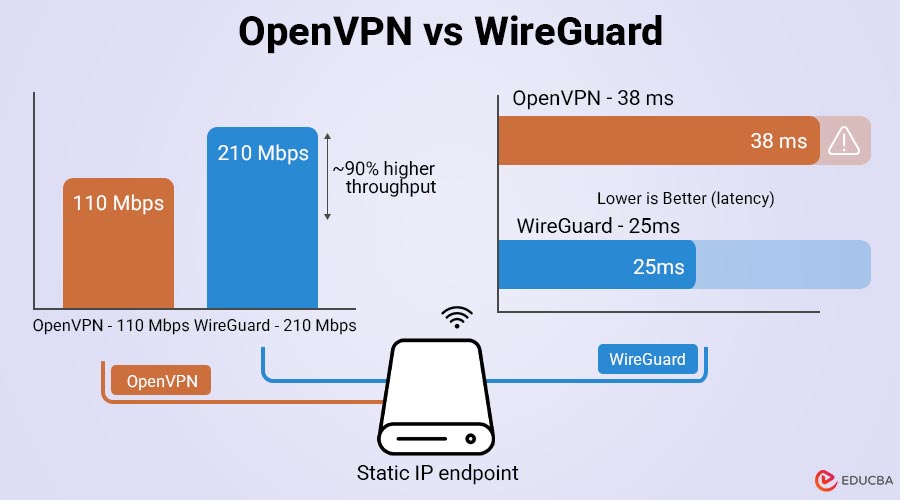
Both protocols are secure, but WireGuard’s smaller codebase simplifies audits and reduces the attack surface. It also allows providers like NordVPN and Surfshark to deploy dedicated IP servers more efficiently, expanding location options and improving uptime.
OpenVPN still excels in compatibility, supporting legacy firewalls, routers, and corporate VPN concentrators. For restrictive networks, providers such as TorGuard or PIA allow protocol switching per profile. Otherwise, WireGuard offers superior speed and efficiency for daily use, with OpenVPN as a reliable fallback.
Buyer’s Checklist for Choosing a Static-IP VPN
Use this pre-flight checklist before subscribing:
- Confirm IP type: A dedicated IP address belongs solely to you, while a shared static address (Windscribe) is split among 5–10 users. Compliance rules that require one-to-one mapping will fail on shared plans.
- Verify location coverage: NordVPN now lists 30+ cities across 25 countries, while PIA lists about 12 cities across 8 countries. Pick a server close to your audience or upstream service.
- Check the privacy model.
- Tokenised: PIA, CyberGhost (anonymous redemption)
- Email-linked: NordVPN, Surfshark
- If pseudonymity matters, tokenised wins.
- Confirm port-forwarding support: TorGuard and PIA allow it on every static-IP server; Surfshark and CyberGhost do not. No port forwarding means no inbound SSH, Plex, or game servers.
- Note device limits: Most providers allow one simultaneous tunnel to the dedicated IP. NordVPN makes an exception: up to 10 OpenVPN connections or one NordLynx connection per static IP. Plan for a router-level tunnel if multiple gadgets need the same address.
- Snapshot the price: IPv4 scarcity keeps fees in flux. Grab a checkout screenshot or save the confirmation email so you can challenge surprise renewals later.
Run through this list, and your new static IP should start routing packets within minutes of the invoice landing.
Security and Privacy Considerations for Dedicated IPs
A dedicated IP simplifies logins and allows lists, but does not make activity anonymous. Since the IP remains constant, websites can track visits over time. For sensitive activities such as torrenting or scraping, a rotating shared IP address provides better privacy.
VPN providers handle IP assignment differently:
- Tokenised flow: Private Internet Access and CyberGhost erase the assignment after one-time redemption, preventing links to billing data.
- Account-linked: NordVPN and Surfshark tie the IP to the user’s email, leaving a metadata trail.
Dedicated IPs can reduce CAPTCHA prompts, though device fingerprinting still exposes activity. Legally, users lease the IP; repeated abuse may result in revocation. Treat dedicated IPs as a convenience for reliability, not as a tool for anonymity, and weigh the metadata implications before purchase.
Final Thoughts
Choosing the right OpenVPN alternatives with static IP depends on speed, privacy, features, and hosting needs. TorGuard and PIA stand out for self-hosting, NordVPN leads in global coverage, Surfshark excels on price, and CyberGhost offers unmatched simplicity. With modern WireGuard-based performance, any of these options can streamline daily VPN use while maintaining a stable, reliable fixed IP address.
Frequently Asked Questions (FAQs)
Q1. Is a dedicated residential IP address worth the extra cost?
Answer: Yes, if you are fighting geo-filters or e-commerce fraud screens. TorGuard, for example, charges $14.29 per month for a datacenter IP and $19.99 for a residential one (about 40 percent more). Residential ranges look like ordinary home connections, so they dodge more blocklists. The trade-off comes with a higher price and slower replacement if users report the IP for abuse.
Q2. Can multiple devices use the same static IP address?
Answer: Usually limited to one tunnel. NordVPN allows up to 10 devices to connect via OpenVPN, but only one device can use NordLynx on a single dedicated IP. Most other providers cap you at one active tunnel per protocol. To cover multiple gadgets, run the VPN on a router or small home proxy.
Q3. Do browser-extension static IPs work differently?
Answer: Functionally, they are the same tunnel; Surfshark simply surfaces the feature inside its Chrome, Firefox, and Edge extensions so you can pin one tab to a fixed address while the rest of your laptop stays on a shared exit node. Handy for banking windows while the rest of your system roams normally.
Q4. Why do some banks still flag my account even with a dedicated IP?
Answer: Institutions weigh dozens of signals device cookies, TLS fingerprints, and login timing, not just the address. A clean IP lowers suspicion but would not override an impossible travel pattern or a brand-new device fingerprint.
Q5. Do all privacy-focused VPNs sell static IPs?
Answer: No. IVPN explicitly rejects dedicated or static IPs “for privacy reasons,” citing the need for anonymity in crowds. If privacy outweighs convenience, stay with a shared pool that rotates regularly.
Recommended Articles
We hope this guide on OpenVPN alternatives with static IP helps streamline your VPN setup. Check out these recommended articles for more tips and insights.

