
Updated March 14, 2023

Introduction to MongoDB Text Search
MongoDB text search is used to search query operations which were used to perform a text search of a string content, to perform text search on the string the MongoDB will perform text search uses text index and $text operator. The view may not be supported in text search but MongoDB collection can support the text search index.
Syntax:
Below is the syntax.
db.collection_name.find ({ $text: search: “String which was used to search using text search”}}){ $text: {$search: <string>,
$language: <string>,
$caseSensitive: <boolean>,
$diacriticSensitive: <boolean>
}}
Below is the parameter description syntax of text search.
- Collection name – Collection name is used to search the document using text search. While searching for data using text search we need to define the collection name in MongoDB.
- $text –It is a text search operator in MongoDB. The text operator will perform a text search on the content of the fields.
- Search – Search is used to search a specific string using text search. A string in MongoDB passes and uses the query.
- Language – It is an optional parameter in the text search. The language in text search determines the list of stop words.
- Case sensitive & Diacritic sensitive – This is a Boolean flag that was used to enable or disable the case sensitive search. It is an optional parameter in the text search.
How to Enable Text Search in MongoDB?
- Below is the procedure to enable a text search.
- To enable text search we need to create a text index on our collection. A collection contains only have one text search index in MongoDB, but the text index on the collection covers multiple fields.
- Text operators will be used to tokenize the search string which was used in whitespace and punctuation as delimiters.
- Text operators will be used to perform logical OR and all such tokens in the search string in MongoDB.
- We can also use the search to extract phrases in MongoDB by wrapping them into double quotes.
- If the $search phrase will contain phrases and individual terms text search will match the documents which include the phrase.
- We can also exclude the character in the text search. To exclude the word we need to prepend character in text search.
How to Create a Text index in MongoDB?
- Below is an example to create a text index.
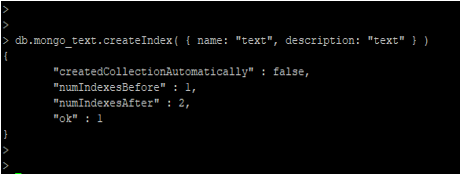
- In the below example we have created an index on mongo_text collections. We have created the text index name as name_text_description_text.
- we have used two fields to create a text search index, the first field contains the name of the text search index and the second field contains the description of an index.
db.mongo_text.createIndex( { name: "text", description: "text" } )
- We can also create a collection at the time of creating a text search index. The below example shows that create collection and index in one query.
use mongo_test

show collections

db.mongo_text_col.createIndex( { name: "text", description: "text" } )
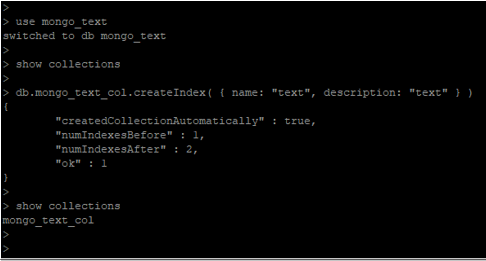
- In the above example, we have created an index and collection in one query. After creating index and collection one query create a collection automatically flag displayed true.
- Also, the number of the index before the index creation flag display one and the number of the index after the flag will be displayed as two.
- After the successful execution of the query, the flag ok will display one.
How to delete the Text index?
- Below is the procedure to delete the text index.
db.mongo_text.dropIndex("name_text_description_text")
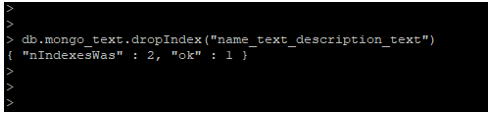
- In the above example, we have deleted one index. In mongo_text collection, there are two indexes is present, one is on id filed and the second index is text index.
- We have deleted the text index from the mongo_text collection using the drop index method.
How to use the Text index?
- The below example shows the use of the text index.
db.mongo_text.find( { $text: { $search: "MongoDB" } } )

- In the above example, we have a search name as MongoDB from all the documents from mongo_text collections.
- After using the text index on mongo_text collection it will display all the collections which contain the MongoDB word.
Recommended Articles
This is a guide to MongoDB Text Search. Here we discuss How to enable, create, delete, and use the Text Search in MongoDB along with the syntax and parameters. You may also look at the following articles to learn more –

