

Difference Between Kotlin and Swift
This topic will learn about the difference between Kotlin vs Swift with the introduction, key differences, and head-to-head comparison table, which is provided below.
Kotlin
It was introduced in the year 2016 by JetBrains and Google. The first stable version was Kotlin 1.0, which was widely used and appreciated by the developer’s community. It is another programming language that runs on JVM and highly interoperable with Java. It is compiled and statically typed language and can be compiled on different platforms.
Kotlin is officially launched for Android development by Google. Unlike Java, Kotlin has a more expressive syntax like python. To start with Kotlin, a good understanding of Java is a must.
Kotlin has overcome some of the restrictions that Java has, like semicolons; semicolons are optional in Kotlin, and the newline character is enough to mark the termination of that statement. In Kotlin, variables can be immutable using the keyword var. Static variables and methods need not exist within a class body and can be defined at the package’s top level.
Swift
It is the most preferred and most popular programming language for iOS applications, watchOS applications, tv application, and macOS applications. It is an object-oriented, functional, block-structured general-purpose language. Chris Lattner develops it with an aim to overcome issues and difficulties in Objective C.
Swift allows writing codes compatible with phones, desktops, servers, or any device that executes the code. It is built on top of the modern programming approach that combines safety and design pattern, which allows the programmer to code efficiently and easily.
Swift libraries have a vast set of predefined methods that can be readily used to structure the logic. Thus it is not just easier to write the code, but also the code’s maintenance is hassle-free. Swift avoids using large classes that are error-prone and adopts modern programming patterns, such as
- It tends to initialize the variable at the start of the program before it is being called.
- Arrays and lists are checked of Out of Bound Index errors.
- Programmers do not need to write extra lines of code for memory management; it utilizes automatic reference counting for memory management.
- Easy error handling allows the programmers to handle unexpected errors at the run time in an efficient and user-friendly manner.
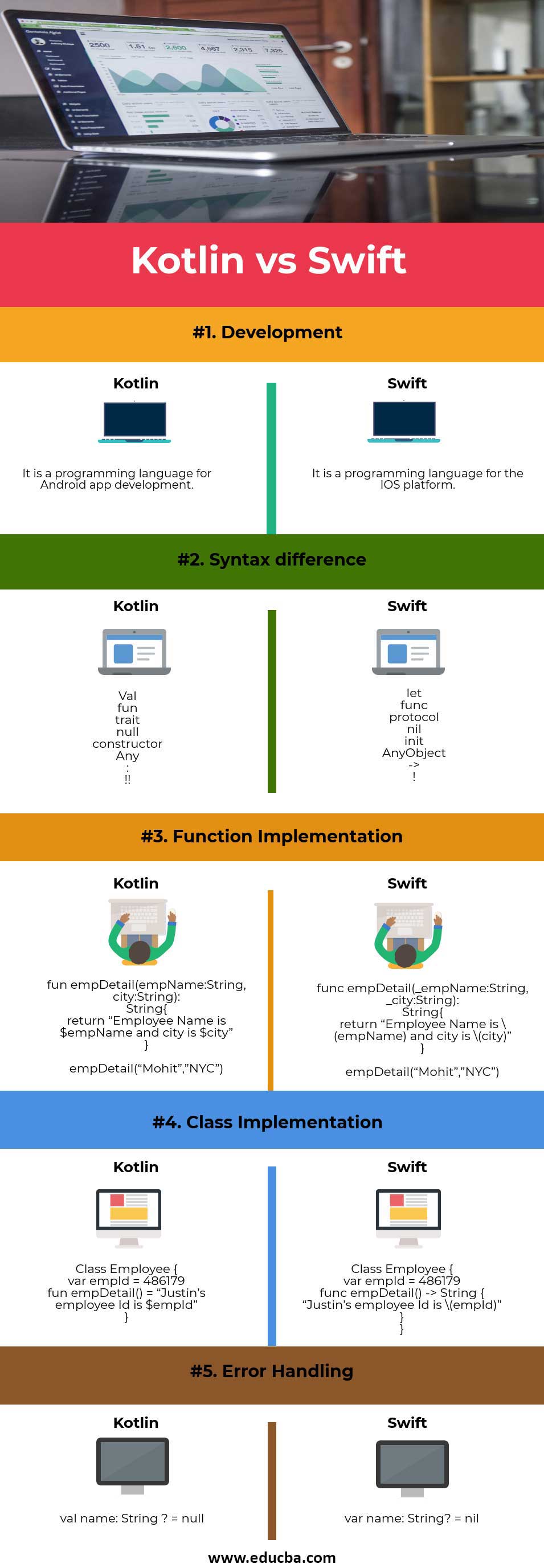
Head To Head Comparison between Kotlin and Swift (Infographics)
Below are the top 5 differences between Kotlin vs Swift:
Key Differences between Kotlin and Swift
Both Kotlin vs swift are powerful languages to develop IOS and Android development. Let’s have a look at the key differences of both languages:
- Enums in swift is considered more powerful than that of Kotlin.
- There is not a data class in Swift.
- Delegated Classes and properties are missing in Swift.
- Annotations are not allowed in Swift.
- All the classes in Kotlin are final by default.
- Kotlin does not have strut or passing data by value.
- Kotlin does not offer Tuple.
- Kotlin does not have a type alias.
- Kotlin does not have a guard statement.
Memory Management
Kotlin and Swift implement a different approach to memory management. Swift utilizes ARC or Automatic Reference Counting for memory management, whereas Kotlin uses Garbage Collection.
Annotations
Annotations are the easiest way to add metadata to the code. Kotlin supports a number of annotations to include in the code, whereas Swift does not offer any.
Data Class
Data class or POJO with respect to traditional Java programming are the classes that hold data variables; In Kotlin, it is possible to have these data classes, whereas, in Swift, it is not possible.
Structs
Though Kotlin is a Java-like language, it does not support any structs for the developer; on the other hand, Swift offers structs using an extensive list of libraries.
Delegated Class and Properties
Kotlin supports Delegated Class and properties, whereas Swift does not offer any. The delegated properties allow the developers to use the citation of methods to other classes.
Kotlin vs Swift Comparison table
Below is the topmost comparison between Kotlin vs Swift:
| Concepts | Kotlin | Swift |
| Development | It is a programming language for Android app development. | It is a programming language for the IOS platform. |
| Syntax difference | Val | let |
| fun | func | |
| trait | protocol | |
| null | nil | |
| constructor | init | |
| Any | AnyObject | |
| : | -> | |
| !! | ! | |
| Function Implementation | fun empDetail(empName:String, city:String):
String{ return “Employee Name is $empName and city is $city” }
empDetail(“Mohit”,” NYC”)
|
func empDetail(_empName:String, _city:String):
String{ return “Employee Name is \(empName) and city is \(city)” }
empDetail(“Mohit”,” NYC”)
|
| Class Implementation | Class Employee {
var empId = 486179 fun empDetail() = “Justin’s employee Id is $empId” } |
Class Employee {
var empId = 486179 func empDetail() -> String { “Justin’s employee Id is \(empId)” } } |
| Error Handling | Val name: String? = null | var name: String? = Nil |
As you see, there are minor differences when it comes to function implementation; if you notice the parameter of the function implementation of swift, the variable has underscore ( _ ) as a prefix, whereas, in Kotlin, it is not.
Similarly, in Kotlin to return, the argument value $ is prefixed with the variable name, which marks the absolute value to be returned. Whereas to return the argument in swift, the variable is enclosed in simple braces, and forward slash (\) is prefixed.
For error handling in the case of String variables, null is used in Kotlin and nil is used in Swift. However, it works exactly in the same way irrespective of the keyword being used.
Conclusion
Now that we have reached the end of the article, let’s summarize what we have learned so far. Kotlin is a programming language for Android app development, and Swift is for IOS application development. Both kotlin vs swift languages are built on top of the modern programming approach and software design pattern. Both the languages offer several inbuilt functions defined in an extensive list of libraries. There are some similarities and differences in both languages that we have seen in this article. There are some conceptual differences and minor syntactical differences that draws a thin line between the languages.
Both the languages are not limited to mobile app development and can be extended to server-side development and cross-platform applications using different available frameworks. These languages are continuously evolving to improve performance, programming efforts and security.
Recommended Articles
This has been a guide to the differences between Kotlin vs Swift. Here we also discuss the key differences with infographics and comparison table. You may also have a look at the following articles to learn more-

