

Updated March 24, 2023
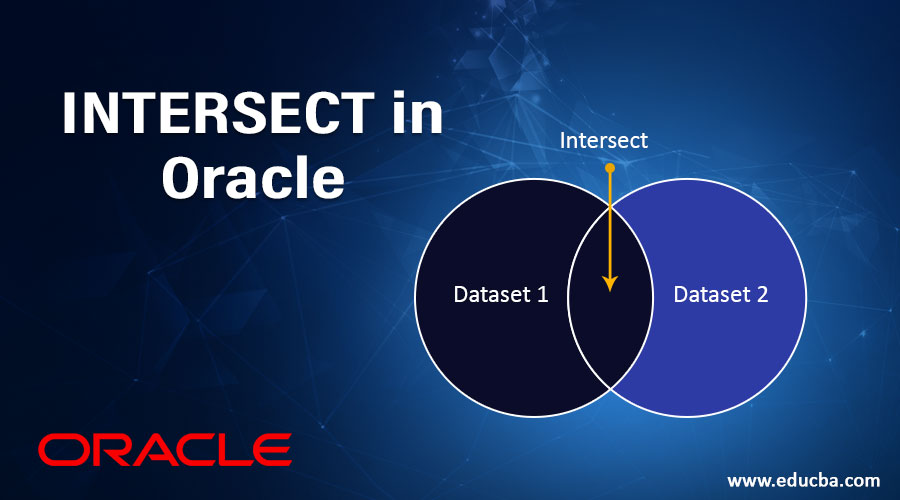
What is INTERSECT in Oracle?
INTERSECT is also called as ‘Vertical Join’, as the name says it is a type of SET function used to associate the contents of a number of tables and display it as a single result set, provided there are matching records from the SELECT query. The SELECT query for each table will be executed individually, but the result after INTERSECT will be displayed as a single set of records. It is important that all the columns involved in the INTERSECT query should have same data types in order to execute and fetch the results successfully.
- INTERSECT operator returns only those rows that are returned by each of the SELECT statement.
- INTERSECT operator is often called VERTICAL JOIN, as the result combines data from two or more SELECT statements based on column instead of rows.
- The result of each SELECT statement can be treated as a set and the INTERSECT operator applies on the sets and combines the result set to get the one final result or a single set with the matching record(s).
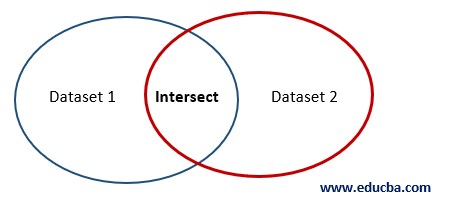
Explanation: The INTERSECT query returns the records in the Intersect area. These are the records that exist in both Dataset 1 and Dataset 2.
Points of Concentration
- The queries are all executed independently, but their output is merged
- Only the final query ends with a semicolon ‘;’
Syntax:
SELECT col_1, col_2, ..., col_n FROM TableName WHERE condition(s)

INTERSECT

SELECT col_1, col_2, ..., col_n FROM TableName WHERE condition(s);
Description:
- Col_1/2/n: The column(s) or calculation as per your requirement.
- Table Name: As per your requirement.
- WHERE: It’s optional, depends on your requirements.
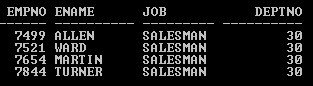
Query:
SELECT empno, ename, job, deptno FROM Emp WHERE job=’SALESMAN’

INTERSECT

SELECT empno, ename, job, deptno FROM Emp WHERE deptno=30;
Output:
Rules and Restrictions
Before implementing of INTERSECT operator, we must know some important rules and restrictions of the INTERSECT operator. Listed below:
- The result sets of the queries must have the same number of columns.
- The data type of each column in the second result set must match the data type of its corresponding column in the first result set.
- The two SELECT statements may not contain an ORDER BY clause, but the final result of the INTERSECT operation can be ordered.
- The column used for ordering can be defined through the column number.
- To sort the final result set, the SELECT statement can contain an ORDER BY clause but the last SELECT statement only can contain the ORDER BY clause.
Implementations of INTERSECT in Oracle
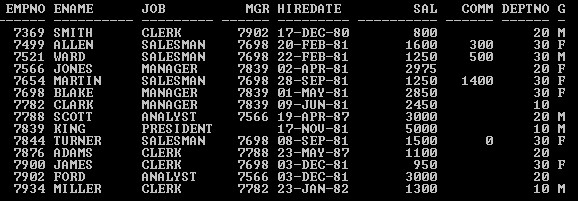
In this section, we’ll see the implementation of the INTERSECT operator and its behavior. For that, we will use the below table (Emp) with 14 records throughout the examples to understand the INTERSECT operator behavior.
Query:
SELECT * from Emp;
Output:
1. INTERSECT Operator without any Condition
Query:
SELECT empno, ename, deptno FROM Emp

INTERSECT

SELECT empno, ename, deptno FROM Emp;
Output:
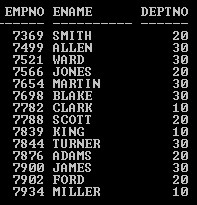
In this SQL SELECT statement with INTERSECT operator, we got the same 14 records in which the EMP table consists because each SELECT statement generated an individual set of results but during the merge of the result sets, all records of one set matching with the other set.
2. INTERSECT Operator with WHERE Clause
Query:
SELECT ename, deptno FROM Emp WHERE deptno = 10

INTERSECT

SELECT ename, deptno FROM Emp WHERE deptno = 30;
Output:

In this example, both the SELECT statements create a separate result set based on condition respectively and INTERSECT operator merged both the sets and displayed a final result with ZERO records because
- First SELECT statement fetched below records
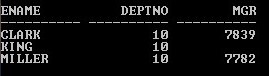
- And second SELECT statement fetched below records
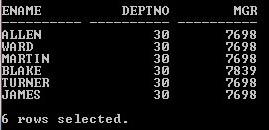
And it clearly shows that the record(s) of the first set is not matching with the second set record(s), that’s why the final result shows ZERO rows selected output.
3. INTERSECT Operator with Different Number of Columns
Query:
SELECT empno, ename, deptno FROM Emp WHERE deptno = 10

INTERSECT

SELECT ename, deptno FROM Emp WHERE deptno = 30;
Output:

ERROR output! WHY?
As INTERSECT operator Rules and Restrictions says that the result sets of all SELECT statements must have the same NUMBER of columns. But in this example first SELECT statement having three columns but the second SELECT statement having two columns. That’s why OUTPUT showing an incorrect number of result columns error.
4. INTERSECT Operator with Invalid Column Name
Query:
SELECT dname, ename, deptno FROM Emp WHERE deptno = 10

INTERSECT

SELECT ename, deptno FROM Emp WHERE deptno = 30;
Output:

ERROR output! WHY?
Because the column name “Dname” does not exist in the Emp Table. That’s why I got an invalid identifier.
5. INTERSECT Operator with Mismatch Data type
Query:
SELECT ename, hiredate, deptno FROM Emp WHERE job =’SALESMAN’

INTERSECT

SELECT ename, job, deptno FROM Emp WHERE deptno = 30;
Output:

ERROR Output! WHY?
As INTERSECT operator Rules and Restrictions says that the data type of each column in the second result set must match the data type of its corresponding column in the first result set. But in this example, column numbers are the same in both the result sets but the data type is mismatching with the result sets. First SELECT statement result set consisting column “Hiredate” which is DATE data type but the second result set consisting column “Job” which is VARCHAR2 data type it’s not matching. That’s why OUTPUT showing data type error.
6. INTERSECT Operator with ORDER BY Clause
Query:
SELECT empno, ename, deptno FROM Emp WHERE job =’SALESMAN’

ORDER BY empno

INTERSECT

SELECT empno, ename, deptno FROM Emp WHERE deptno = 30 ;
Output:

In this example output throwing an ERROR even if the column number and data type criteria is matching with both the result sets.
WHY THE ERROR?
In this example ORDER BY clause used by the first SELECT statement to sort the result set. But we can only use the ORDER BY clause in the last SELECT statement.
Query:
SELECT empno, ename, hiredate, deptno FROM Emp WHERE Job =’SALESMAN’

INTERSECT

SELECT empno, ename, hiredate, deptno FROM Emp WHERE deptno = 30

ORDER BY   1;
Output:
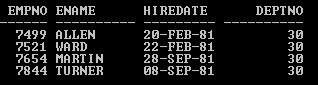
In this example ORDER BY clause used by the last SELECT statement to sort the result without any error.
NOTE:
- In the order by clause, you can also use the column position number instead of the column name.
- In some cases, INTERSECT operation is costlier than other operations (join, sub query, etc).
Conclusion
INTERSECT Operator performs VERTICAL Join and returns only those record(s) that are matching with each SELECT statement result set. If you are looking for records, that exist in each SELECT statement result set, use the INTERSECT operator but column(s) number and data type must be the same.
Recommended Articles
This is a guide to the INTERSECT operator in Oracle. Here we discuss what is INTERSECT in oracle and the implementation of INTERSECT operator along with rules and restrictions. You may also look at the following articles to learn more –

