
Updated March 4, 2023

Introduction to Hadoop Namenode
In the Hadoop stack, we are having multiple components in it. The namenode is one of the components. It is associated with the HDFS service. Namenode will keep the hdfs metadata information. With the help of namenode, we are getting the information of the hdfs file that rest on the hdfs level. In namenode, we are having multiple components like datanode, standby namenode, journal node, NFSGATEAY, etc. We are able to do the namenode high availability. In the namenode, we are having a service metric. Here, we are getting the hdfs block-level information like the total number of blocks, Corrupt Replica, Missing, Under Replicated, disk utilization status on DFS level, disk utilization status on non-DFS level, etc.
Syntax:
hadoop fs/admin [ OPTION ] [ COMMAND ]
1) Hadoop: We can use the Hadoop or hdfs keyword in the syntax or command. It will take the different arguments as an option and command. As the end result, we are able to do work on the Hadoop HDFS level.
2) fs/admin: In the Hadoop namenode command, we need to use a different compatible keyword like fs, admin, etc. As per the requirement, we can use the hdfs command.
3) OPTION: We can provide the different flags as options that are compatible with the Hadoop command.
4) COMMAND: As per the requirement, we need to use the different commands in it.
Note: In the Hadoop environment, there is nothing related or stick to the namenode command. To work with the namenode, we need to use the hdfs commands only.
How Hadoop Namenode Works?
As we have discussed, in the Hadoop environment we are having multiple components or services. The namenode is detailing with the storage part. The namenode is using for the big data purpose. We can store a huge amount of data on hdfs like TB or more. The data will store in terms of the block level. The size of the single block is 128 MB.
When any user or client wants to read or write any operation on hdfs level. The client first will trigger Hadoop or hdfs command. It will be on hdfs shell or the hue or any third-party application. The first request will go to the namenode. (If the namenode will not live then the hdfs command or hdfs request will not work). Namenode will check the information from its metadata. If the block information is present then it will serve the request. Otherwise, it will through an error message.
Examples
Let us discuss examples of Hadoop Namenode.
1. Hadoop Namenode Status
Namenode is a very important service in the Hadoop stack. Majorly all the services in the Hadoop stack will depend on the hdfs service i.e. namenode plays a very important role. We are able to get the active namenode status.
Syntax :
hdfs dfsadmin -report
Explanation:
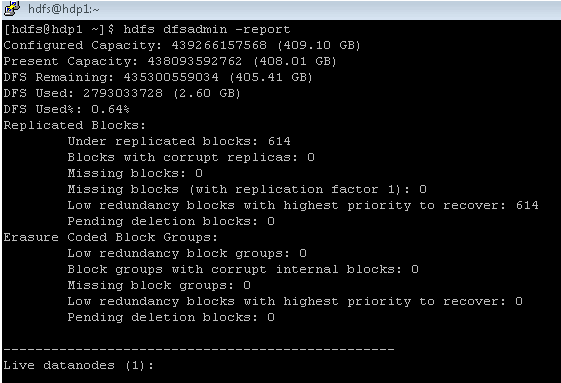
As per the above command, we are getting the complete report of the namenode.
As per the below Screenshot 1 (A), we are getting the detailed information of the hdfs block.
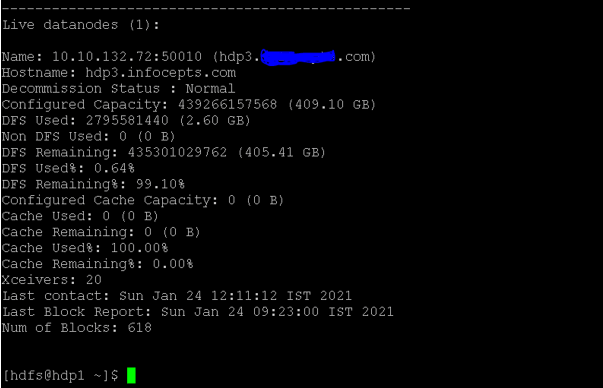
As per the below Screenshot 1 (B), we have got the live namenode status. dfs data, non dfs data, cache used, cache remaining, cache used, etc.
Output :
Screenshot 1 (A)
Screenshot 1 (B)
2. Hadoop Namenode Backup
In Hadoop, we are having the functionality to get the backup of the namenode metadata. It is highly recommended to take the back of the namenode in a timely manner. As per the requirement, we can restore the backup of the name.
Syntax :
hdfs dfsadmin -fetchImage backup_24_jan
Explanation:
As per the above command, we are taking the backup of the namenode. It will save the file on the operating system level only. As per the standard process, we need to add the date in the backup file. It will help to identify the namenode backup file as per the respective date.
Output :

3. Hadoop Namenode Block Mapping Information
In Hadoop, all the data or files are store in terms of the block level. We are having the functionality to check the file system. We are also getting the information of block status. It will also help to identify the corrupted block. We can also delete the corrupted blocks and keep the hdfs in a healthy state.
Syntax :
hdfs fsck /
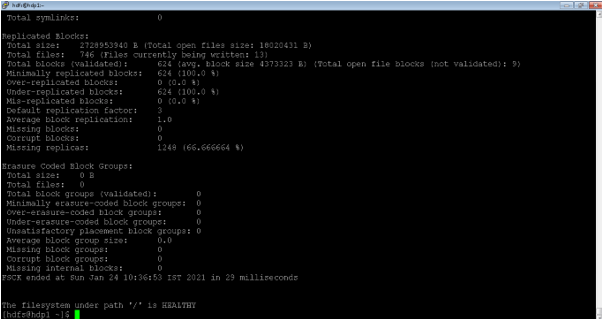
Explanation:
As per the above command, we are able to get the block information of the hdfs level. It is not mandatory to check the block information on the root level or “/” level.
Output :
4. Hadoop Namenode: List the Number of file Recursively
In the namenode, we are having the functionality to list out all the files in a single shot. It will help when we need to all the file information for the analyzing purpose. We can also save all the file information in a single output file.
Syntax :
hdfs dfs -ls -R /
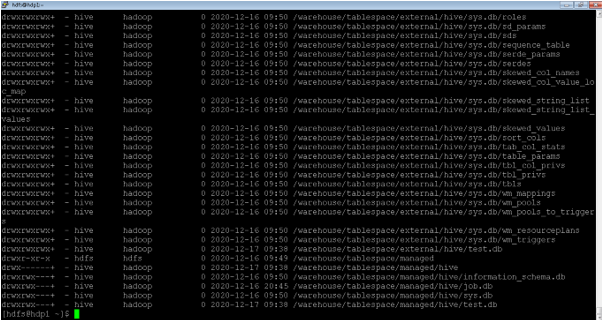
Explanation:
As per the above command, we are able to list the number of files in a recursive manner. We can also use the same command for the hive or HBase files analysis purpose.
Output :
5. Hadoop Namenode: Check Safemode Status
In the Hadoop environment, most of the namenode command is not running if the namenode is not in the safemode. We need to change the current status of the safemode of the namenode.
In safemode, we are having four different modes like enter, leave, get, wait. As per the requirement, we can change the status of the namenode safemode.
Syntax :
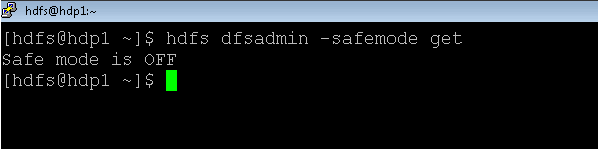
hdfs dfsadmin -safemode get
Explanation:
As per the above command, we are getting the safemode information of the namenode.
Output :
Conclusion
We have seen the uncut concept of “Hadoop namenode” with the proper example, explanation, and output. The Hadoop namenode is very important in terms of the Hadoop environment. Most of the Hadoop services rely on the hdfs for storing their data in a distributed manner. The namenode is not storing the hdfs data. It is just having the hdfs metadata information.
Recommended Articles
This is a guide to Hadoop Namenode. Here we discuss the Introduction, How Hadoop Namenode Works? and examples with syntax. You may also have a look at the following articles to learn more –

