
Updated March 6, 2023

Introduction to Hadoop Configuration
In the Hadoop stack, we are having the multiple services in it like HDFS, Yarn, Oozie, MapReduce, Spark, Atlas, Ranger, Zeppelin, Kafka, NiFi, Hive, HBase, etc. Every service is having its own functionality and working methodology. As we have said the working methodology is different than the configuration is also different for the different services. Before doing the Hadoop configuration, we need to take care of the operating system configuration also. In the Hadoop ecosystem, Hadoop configuration will come in the second part. In the primary part, we need to tune up the operating system configuration and make the operating system up to the mark. So, the operating system will able to handle the load of the Hadoop ecosystem.
Syntax of Hadoop Configuration:
As such, there is no specific syntax available for the Hadoop /. Generally, we are using the number of services on it. As per the requirement or need, we will install the Hadoop services and configure the parameters. In the Hadoop stack, most of the time we will do the configuration form the UI level only. But for the troubleshooting or some different configuration, we will also use the CLI.
Different Hadoop Configuration
Given below are the different Hadoop Configuration:
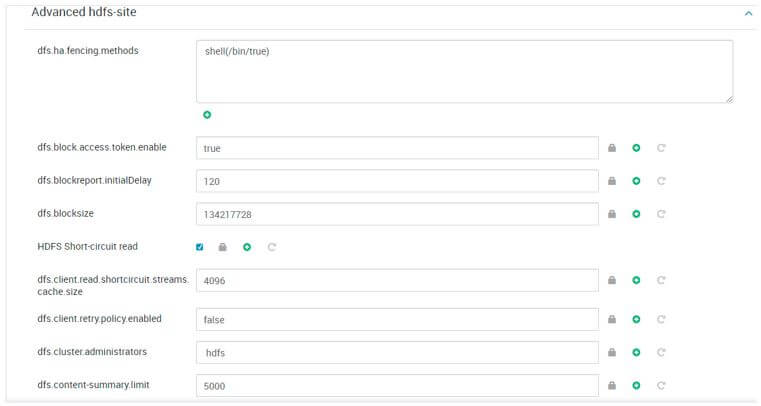
1. Hadoop Configuration: HDFS
In the Hadoop environment, the Hadoop configuration command is very common. It is using very widely. It will help us to list out the number of files on the HDFS level.
Configuration Properties:
- client.https.need-auth: It will help to check whether SSL client certificate authentication is required or not for the client and server communication.
- client.cached.conn.retry: From the cache, the value will define the number of times the HDFS client will able to get a socket. If the number of socket try will be exceeded, the HDFS client will try to create new socket.
- https.server.keystore.resource: It will be the same resource file from which we will get the SSL server Keystore evidence will be extracted.
- client.https.keystore.resource: It will be the same resource file from which we will get the SSL server Keystore evidence will be extracted in terms of HTTPS communication.
- datanode.https.address: It will be the configuration parameter of the datanode secure HTTPS server address and port information.
- namenode.https-address: It will be the configuration parameter of the namenode secure https server address and port information.
- qjournal.queued-edits.limit.mb: In terms of the quorum journal edits, it will help to define the queue size. The value will be defined in MB.
- qjournal.select-input-streams.timeout.ms: In terms of the journal managers, it is the timeout value for accepting streams. The value would be in milliseconds.
- qjournal.start-segment.timeout.mb: This configuration value will help to define the quorum timeout. The value will be in milliseconds.
Configuration Screenshot:
2. Hadoop Configuration: Yarn
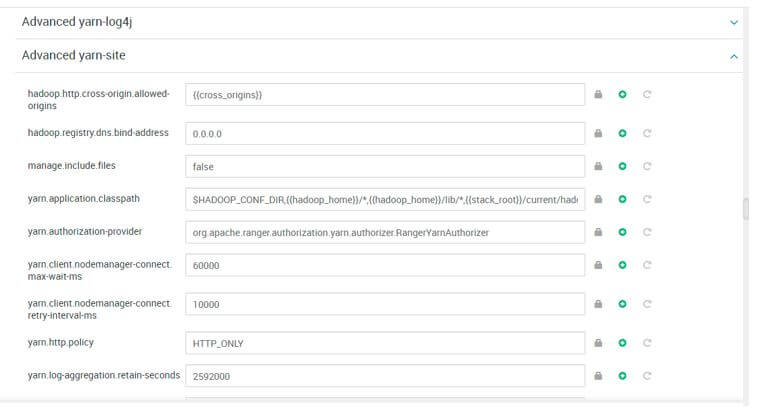
The yarn is very important in terms of resource allocation to the jobs that are running in the Hadoop ecosystem.
Configuration Properties:
- resource-types: It will be the addition of the resources. We need to define by Comma separated value. It will not include the configuration parameters like memory (in Mb or GB) or vcores values.
- resource-types.<resource>.units: It will be the default unit for the specified resource type in the yarn config.
- resource-types.<resource>.minimum-allocation: We can set the value for the minimum request for the definite resource type.
- resource-types.<resource>.maximum-allocation: We can set the value for the maximum request for the definite resource type.
- app.mapreduce.am.resource.mb: It will help to configure the memory requested for the application master container. The value will be in MB. The defaults of the configuration are 1536.
- app.mapreduce.am.resource.memory: It will help to configure the memory requested for the application master container. The value will be in MB. The defaults of the configuration are 1536.
- app.mapreduce.am.resource.memory-mb: It will help to set the memory requested for the application master. The value will be in MB. The defaults of the configuration are 1536.
- app.mapreduce.am.resource.cpu-vcores: It will help to configure the CPU requested for the application master container to the value. The value will be in CPU count. The defaults of the configuration are 1.
Configuration Screenshot:
3. Hadoop Configuration: Oozie
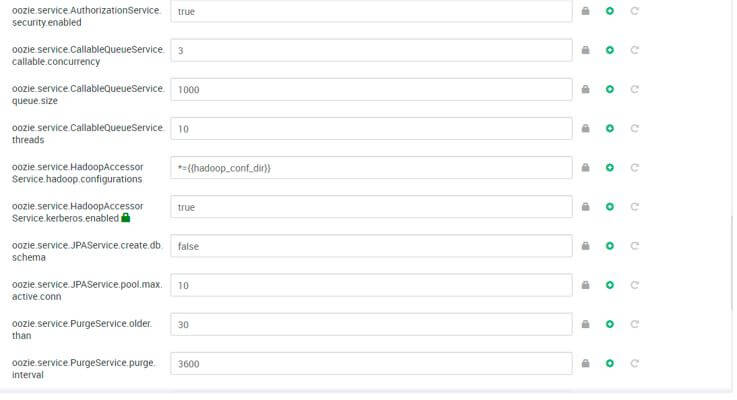
In Hadoop, we are using the Oozie service to schedule the Hadoop level job.
Configuration Properties:
- CATALINA_OPTS: It will help to setup the tomcat server. It will help to run the oozie java configuration or properties. The oozie properties will provided in term of the variable. There is no default value for this configuration.
- OOZIE_CONFIG_FILE: With the help of this configuration property, we will load the oozie configuration file in the system. The value of this configuration is oozie-site.xml.
- OOZIE_LOGS: It will help to store the oozie logs information to the specific directory. While installing the oozie server, it will define the value by its own.
- OOZIE_LOG4J_FILE: With the help of this configuration property, we will load the oozie Log4J configuration file in the system. The value of this configuration is oozie-log4j.properties.
- OOZIE_LOG4J_RELOAD: It will help to reload the Log4J configuration file on a specific interval of time. The value will be in seconds. The default value is 10.
- OOZIE_HTTP_PORT: It will help to define the port for the Oozie server. The default port value is 11000.
- OOZIE_ADMIN_PORT: It will help to define the admin port for the Oozie server. The default port value is 11001.
- OOZIE_HTTP_HOSTNAME: It will help to define the hostname on which the Oozie server runs. As per the Hadoop architecture, we need to define the specific host or node for it.
- OOZIE_BASE_URL: It will help to define the base URL for call-back actions URLs to Oozie server. The default configuration value for the property is http://$ {oozie server host name} : $ {oozie server HTTP port} / oozie.
Configuration Screenshot:
Conclusion
We have seen the uncut concept of “Hadoop Configuration” with the proper example, explanation and configuration output. In terms of service level tuning, the Hadoop configuration is very important. While doing the Hadoop configuration, we need to consider the other Hadoop level services also. Before doing the Hadoop configuration, we need to tune the operating system as well.
Recommended Articles
This is a guide to Hadoop Configuration. Here we discuss the introduction and different Hadoop configurations respectively. You may also have a look at the following articles to learn more –

