
Updated May 30, 2023

Introduction to AWK Command in Unix
AWK Command in Unix Shell Scripting changes the data’s form and report generation. We can use numeric functions, logical operators, variables, and string functions to manipulate the data without compiling. AWK command is generally used for processing the data and scanning the patterns in the file. It tries to scan one or more files to check if it contains the patterns that match the specified pattern required and finally does the required action on it. The AWK command derives its name from the initials of three people – Aho, Weinberger, and Kernighan. They are from AT&T Bell Lab and have contributed many other command-line prompts in Unix Shell Scripting.
AWK Command is used to perform the below actions:
- Define variables.
- Use numeric functions or Logical/Arithmetic operators, Variables, or Strings.
- Apply loops or control flow actions.
- Generate reports.
Basic Syntax of AWK command:
awk [options] [program] [file]What can we do from AWK Command?
Following is the list of Operations that we can do with AWK Command in Unix:
- AWK command initially tries to scan a file line by line.
- Divides each input file into fields to match the pattern.
- It then tries to compare the input file to the specified pattern.
- Finally, it performs actions on the matched lines.
AWK command is useful for transforming the data files and generating reports. It is also actively used for performing arithmetic or logical operations to find matched patterns.
AWK Command is used to perform the below actions:
- Define variables.
- Use numeric functions or Logical/Arithmetic operators, Variables, or Strings.
- Apply loops or control flow actions.
- Generate reports.
AWK Syntax:
awk [options] [selection action] [input_file]Examples of How to Use AWK Command in Unix
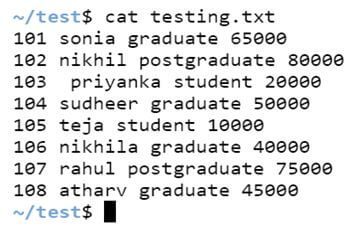
Let us consider there is a file named ‘testing.txt’, where the contents of the file are below:
Code:
cat testing.txtOutput:
Example #1 – Option ‘print’.
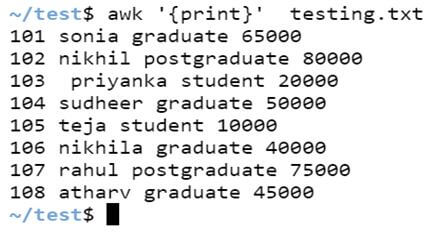
To print all the contents in the file, awk helps to print all the lines of the content in the file. In the below example, we have not used any pattern, so actions are applicable to the file lines. By default, an action without any pattern argument will print the whole data/lines in the file. Hence, we can see that all the lines in the below file have been printed.
Syntax:
awk '{print}' file_name.txtCode:
awk '{print}' testing.txtOutput:
Example #2 – Pattern match.
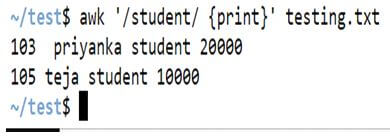
We can use the syntax below to print the specified pattern in the file. It will list out the pattern matched in the input parameter given and will list out the data in the output.
Syntax:
awk '/pattern/ {print}' file_name.txtCode:
awk '/student/ {print}' testing.txtOutput:
Example #3 – Splitting lines to fields.
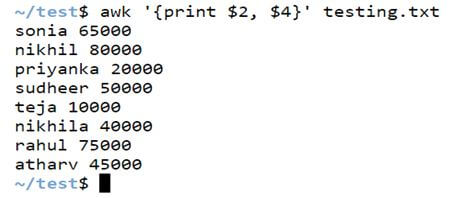
We can also split the records in line with whitespace as its delimiter by default. For example, 4 words in a line will be stored as $1, $2, $3, and $4, respectively, and $0 will print the complete line.
Syntax:
awk '{print $n, $m}' file_name.txtCode:
awk '{print $2, $4}' testing.txtOutput:
Variables Built-in AWK Command in Unix
- NF: AWK Command with NF variable counts the number of fields in the input parameter passed.
- RS: AWK Command with RS stores the record separator in the current input parameter. In AWK, if you don’t specify a variable, it actively considers a new line as the default record separator.
- NR: AWK command with its variable NR helps to count the number of input records. Generally, lines are considered records.
- FS: We need to specify the field delimiter while using the FS command. In AWK, the default delimiter is white space if no specific delimiter is mentioned. It actively divides the fields based on the input lines.
- ORS: AWK command with OFS variable stores the output record separator separated by AWK command to print the output lines. In AWK, the new line character actively serves as the default record separator.
- OFS: AWK command with OFS variable stores the output field separator when AWK prints the output. In AWK, the default field separator is a blank space character.
Examples of Variables in AWK Command
Given below are the examples mentioned:
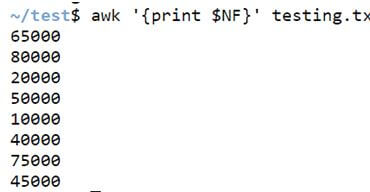
Example #1 – Variable NF.
When we want to print the last line of the record in the file, we can use the awk command with the variable NF.
Syntax:
awk '{print $NF}' file_name.txtCode:
awk '{print $NF}' testing.txtOutput:
Example #2 – Variable NR.
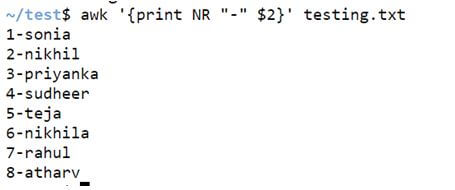
AWK command with its variable NR helps to count the input records. Generally, lines are considered records.
Syntax:
awk '{print $NR <file separator> $n}' file-name.txtCode:
awk '{print NR "-" $2}' testing.txtOutput:
Example #3 – Variable OFS.
AWK command with OFS variable stores the output field separator when AWK prints the output. A blank space character serves as the default field separator in AWK.
Syntax:
awk 'OFS=”field_separator” {print $n, $m, $o}Code:
date | awk 'OFS="/" {print $2, $3, $6}'
date | awk 'OFS="-" {print $2, $3, $6}'
Output:

Example #4 – Variable END.
As shown below, we can use the END variable with the awk command to count the number of lines in the input file.
Syntax:
awk 'END {print NR}' file_name.txtCode:
awk 'END {print NR}' testing.txtOutput:

Example #5 – Variable BEGIN.
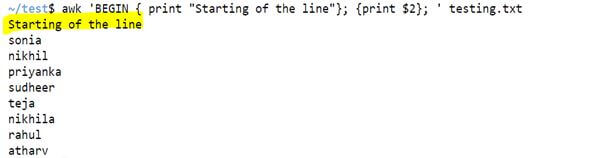
The BEGIN variable actively sets actions to execute before processing any records. As shown below, we can also print any desired data before processing the records.
Syntax:
awk 'BEGIN { print “print your data”} ' file-name.txtCode:
awk 'BEGIN {print "Starting of the line"}; {print $2}; ' testing.txtOutput:
Conclusion
In Unix Shell Scripting, the AWK command allows for advanced text processing. It is common to use the AWK command for pattern matching and as a reporting tool. Using awk, we can define a set of actions to be executed on the input file. The AWK command divides the input data, passed as a parameter, into fields and records.
Recommended Articles
We hope that this EDUCBA information on “AWK Command in Unix” was beneficial to you. You can view EDUCBA’s recommended articles for more information.

