
EDUCBA Logo

EDUCBA

MENUMENU
  • Explore
    • EDUCBA Pro
    • PRO Bundles
    • All Courses
    • All Specializations
  • Blog
  • Enterprise
  • Free Courses
  • All Courses
  • All Specializations
  • Log in
  • Sign Up
Home Design Design Tutorials Design - Key Differences Tutorial Autocad vs Archicad
 

Autocad vs Archicad

Updated September 14, 2023
autocad-vs-archicad


Difference Between Autocad and Archicad

A Building Information Modeling (BIM) platform designed by the Hungarian company Graphisoft is ArchiCAD. It was primarily developed for Apple Macintosh in the year 1982. Urban planners, architects, designers, and interior designers use this software. ArchiCAD is the solution to many engineering aspects required to build models of buildings, interiors, urban areas, etc. ArchiCAD keeps the demands of 2D or 3D designs and BIM functions from the groundwork through plan execution to resource management. Windows, Mac, and mobile devices support ArchiCAD.In this article, we are going to learn about Autocad Vs Archicad.

Watch our Demo Courses and Videos

Valuation, Hadoop, Excel, Mobile Apps, Web Development & many more.

AutoCAD is software designers, builders, manufacturers, and planners use to create three-dimensional computer-aided designs. Autodesk developed this software in 1982 as a desktop app running on microcomputers. In 2010, AutoCAD was released as a mobile and web app called AutoCAD 360. AutoCAD is an amazing software and a guide to many architects, entertainment industries, educators, students, freelancers, and even freshers. AutoCAD is a master of 2D drawings, drafts, and documents; it can also create 3D models and visualizations.

Head To Head Comparison Between Autocad and Archicad (Infographics)

Below are the top 3 differences between Autocad vs Archicad
AUTOCAD-VS-ARCHICAD

Key Differences Between Autocad and Archicad

Both are popular choices in the market; let us discuss some of the major differences:

  • AutoCAD is a CAD system that helps in drafting, 3D modeling, and rendering. The use of scripts in multiple languages can also use to improvise. Designers, builders, manufacturers, and planners use AutoCAD to create three-dimensional computer-aided building models.
  • In ArchiCAD, drawings are blended or meshed within the model. While in AutoCAD, the user would create the drawings independently.
  • With ArchiCAD, Users can create buildings virtually from real constructed elements like walls, windows, roofs, slabs, etc. Whereas in AutoCAD, the user creates a drawing from a 2D line.
  • ArchiCAD offers a significant increase in productivity and has a better-coordinated design and a computer model based on the building process. While AutoCAD lacks this feature.
  • While AutoCAD may be easy to use and understand, ArchiCAD requires more time because of too many option settings.
  • AutoCAD is a 2D electronic drawing board that can also create 3D geometry. While ArchiCAD is for creating virtual electronic buildings. The application can understand the attributes of building elements and how to connect them.

Autocad vs Archicad Comparison Table

Below are the topmost comparisons:

Basis of Comparison 

Autocad

Archicad

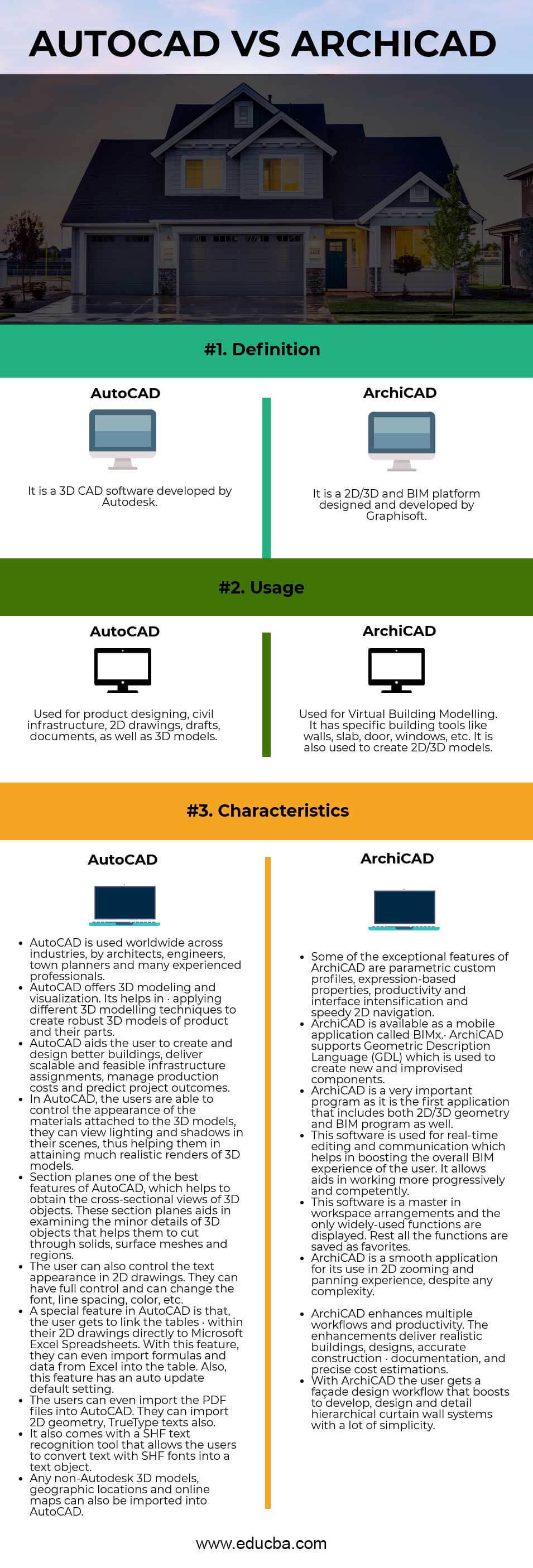
Definition It is a 3D CAD software developed by Autodesk It is a 2D/3D and BIM platform designed and developed by Graphisoft
Usage Used for product designing, civil infrastructure, 2D drawings, drafts, documents, and 3D models. Used for Virtual Building Modelling. It has specific building tools like walls, slabs, doors, windows, etc.tis also used to create 2D/3D models.
Characteristics
  • Architects, engineers, town planners, and many experienced professionals use AutoCAD worldwide across industries.
  • AutoCAD offers 3D modeling and visualization. It helps apply different 3D modeling techniques to create robust 3D models of the product and its parts.
  • AutoCAD aids the user in creating and designing better buildings, delivering scalable and feasible infrastructure assignments, managing production costs, and predicting project outcomes.
  • In AutoCAD, the users can control the appearance of the materials attached to the 3D models; they can view lighting and shadows in their scenes, thus helping them attain many realistic renders of 3D models.
  • Section planes are one of the best features of AutoCAD, which helps to obtain the cross-sectional views of 3D objects. These section planes aid in examining the minor details of 3D objects that help them to cut through solids, surface meshes, and regions.
  • The user can also control the text appearance in 2D drawings. They can have full control and change the font, line spacing, color, etc.
  • A special feature in AutoCAD is that users link the tables within their 2D drawings directly to Microsoft Excel Spreadsheets. With this feature, they can even import formulas and data from Excel into the table. And this feature has an auto-update default setting.
  • The users can even import PDF files into AutoCAD. They can import 2D geometry and TrueType texts also.
  • AutoCAD comes with an SHF text recognition tool that allows the users to convert text with SHF fonts into a text object.
  • Any non-Autodesk 3D models, geographic locations, and online maps can also be imported into AutoCAD.
  • Some exceptional features of ArchiCAD are parametric custom profiles, expression-based properties, productivity, interface intensification, and speedy 2D navigation.
  • ArchiCAD is available as a mobile application called BIMx.
  • The ArchiCAD supports Geometric Description Language (GDL), which creates new and improvised components.
  • ArchiCAD is a very important program as it is the first application that includes 2D/3D geometry and BIM.
  • This program’s real-time editing and communication are possible, enhancing the user’s overall BIM experience. It allows aids to work more progressively and competently.
  • This software is a master in workspace arrangements, and only widely-used functions are displayed. Rest all the functions are saved as favorites.
  • Despite any complexity, ArchiCAD is a smooth application for its use in the 2D zooming and panning experience.
  • ArchiCAD enhances multiple workflows and productivity. The enhancements deliver realistic buildings, designs, accurate construction documentation, and precise cost estimations.
  • With ArchiCAD, the user gets a façade design workflow that boosts development, design, and detail hierarchical curtain wall systems with a lot of simplicity.

Conclusion

We cannot compare Autocad vs Archicad. Both Autocad and vs Archicad have extremely useful features in their own genre. On the one hand, practically all technicians and experts utilize the CAD program AutoCAD for 2D and 3D modeling; ArchiCAD is a Virtual Building Modeler that uses real-time editing. The software has a clean workspace and interface but is still used for different work types.

Autocad and Archicad have advantages and disadvantages, but different groups widely use both.

Recommended Articles

This has been a guide to the top difference between Autocad vs Archicad. Here we also discuss the key differences with infographics and comparison tables. You may also have a look at the following articles to learn more


  1. AutoCAD vs Revit
  2. AutoCAD vs FreeCAD
  3. Autodesk vs Autocad
  4. Autocad vs Inventor
Primary Sidebar
Footer
Follow us!
  • EDUCBA FacebookEDUCBA TwitterEDUCBA LinkedINEDUCBA Instagram
  • EDUCBA YoutubeEDUCBA CourseraEDUCBA Udemy
APPS
EDUCBA Android AppEDUCBA iOS App
Blog
  • Blog
  • Free Tutorials
  • About us
  • Contact us
  • Log in
Courses
  • Enterprise Solutions
  • Free Courses
  • Explore Programs
  • All Courses
  • All in One Bundles
  • Sign up
Email
  • [email protected]

ISO 10004:2018 & ISO 9001:2015 Certified

© 2025 - EDUCBA. ALL RIGHTS RESERVED. THE CERTIFICATION NAMES ARE THE TRADEMARKS OF THEIR RESPECTIVE OWNERS.

EDUCBA

*Please provide your correct email id. Login details for this Free course will be emailed to you
EDUCBA

*Please provide your correct email id. Login details for this Free course will be emailed to you
EDUCBA

*Please provide your correct email id. Login details for this Free course will be emailed to you

Loading . . .
Quiz
Question:

Answer:

Quiz Result
Total QuestionsCorrect AnswersWrong AnswersPercentage

Explore 1000+ varieties of Mock tests View more

EDUCBA
Free Design Course

3D animation, modelling, simulation, game development & others

By continuing above step, you agree to our Terms of Use and Privacy Policy.
*Please provide your correct email id. Login details for this Free course will be emailed to you
EDUCBA Login

Forgot Password?

🚀 Limited Time Offer! - 🎁 ENROLL NOW