


Updated June 16, 2023
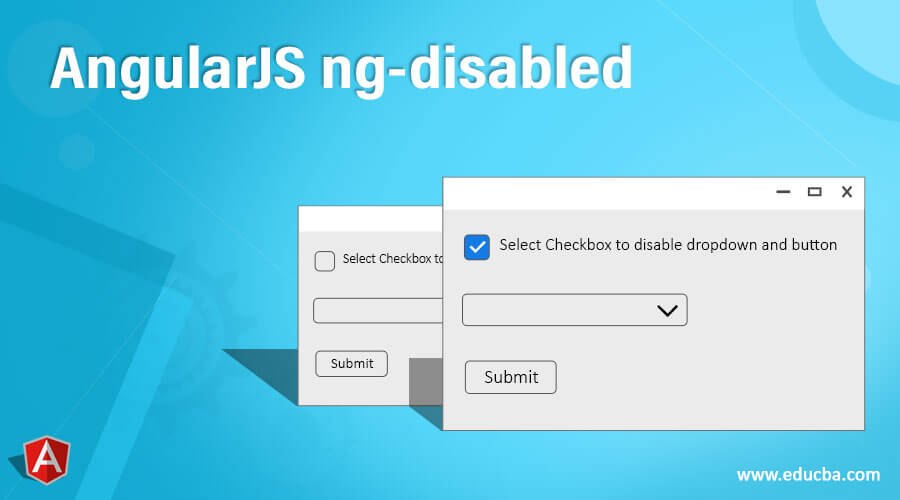
Definition of AngularJS ng-disabled
AngularJS ng-disabled is an In-Built AngularJS directive that is used in the HTML view for disabling HTML elements such as input, select, button, etc. on a conditional basis by evaluating the expression defined in the ng-disabled directive. This directive comes into usage whenever the developer needs to add a disabled attribute in the HTML element but on some conditional basis or based on some criteria. If the expression inside ng-disabled evaluates to be TRUE then the disabled attribute is added to that HTML element and if not then nothing is added. This can be used with HTML tags such as button, select, input, div, span, etc.
Syntax of AngularJS ng-disabled
There are various ways to write ng-disabled directives with different HTML Tags.
- Using ng-disabled with Input Type
<input type="checkbox" ng-disabled="conditionalDisabling" ng-model="modelValue"></input>- Using ng-disabled with Select Type
<select ng-disabled="conditionalDisabling" ng-options="reason as reason.desc for reason in reasonsList"></select>- Using ng-disabled with Button Type
<button ng-model="modelValue" type="text" ng-disabled=" conditionalDisabling">- Using ng-disabled with div/span
<div ng-disabled="conditionalDisabling" ng-click="onClickOperation"> Update Request </div?an ng-disabled directive can be used with multiple HTML elements and can be used conditionally
How ng-disabled Directive Works in AngularJS?
In the AngularJS framework, it is very important to know that all the In-Built directives that the AngularJS framework has provisioned will always be denoted with ng prefix.
The ng-disabled directive is very simple and very easy to use the directive in the HTML view. The ng-disabled directive is used to disable a specific HTML element in the view based on evaluating a conditional expression. When the ng-disabled directive is encountered in the HTML elements, it evaluates the expression. If the expression returns TRUE, the disabled attribute is added to the HTML element, effectively disabling it. The ng-disabled directive can accept various types of conditional expressions, including binary or ternary expressions and method calls defined in the controller. The controller handles the expression and returns a Boolean response. The ng-disabled directive can be used with select, textarea, input (checkbox, submit), div, span, and button HTML tags.
When the model value changes, the ng-disabled directive actively evaluates the expression inside it, which relies on the model value. As a result of this evaluation, the ng-disabled directive takes action and updates the disabled attribute of the element accordingly. It is important to note that the ng-disabled directive holds a high priority level of 100, ensuring its execution over other directives. This priority is particularly relevant due to the limitations of the disabled attribute regarding interpolation.
Examples of AngularJS ng-disabled
Following are the examples given below:
Example #1
Using ng-disabled with input type
Index.html
<!DOCTYPE html>
<html>
<head>
<script src="https://ajax.googleapis.com/ajax/libs/angularjs/1.3.15/angular.min.js"></script>
<script src="script.js"></script>
</head>
<body ng-app="disablingApp" ng-controller="disablingCtrl">
<h2>Billing Portal</h2>
<input type="checkbox" ng-model="mainCheckbox">Get the invoice details !!</input> <br> <br>
<input type="checkbox" ng-model="printCheckBox" ng-disabled="!mainCheckbox"> Print Bill </input>  <br>
<input type="checkbox" ng-model="emailCardCheckBox" ng-disabled="!mainCheckbox"> Email Bill </input>
</body>
</html>
Script.js
var app = angular.module('disablingApp', []);
app.controller('disablingCtrl', function($scope) {
});
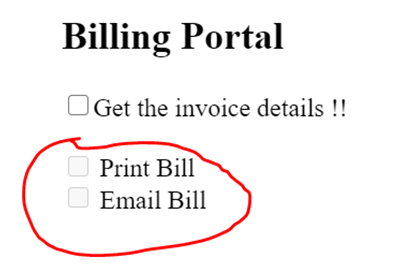
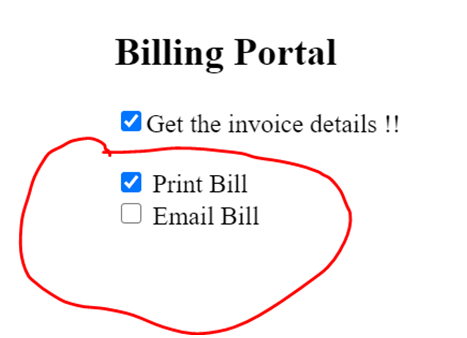
The above example shows how easily the ng-disabled directive can be used in AngularJS HTML view and tweaked around conditions as the developer wants to. This is an example of a Billing Portal where users can select multiple options to receive invoice details. The requirement is If the Use selects the option to receive Invoice details, then only the User should be allowed to Select the mode of invoice bill i.e. does the user needs the bill of invoice or email of invoice or both? When the Get Invoice details option is not selected at that time, we want the print and email checkboxes to be disabled. As soon as the Get Invoice details option is selected, we want the Print and Email checkbox to be enabled. As the model value will change, the ng-disabled will get updated and will enable or disable the checkbox accordingly.
<input type="checkbox" ng-model="mainCheckbox">Here simply a checkbox is added with ng-model.
<input type="checkbox" ng-model="printCheckBox" ng-disabled="!mainCheckbox">Here we are adding the ng-disabled attribute, which will be executed conditionally based on the model value of mainCheckbox. The model value mainCheckbox will get updated whenever the checkbox is selected or deselected.
Output:
Print and Email checkbox is disabled
Print and Email are enabled
Example #2
Index.html
<!DOCTYPE html>
<html>
<head>
<script src="https://ajax.googleapis.com/ajax/libs/angularjs/1.3.15/angular.min.js"></script>
<script src="script.js"></script>
</head>
<body ng-app="disablingApp" ng-controller="disablingCtrl">
<input type="checkbox" ng-model="allOptions">Select Checkbox to disable dropdown and button <br><br>
<select ng-options="color.key for color in colors" ng-model="selectedColor"
ng-disabled="allOptions">
</select><br><br>
<input type="submit" ng-disabled="allOptions"/>
</div>
</body>
</html>
Script.js
// Code goes here
var app = angular.module('disablingApp', []);
app.controller('disablingCtrl', function($scope) {
$scope.colors = [
{'key': 'Black', 'value': 'black'},
{'key': 'Red', 'value': 'red'},
{'key': 'Blue', 'value': 'blue'},
{'key': 'Light blue', 'value': 'cyan'},
{'key': 'Green', 'value': 'green'}];
});
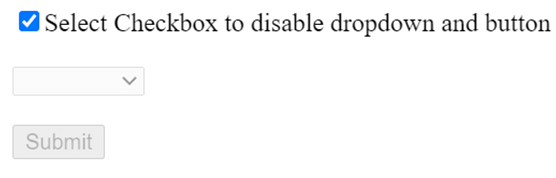
Above example, everything is the same as above except that the ng-disabled is now being used to disable other fields based on its ng-model value and evaluation to TRUE or FALSE. As soon as the Checkbox is selected to disable all input fields on the HTML view, this will disable all elements which have the ng-disabled attribute added, and who evaluation goes to true. This will add a disabled attribute and will disable the fields.
Another Example for ng-disabled is to use ternary operators. You heard it right; ng-disabled works perfectly if used with ternary operators in HTML view.
<input type="checkbox" ng-model="allOptions">Here simply a checkbox is added with ng-model allOptions.
ng-disabled="allOptions"Using conditions based on whether all options is selected or not and then disabling the dropdown and submit button.
Output:
When disable all checkbox is not selected
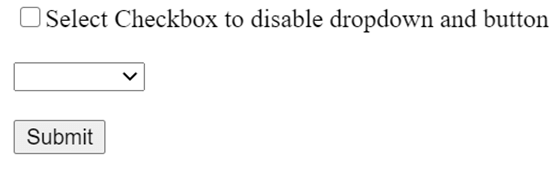
When checkbox is selected
Conclusion
ng-disabled is a directive in AngularJS which is mainly used to disable HTML elements in HTML view based on certain conditions. an ng-disabled directive is an In-Built AngularJS directive. There are various different forms of using this directive, and proper syntax is all that is needed, and you are ready to go.
Recommended Articles
We hope that this EDUCBA information on “AngularJS ng-disabled” was beneficial to you. You can view EDUCBA’s recommended articles for more information.

