
Updated May 12, 2023
What is Adobe Illustrator For Linux?
Adobe Illustrator for Linux is vector graphics software. Adobe Systems develop it, and it is one of the software of the creative cloud (CC) family. Initially, it was designed for Apple Macintosh. Engineers worked on developing Adobe Illustrator for Linux since 1985, and finally, its first version was released on March 19, 1987. Now that time, it is the topmost software for vector graphic editing, and Adobe won a prize for the same from PC magazine in 2018. The application of this software is extensive, and integration with other software of cloud package made more efficient.
This software is mainly used to create logos, graphs, printed and digital photographs, cartoons, charts, postcards, posters, and other designs. Graphics designers, web designers, and other professionals use this software to perform different tasks. Adobe Illustrator is used In fashion design, product design, package design, and to create motion graphics and visual effects. The compatibility of this software with other software, like Photoshop and Brush, makes it a more powerful tool.
Main Applications of Adobe Illustrator for Linux
- To create cartoons
- To create logos
- To create icon
- To design product
- To draw objects
- To edit graphics
Adobe Illustrator supports various formats for import and export. This software support on Windows 10 x64 bit only and Mac OS. This software is available on subscription base service independently or with the combo pack of the creative cloud(CC) package. A free trial version is also available on its official website. Development of adobe illustrator for Linux began in 1985, and the most recent version of this software was CC 2019(23.0.1) on November 2, 2018.
1. Version 1.0 to 1.6 (Illustrator-88)
Early software versions did not support working in preview mode, and users needed to have two windows open on their desktops for a live preview of their work. The last version, 6.0, was launched in 1996.
2. Version 2.0 to 6.0
Adobe Start Illustrator for Windows under this version
3. Version 7.0 to 10.0
Adobe started Illustrator version 7.0 in 1997; under this version, Adobe made critical changes in the user interfaces about path editing and ended by 2001.
4. Version CS (11.0) to CS6 (16.0)
Illustrator CS (1.0) was launched in 2003 with 3 Dimensional capabilities to create 3D objects, and the last version, version 17.0, under these categories, was CS (6.0) in 2012. Adobe added many features, such as a new user interface, layer panels, and RGB codes, and fixed many bugs
5. Version CC (17.0) to CC (23.0)
This software was first launched in its CC package with version 17.0 (CC 1.0) on June 17, 2013, and the recent version was CC 23.0 by Nov 2018. This version Improves and enhances many tools such as program, font, color, saving the document to the cloud, and adds extra tools such as touch compatible type tool, the image in brushes, CSS extraction, and file packaging.
New Update of Adobe Illustrator for Linux (CC 2019 23.0.1)
1. Free flow gradient
Create a complex color blend that gives your project and artwork a more natural look and feel.
2. Global editing
Save time by repeating text or objects across multiple artboards all at once.
3. Customized toolbar
Eliminate distraction by setting up your toolbars to show only what you need for a specific workflow
4. Presentation and trim preview
Turn artboards into the slide; you can easily project and share and see how documents with bleeds will look with the edge trimmed off.
5. Tools and application of Adobe Illustrator for Linux
Various tools in Adobe Illustrator for Linux are available for multiple tasks like selecting, creating, and manipulating objects or artworks in Illustrator. The tolls can be chosen according to your requirements.
How to Install Adobe Illustrator for Linux?
Below are the different steps to install Adobe Illustrator for Linux.
Step 1:
You can download Adobe Illustrator for Linux from the following link given below (Free Trial version)
https://www.adobe.com/in/products/illustrator.html
Step 2:Its 64-bit operated Adobe Illustrator for Linux. Open the folder as shown below.

Step 3:
Double Click on Setup.

Double Click on the setup.exe file.

Step 4:
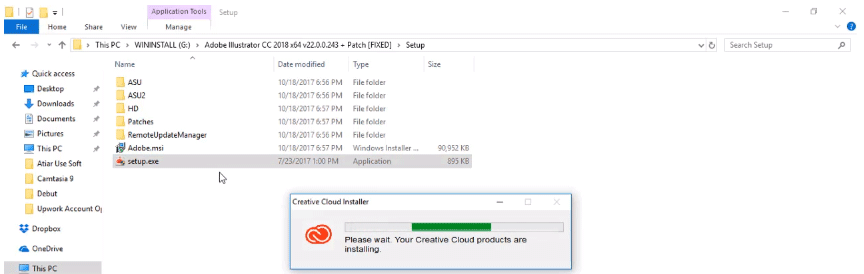
You will get a screen like this given below.
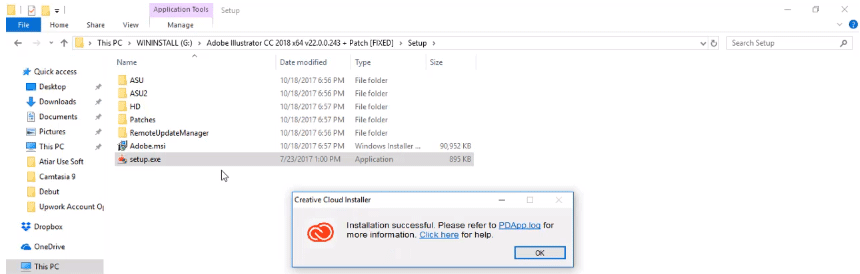
After successful installation, you will get the following pop-up message on the screen.
Click Ok
Step 5:
Go back to the setup page, as shown below.

Step 6:
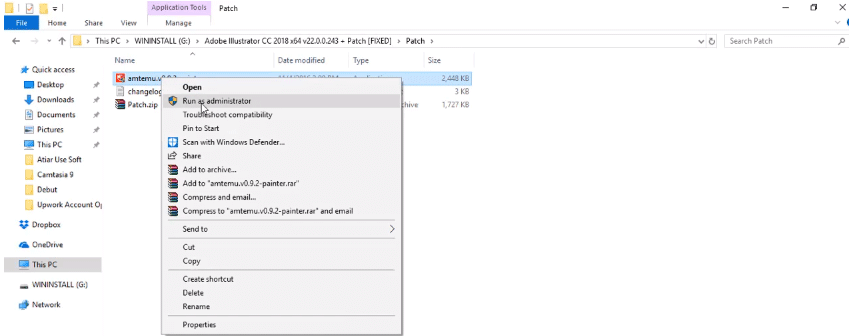
After Clicking on the patch, you will get a screen like this, as shown below.
Amtemu.v0.9.2-painter.exe application right-clicks on this icon and runs as Administrator.
Step 7:
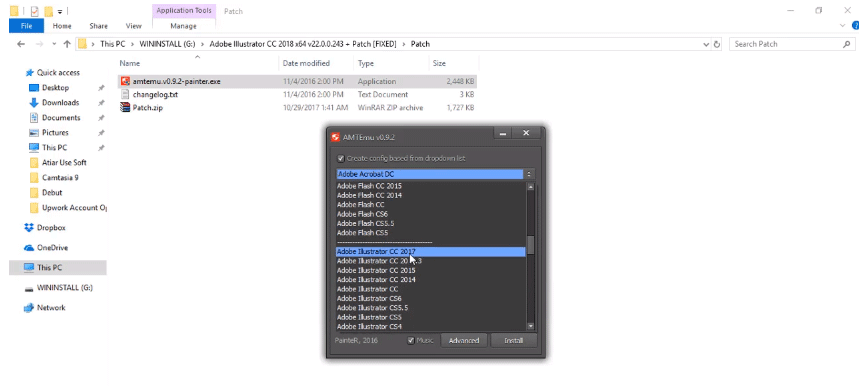
You will get a new pop-up screen as shown below; click on Adobe Acrobat DC drop-down menu and select Adobe Illustrator cc 2017 and click on Install.
Step 8:
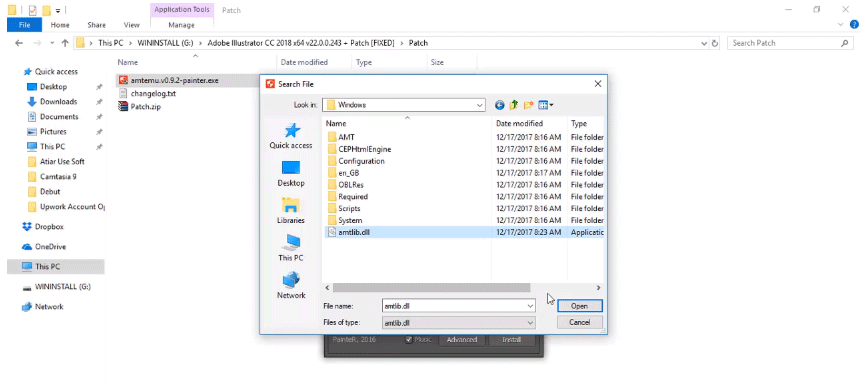
After clicking on Install, you will get a screen like this as shown below; you need to select the file path you need to go the following path.
C:\Program Files\Adobe\Acrobat Illustrator CC 2018\support files\contents\windows
Select the amtilb.dll file and click open.
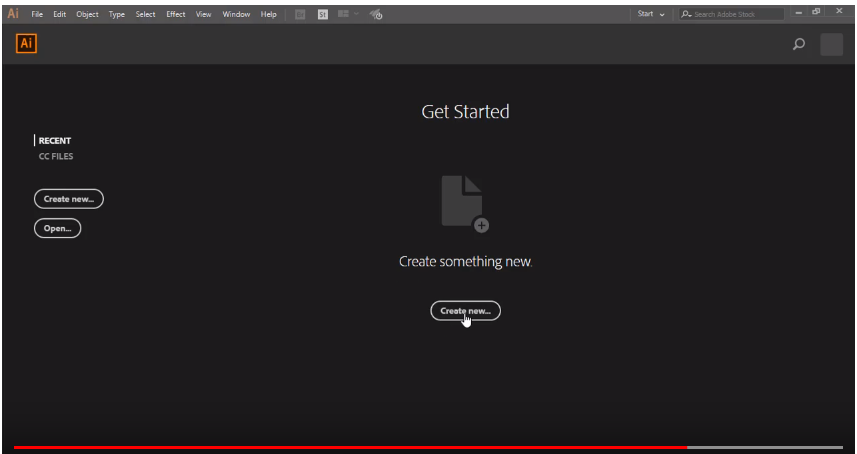
Now that your Adobe Illustrator software is installed on your PC, go to the home screen where you will get the software icon; after clicking on the icon, you can open the software on your PC, and first adobe illustrator screen looks like this as shown below.
Illustration
The illustration is a way to express emotion and imagination on paper. The other thing is the focus of the attention. Illustration means the same meaning as a picture or a diagram that helps make something clear visible, and more attractive. An illustration is an act of removing noise from the picture to look more clarifying and shining. An illustration is a decoration, shining or visual explanation of a text concept, image, object, or process. Illustration word widely used for exploration and integration for posters, flyers, magazines, books, postcards, logos, animation, teaching materials, films, video games, etc.
Illustration has widely used in advertisements, flyers, cartoons, greeting cards, posters, book graphics, novels, storyboards, manuals, businesses, magazines, shirts, video games, tutorials, and newspapers. Most illustrators work on a freelance basis. Depending on the purpose, the illustration may be expressive, stylized, realistic, or highly technical. An illustrator is always trying to provide a clear image of any drawing or picture for you so that your focus not distract anywhere else. An illustrator always wants attention for his illustration. Computer illustration or digital illustration. The illustration is a pre-process of creating a drawing; it’s an art, an act, nothing else.
Recommended Articles
This has been a guide to Adobe Illustrator For Linux. Here we have discussed the basic concepts, main applications, and how to install Adobe Illustrator for Linux. You may also look at the following articles to learn more –