


Difference Between Trello vs Planner
The following article provides an outline for Trello vs Planner. The Trello is an online available tool that is used for managing personal and group tasks. The tool is provided as an open-source tool and also a flexible tool that provides numerous features to the user. The project activities can be planned and monitored easily using this tool. The Planner is a Microsoft product that is categorized as a teamwork planning tool. The planner tool bundles up with Microsoft 365 and is used for personal planning and group planning activities. The interface used by the tool is simple card oriented, just similar to the Trello tool.
Head to Head Comparison Between Trello vs Planner (Infographics)
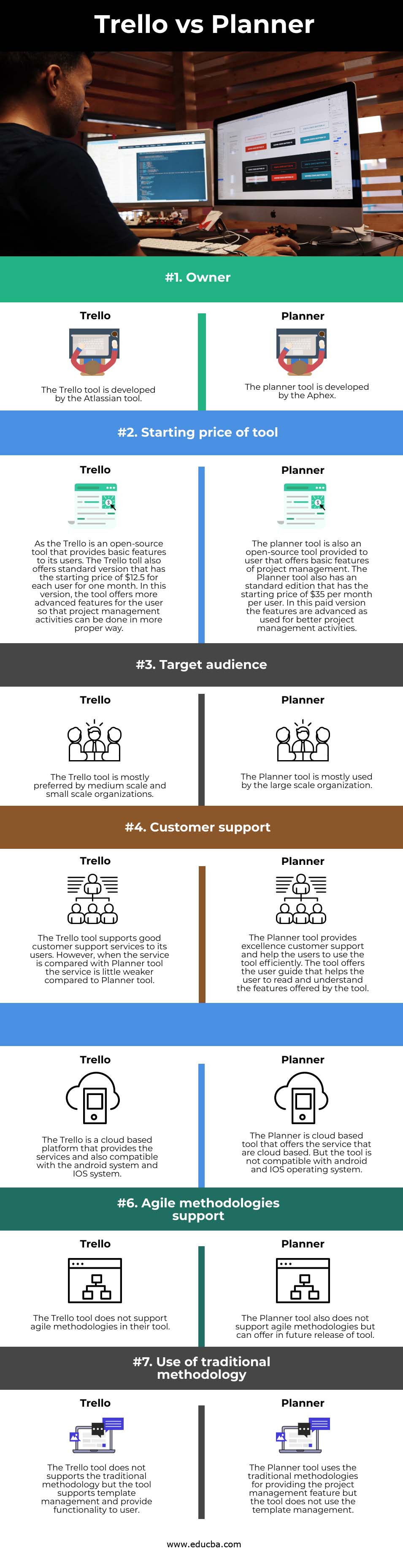
Below are the top 7 differences between Trello and Planner:
Key Difference Between Trello vs Planner
Let us discuss some of the major key differences between Trello and Planner:
- One of the major differences between Trello and Microsoft Planner is a preference by the user. The user considered Trello as a better tool compared to the Microsoft Planner tool. Although both tools are used for project management activities and project tracking activities, the user prefers Trello as a better option. The Trello is a web-based tool used for project management activities and also a type of collaboration tool. The Trello tool uses the Kanban board, provide the functionality to share documents and use card and list in the interface. All this functionality are missing in the Planner tool.
- The other difference between both tools is a work management feature. The Microsoft planner provides a user-friendly type interface to the user that bundles up with Office 365. The plan can be created by using the tool and can make customized as per the user requirements. Once the plan is created, the user can add a task to it and manage the project activities. On the other hands, in the Trello tool, the whole team can create the board and then the task can be easily added to the board as per the user requirement. The Trello tool also offers a privacy feature that enables task privacy, whether it needs to be public or private. And if we compared both the tool, the Trello has a better performance compared in terms of work management of project activities.
- The other difference between the Planner and Trello tool is collaboration. The Microsoft planner tool offers the interface that contains my task tab in which the user can see all the assigned task related to the project. As this feature is an in-built feature in the tool, every team member can read the task and respond accordingly using the Outlook group or other mode. The Microsoft planner tool cannot be easily integrated with other types of tools. On the other hand, the Trello tool is specifically designed for the teams as the user can send an invite to one other. Every member has a unique name and identity that can be easily distinguished. The Trello tool can be easily integrated with Google Drive, Slack, JIRA and many more tool.
- The other major difference between both tools is the pricing of the tool. The pricing of Microsoft Planner is more compared to the Trello tool. But the features offered by the Microsoft planner is more advanced when it is compared with the Trello tool. The Microsoft Planner targets the large organization as their customer, whereas the target audience for the Trello tool is a medium scale and small scale organization. Both the tools are open source tool but offer minimal features in their free version. For getting the more advanced feature, a user needs to go for the standard version. The standard version rate for the Microsoft planner is around $35 per user for one month. On the other hand, the standard version rate for the Trello tool is $12.5 per user for one month.
Trello vs Planner Comparison Table
Let’s discuss the top comparison between Trello vs Planner:
| Feature | Trello | Planner |
| Owner | The Trello tool is developed by the Atlassian tool. | Aphex develops the planner tool. |
| Starting price of a tool | The Trello is an open-source tool that provides basic features to its users. The Trello tool also offers a standard version with the starting price of $12.5 for each user for one month. In this version, the tool offers more advanced features for the user so that project management activities can be done more properly. | A planner tool is also an open-source tool provided to a user that offers basic project management features. The Planner tool also has a standard edition with a starting price of $35 per month per user. In this paid version, the features are advanced as used for better project management activities. |
| Target audience | The Trello tool is mostly preferred by medium scale and small scale organizations. | The Planner tool is mostly used by large scale organization. |
| Customer support | The Trello tool supports good customer support services to its users. However, when the service is compared with the Planner tool, the service is slightly weaker than the Planner tool. | The Planner tool provides excellent customer support and helps the users to use the tool efficiently. The tool offers a user guide that helps the user read and understand the tool’s features. |
| Platform supported | The Trello is a cloud-based platform that provides the services and is compatible with the Android and IOS systems. | A Planner is a cloud-based tool that offers a cloud-based service. But the tool is not compatible with the android and IOS operating system. |
| Agile methodologies support | The Trello tool does not support agile methodologies in its tool. | The Planner tool also does not support agile methodologies but can offer in a future release of the tool. |
| Use of the traditional methodology | The Trello tool does not support the traditional methodology, but it supports template management and provides functionality to the user. | The Planner tool uses the traditional methodologies for providing the project management feature, but the tool does not use template management. |
Conclusion
The Trello and Planner tool are both used for planning and managing the project activities and task. Both tools are used to monitor the progress of a project. The Trello and planner is an open-source tool and can be used by the user from anywhere in the world. And a selection of the tool for the project is completely dependent on user requirements.
Recommended Articles
This is a guide to Trello vs Planner. Here we discuss the Trello vs Planner key differences with infographics and comparison table. You may also have a look at the following articles to learn more –

