

Updated February 27, 2023

Introduction to MongoDB Authentication
MongoDB Authentication is used to control access to the user for unauthenticated access to the database, and authentication will prevent the unauthenticated access from the database. After enabling authentication on a database, MongoDB will authenticate every user to the database, after enabling authentication on database user requires authentication to connect to the database. Authentication is very useful and important in every database to avoid unauthenticated access to the database. In MongoDB authorization and authentication are closely connected, authentication is distinct from MongoDB authorization, and authentication will verify the user’s identity.
MongoDB Authentication Commands
- There are various authentication commands available in MongoDB. Authentication commands are referred to authenticate the database from the unauthenticated access.
- Authentication of the database we can provide the specific permission to every user. We can also provide permission to the user as per the requirement.
- For authentication of a database, we need to enable authentication on the database. Below is the procedure to enable authentication in the MongoDB database.
Steps to enable Authentication
Step 1: Use the admin database and create an admin user.
Code:
use admin;

db.createUser(

{

user: "mongo_test",

pwd: "Abc@123",

roles: [ { role: "dbOwner", db: "admin" } ]    ## Define role as dbOwner on admin DB.

}

)
Output:
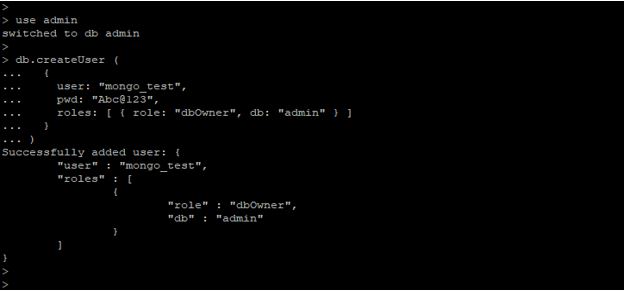
Step 2: Enable authentication in the configuration file. Default location of MongoDB configuration file is “/etc/mongod.conf”.
Code:
vi /etc/mongod.conf
Output:

Step 3: Take restart for MongoDB service. To effect changes on the database, we need to take the restart of MongoDB service.
Code:
/etc/init.d/mongod stop

/etc/init.d/mongod start
Output:
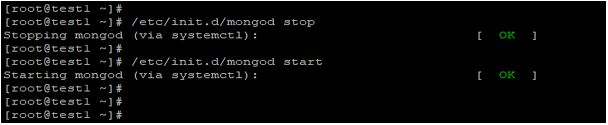
Step 4: Connect to the database with the authenticated users. After enabling authentication on a database, we can connect to the database with authentication.
Code:
mongo admin -u 'mongo_test' -p 'Abc@123'
Output:

Authentication Commands in MongoDB
Below are the authentication commands available in MongoDB. MongoDB is the database that allows authenticating the database from unauthenticated access.
- Authenticate
- Copydbgetnonce
- Logout
- AuthSchemaUpgrade
Authenticate
- Authentication is essential in the MongoDB database to access unauthenticated access from the database.
- In MongoDB, we have used x.509 methods to authenticate the database. We have use db.auth () as below.
- This method allows the user to authenticate the database within the MongoDB database. The authentication method in MongoDB accepts a username and password.
- Below is the syntax of the authentication method in MongoDB.
db.auth (“username”, “password”)
In the above syntax, auth is a command which was used in the MongoDB database for authentication. Username is defined as the name of the user which was used to authenticate the database. A password is defined as a user password that was used to authenticate the database. We have also use the machine parameter with authenticating command. But the mechanism is an optional parameter in the authentication method. For authentication of the database, we need first to provide the grant to the database. In the below example, we have provided grant dbOwner to the test database.
Code:
db.createUser ( {user: "test", pwd: "Abc@123" roles: [ { role: "dbOwner", db: "test" } ] } )    ## Create user to use auth command.

db.auth("test", "Abc@123")
Output:
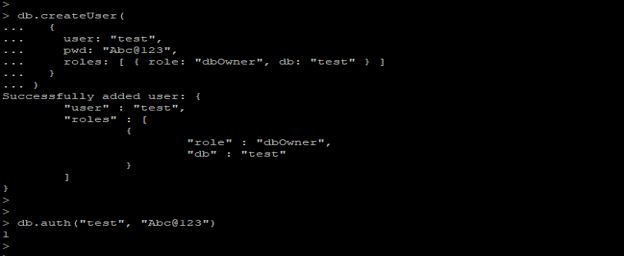
Explanation: In the above example, we have to authenticate the database from the test user with the password. Authenticate is a very important and useful authenticate command in MongoDB to authenticate the database.
Copydbgetnonce
- Copydbgetnonce is a client library in MongoDB which was used in MongoDB to copy database one instance to other instance.
- Copydbgetnonce is an essential and useful command in MongoDB to copy databases from one instance to another instance.
- We have used copied command to copy one database to another database.
- Below is the syntax of the Copydbgetnonce command.
{copydb: 1,    -- Copy database

fromhost: <hostname>,  -- Database hostname from which we have copy database.

fromdb: <database>,     -- Database name that we have copy data.

todb: <database>,         -- Database name that we have restore data.

slaveOk: <bool>,

username: <username>,   -- Database user name which we have used to copy database.

nonce: <nonce>,

key: <key> }
In the above syntax, copydb is a command that we have used copy database from one host to another host. From host defines as database hostname from which we have a copy database. Fromdb and todb define as copy data from one database and restore it on other databases. Username defined as username which we have used to copy databases in MongoDB. Below is the example of Copydbgetnonce in MongoDB.
Code:
use admin

db.runCommand({

copydb: 1,

fromdb: "test",

todb: "test_copy"

})
Output:
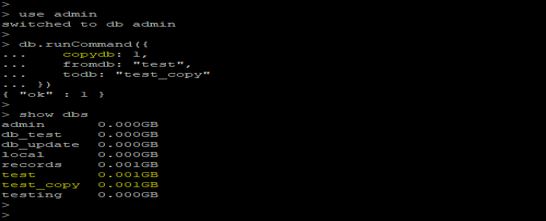
Logout
- Logout command is used to terminate the authenticated connection of the user in MongoDB.
- Logout is an essential and useful command in MongoDB to terminate the current session of the user.
- Below is the syntax of the logout administrative command in MongoDB.
{logout: 1}
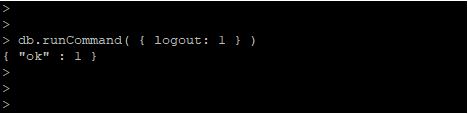
In the above example, logout is an administrative command used to terminate the user’s authenticated connection in MongoDB. Below is the example of the logout command in MongoDB.
Code:
db.runCommand( { logout: 1 } ) ## Logout command.
Output:
AuthSchemaUpgrade
- Authschemaupgrade authentication command is used to upgrade the process of the existing system in MongoDB.
- MongoDB supports the SCRAM – SHA1 authentication mechanism, which MongoDB uses and stores the user credentials.
- For upgrading user authentication, we have used an authschemaupgrade command. We need to upgrade the authentication schema in MongoDB.
- We have upgraded the authentication schema by using an authschemaupgrade method in MongoDB.
- Below is the syntax of authschemaupgrade in MongoDB.
db.adminCommand({authSchemaUpgrade: 1});
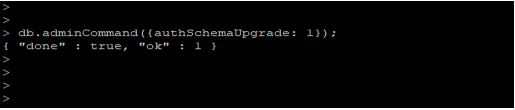
The above syntax states that the admin command is used to define the syntax of authschemaupgrade in MongoDB. We have use flag as 1 to upgrade the auth schema database in MongoDB.
Code:
db.adminCommand({authSchemaUpgrade: 1});
Output:
Conclusion
Authentication is used to control the user’s access for unauthenticated access to the database; authentication will prevent unauthenticated access to the database. After enabling authentication on the database, MongoDB will allow authenticating the user to the database. After enabling authentication on the database, the user requires authentication to connect to the database.
Recommended Articles
This is a guide to MongoDB Authentication. Here we discuss an introduction to MongoDB Authentication, steps to enable Authentication and commands. You can also go through our other related articles to learn more –

