


Introduction to Uses of the Internet
The Internet is a huge virtual networking web medium that enables users to send, receive, store, update, delete, and more. The Internet can search for anything and everything with a simple click or typing the necessary question in the search box on any device with a network connection.
Over the years, the uses of the Internet have expanded significantly. In 2026, the Internet is not limited to browsing websites or sending emails; it has become an essential part of communication, education, business, healthcare, entertainment, banking, and daily activities. Technologies such as cloud computing, Artificial Intelligence (AI), Internet of Things (IoT), and advanced digital services have further increased the importance of the Internet. You are reading this article on the Internet, which is one of many examples of how it connects people with information.
Table of Contents
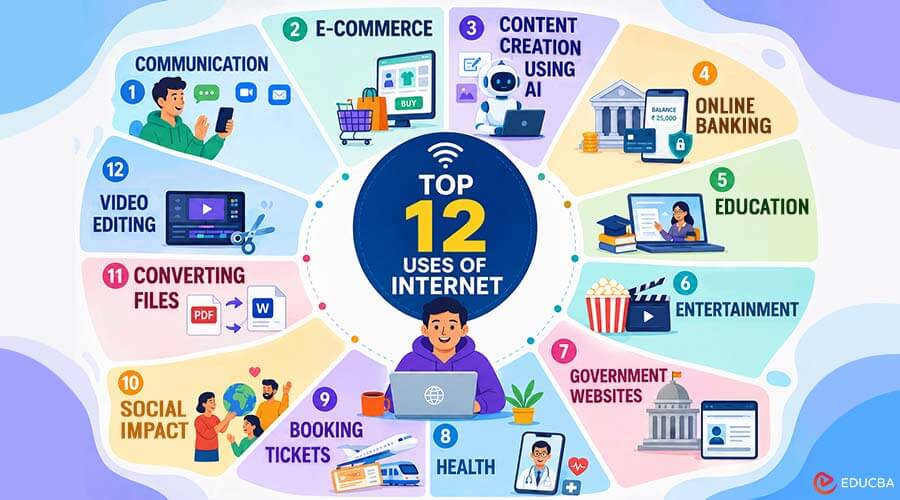
Top 12 Uses of Internet
Here are the top uses of the Internet explained below in detail:
1. Communication
Communication is all about how we talk to each other and share important things. The Internet offers email, instant messaging, social media, online discussion forums, video, and voice calls for most communication. The following tools make it easier for us to connect, collaborate, and learn from one another.
- Email: Email was one of the earliest and most important uses of the Internet. It allows people to send messages, share files, photos, and videos, and communicate for both personal and business purposes. While many other advanced collaboration tools are now available, email remains extremely popular for both official and personal communication. There are numerous free email services, and almost everyone has an email address.
- Social Media Platforms for Connecting: Social media is where we connect with friends, family, and others online. We can share updates, pictures, and videos on platforms like Facebook, Twitter, and Instagram. It’s like having an online diary that others can see and comment on. We can also use social media to find jobs or connect with professionals through platforms like LinkedIn.
- Online Forums and Discussion Boards: Online forums are like virtual places where people with similar interests can have conversations and ask questions. It’s like being in a big group chat where you can discuss specific topics. Websites like Reddit have different communities called subreddits where people can share ideas, ask for help, or discuss things they’re interested in.
- Video and Voice Calls: Sometimes, we can’t meet in person, but we still want to see and talk to each other. That’s where video and voice calls come in. Apps like Skype, Zoom, or Google Meet let us talk to someone using our computer or phone. We can see each other on the screen and have a conversation, just as if we were in the same room.
2. E-Commerce
E-commerce is the buying and selling of goods and services on the Internet. It’s like shopping, but the Internet allows you to do it from your computer or phone instead of going to a physical store. There are different parts to it that we’ll talk about.
- Online shopping and retail websites: Online shopping is purchasing items from websites rather than in stores. There are websites from various vendors where you can find what you want, compare prices, read reviews, and order it. It is like going through a virtual store on your computer. For example, let’s say you want to buy a new pair of shoes. You can go to a shoe website, browse through different types of shoes, select the one you want, choose the right size and color, and then enter the shipping and payment details to complete the purchase.
- Payment gateways and secure transactions: When you buy something online, the payment gateway transfers your money from your bank or credit card to the seller’s account. For example, you might see options like PayPal or Stripe for making payments when buying something online. These are payment gateways. They redirect you to their websites, where you can securely enter your payment information. Once the payment is authorized, your purchase is complete.
3. Content Creation Using AI
Artificial intelligence has become one of the fastest-growing uses of the Internet. AI-powered tools help individuals and businesses create high-quality content quickly, improving productivity and creativity across various industries.
- AI Writing Tools: Platforms like OpenAI’s ChatGPT, HubSpot, and Copy.ai leverage language models to generate human-like text, providing content creators, marketers, and businesses with valuable resources.
- Image and Video Generation: Online AI platforms create images, edit photos, generate videos, and enhance visual content with minimal manual effort, making professional-quality design accessible to everyone.
- Coding and Productivity: Developers use AI coding assistants to write, debug, and optimize code, while professionals use AI to summarize meetings, create presentations, and automate repetitive tasks.
4. Online Banking
The Internet has transformed banking by making financial services available anytime and anywhere. Users can transfer money, pay bills, invest, and securely monitor their accounts through online banking platforms.
- Digital banking services: Customers can access their accounts, transfer funds, pay utility bills, and apply for financial products without visiting a bank branch.
- UPI and digital wallets: Instant payment systems and digital wallets enable users to complete secure transactions on smartphones within seconds.
- AI-powered security: Banks use biometric authentication and AI-based fraud detection to identify suspicious activities and protect customer accounts.
5. Education
In today’s world, the Internet has new ways for our research and education. With the Internet, we can access online databases and libraries, take online courses, collaborate with others, find tutorials and resources, and attend classes online. The following uses of the Internet have made learning more accessible and fun for everyone.
- Access to vast online libraries: With the internet, researchers, students, and teachers can find numerous articles, books, and other resources without leaving home. This means we can find the information we need quickly and easily.
- E-learning platforms and online courses: Now, we can learn online! There are special websites where we can take courses on different subjects. These courses are flexible, so we can learn at our own pace and whenever possible. Many websites offer courses on topics such as Investment Banking, Financial Modeling, Data Science, and Python. We can watch videos, take quizzes, and even earn certificates upon completing courses. It’s like having a school in our own homes!
- Virtual classrooms and distance learning programs: Sometimes, we can not attend a physical classroom. But the Internet lets us attend classes online! We can join virtual classrooms using video calls and special software. Platforms like Zoom and Microsoft Teams are used for virtual classrooms. We can talk to our teachers and classmates, join discussions, and submit assignments online. Distance learning programs are also available for people who can’t attend regular school. These programs use online resources, video lectures, and virtual interactions to teach us.
6. Entertainment
Entertainment and media have become much easier and more fun because of the Internet. The following features of the Internet showcase how we can create videos, share them online, and watch any video we want.
- Streaming of movies, TV shows, and music: Streaming services on the Internet are like giant libraries where we can watch and enjoy TV shows and movies and listen to music without having to buy them. Instead of going to a store or waiting for a specific time on TV, the Internet lets us subscribe to services like Netflix and instantly watch a wide range of content on our phones, computers, or TVs. It’s like having access to a huge collection of entertainment at our fingertips.
- Online gaming and multiplayer platforms: Online gaming lets us play video games with people worldwide via the internet.
- Content Creators and Influencers: Social media has also enabled creative people to showcase their talents and gain recognition for their work. Influencers create videos or posts on platforms like YouTube, Instagram, and TikTok, where many people enjoy their content, and some even buy TikTok followers to enhance their online presence.
7. Government Websites
The Internet provides access to various government websites where users can find important information and complete official tasks online. These websites make government services more accessible and convenient, allowing people to access information without visiting administrative offices.
- Access to Government Information and Services: Government websites such as The White House, the National Portal of India, and the National Informatics Center provide useful information on policies, public services, and official updates. These platforms are designed to be user-friendly, making it easier for people to find the information they need.
- Online Government Services: Many government services can now be completed online. For example, citizens can file income tax returns through the Income Tax Department website instead of submitting physical forms at government offices. Online platforms also provide real-time updates about policy changes, public announcements, and safety alerts.
- Exams, Transparency, and Secure Access: Students can access government exam schedules, syllabi, and other educational updates through official websites. Services like the Right To Information (RTI) help citizens access information about government activities. While using these websites, users should check for security indicators such as the lock symbol or “https://” in the web address to protect sensitive information.
8. Health
In today’s world, the Internet has changed how we care for our health and well-being by making it easier to stay healthy, get the support we need, and connect with others in similar situations. Let’s look at some ways the Internet has made things easier for us:
- Telemedicine and online consultations: Instead of going to the doctor’s office, we can now have appointments through video calls. This is called telemedicine. It’s helpful for non-emergency cases and saves time and effort. So, if you have a minor illness, you can talk to a doctor online using apps like Doctor On Demand.
- Access to medical information and resources: Nowadays, we can find lots of medical information online. Websites and apps provide information on various health conditions, treatments, and ways to stay healthy. For example, websites like WebMD and Mayo Clinic provide information on symptoms and advice on what to do.
- Health and fitness apps and platforms: Some apps and devices help us keep track of our exercise, heart rate, and what we eat. They can help us set goals and stay fit by monitoring our activities and calorie intake.
- Online communities and support groups: The internet has created spaces where people facing similar health challenges can connect and support one another. These communities make us feel like we belong and offer emotional support. Websites like PatientsLikeMe and Inspire let people with chronic conditions share their experiences and learn from others.
9. Booking Tickets
The Internet has made booking tickets faster and more convenient. Users can easily book movie tickets, flights, hotels, trains, buses, and event tickets online without standing in long queues or making phone calls.
- Online Travel and Ticket Booking: Websites and mobile applications enable users to search for, compare, and book travel services from anywhere. Platforms provide details about prices, availability, schedules, and customer reviews to help users make better decisions.
- Easy Online Payments: Digital payment options enable users to complete bookings quickly using debit cards, credit cards, digital wallets, and UPI. Instant confirmation and electronic tickets make the process simple and efficient.
- AI-Based Recommendations: Modern booking platforms use Artificial Intelligence to suggest affordable travel options, personalized recommendations, and better deals based on user preferences.
10. Social Impact
Social Impact and Activism are about how people use the Internet to make a difference and improve society by leveraging viral content to spread messages and enabling regular people to share news and opinions.
- Online activism and awareness campaigns: This involves using websites and social media to discuss important issues and engage people. For example, in Feb 2023, the Indian Government launched “Stay Safe Online”, an online campaign to increase awareness about cybersecurity.
- Social change through viral content: Sometimes videos, photos, or funny content spreads quickly online. This can bring attention to important issues and get people talking about them. For example, the Ice Bucket Challenge video became very popular and helped raise money and awareness for ALS.
- Online petitions: An online petition is like signing your name to support a cause. It’s easy for many people to show they care about something. Grassroots movements are when people come together to protest or fight for something they believe in. Both of these things can start online and then grow into something bigger.
11. Converting Files
The Internet offers a range of online tools that help users convert files to different formats without installing additional software. These tools make managing documents, images, videos, and other files easier.
- Document and Image Conversion: Users can convert files such as PDFs into Word files or convert image formats like JPEG and PNG. Online converters save time and make editing files more convenient.
- Video and Audio Conversion: Internet-based tools allow users to convert video and audio files to suit their requirements. These services are useful for sharing files across different devices and platforms.
- Cloud-Based File Management: Many online services allow users to store, convert, and manage files through the cloud. This makes files accessible from multiple devices at any time.
12. Video Editing
The Internet has made video editing accessible to everyone by providing online editing tools with simple interfaces and advanced features. Users can create professional-looking videos without requiring expensive software or technical expertise.
- Online Video Editing Tools: Internet-based video editors allow users to trim clips, add transitions, apply effects, insert text, and include background music. These tools help beginners create engaging videos easily.
- AI-Powered Video Editing: Modern video editing platforms use Artificial Intelligence to automate tasks such as background removal, subtitle generation, audio enhancement, and video improvements.
- Content Creation and Sharing: The Internet enables users to create and share videos on platforms like YouTube, Instagram, and other social media networks. These platforms help creators reach audiences worldwide and build online communities.
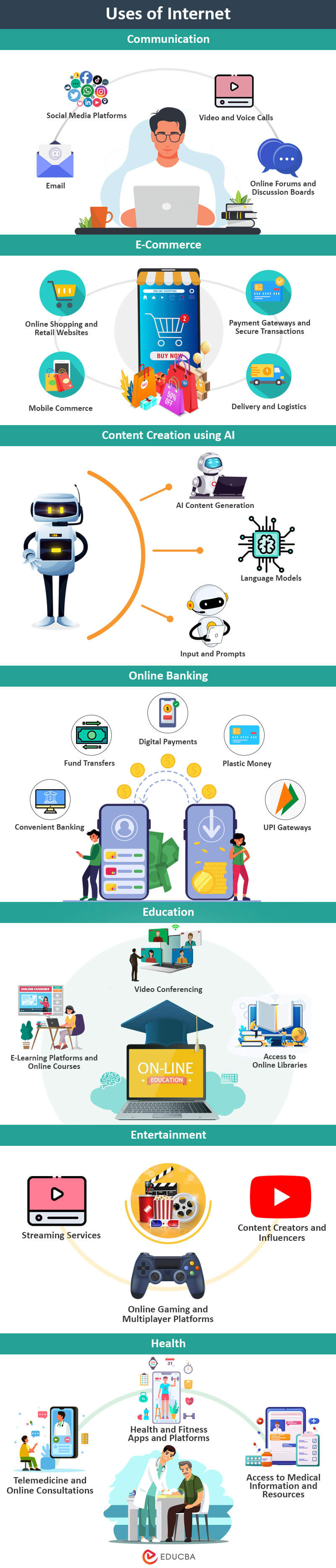
Infographic on Uses of Internet
Conclusion
In the future, the internet will continue to improve with new technologies such as artificial intelligence, augmented reality, and wearable devices. These advancements will make us more connected and aware of the world. However, there are some challenges we need to address. One is ensuring our privacy and security are protected as more data is collected and analyzed. Another challenge is dealing with fake information, cybercrime, and online bullying, which require ongoing efforts to address. So, while the future of the internet looks promising, we must also be aware of and address these challenges to make the most of its potential.
Frequently Asked Questions (FAQs)
Q1. How to Run an Internet Speed Test?
Answer: To run an internet speed test, follow these steps:
- Open any web browser (Chrome or Firefox) on your device.
- Go to a website called Speedtest.net.
- Click the big “GO” button on the screen to start the test.
- Wait a moment for the test to finish.
The screen will show the internet speed in megabytes per second (Mbps). That’s it!
Q2. What is the “Dinosaur no Internet Game”?
Answer: The “No Internet Game” refers to a popular browser game known as the “T-Rex Game” or “T-Rex Runner.” It is a simple side-scrolling game in Google Chrome that requires no internet connection. To play the game, you can open Google Chrome and try to load a webpage while offline. When the “No Internet” page appears with the T-Rex dinosaur icon, press the spacebar or tap the screen (touch-screen devices) to make the dinosaur jump and avoid obstacles like cacti. The goal is to survive as long as possible by correctly calculating jumps and achieving a high score. The game is a fun distraction during internet unavailability.
Recommended Articles
We hope this comprehensive guide to the uses of Internet has helped you understand how the Internet transforms communication, education, business, and everyday life. Check out these recommended articles for more insights into digital technologies and Internet-related innovations.

