

Updated May 31, 2023
Introduction to Unix Operators
Entities that enable operations between variables may be divided into different types, with a certain order of importance that occurs between them, and certain subcategories may also be present in each of these types, with a specific order of execution that exists for subcategories present in each form and each entity in a subcategory having its special significance when dealing with the necessary number of variables. Operating with a unique logic, and conforming to principles in mathematics, logic, or algorithms, in the sense of Unix programming, is referred to as Unix operators.
Unix consists of three parts: the kernel, the shell, and programs.
- A Kernel is the core of Unix, which manages time and memory for the tasks
- Shell is the CLI ( Command Line interface ) between the kernel and the user. When a user logs in to the system, he enters the shell, where it accepts commands and calls the respective program to process the same.
- Programs and Files – The various commands of Unix are documented in the manual, which can be accessed by typing man <command>. Some processes run in the shell identified by their unique PID (process identifier). The files and directories stored inside Unix have a hierarchical structure/path starting with / meaning root location.
Types of Operators in Unix
There are 5 types of basic operators in Unix which are:
1. Arithmetic
2. Relational
3. Boolean
4. File Test Operators
5. Bitwise
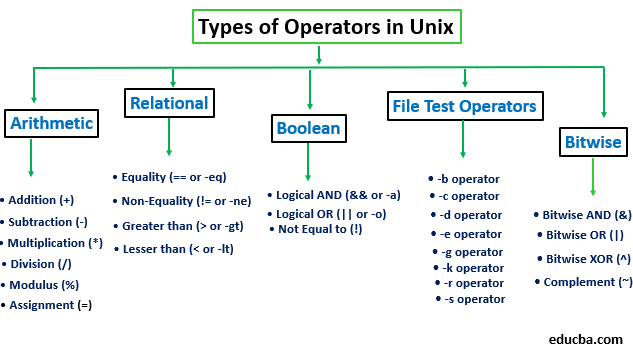
1) Arithmetic Operators
These are used for performing arithmetic mathematical operations. Following are some of the arithmetic operators:
- Addition (+): Used to perform addition between 2 operands
Ex: c=`expr $a + $b` - Subtraction (-): Used to perform a subtraction between 2 operands
Ex: c=`expr $a – $b` - Multiplication (*): Used to multiply the value of 2 operands
Ex: c=`expr $a \* $b` - Division (/): Used to divide the first operand by the second one
Ex: c=`expr $a / $b` - Modulus (%): Used to provide remainder obtained by dividing the first operand by the second one
Ex: f=`expr $a % $b` - • Assignment (=): Used to assign the value given in the second operand to the first one
Ex: c=$b - Increment (++): Used to increment the value of the operand by 1.
Ex: ((a++)) – Post increment, ((++a)) – Pre increment, ((a–)) – Post decrement, ((–a)) – Pre decrement
2) Relational Operators
These operators compare and determine the relationship between two operands. Following are some of the relational operators:
- Equality (== or -eq): This returns true if both the operands are equal and false if not equal.
Ex: $a == $b - Non-Equality (!= or -ne): This is the opposite of the equality operator; it returns true if both operands are not equal and vice versa.
Ex: $a != $b - Greater than (> or -gt): This returns true if the first operand is greater than the second one and vice versa.
Ex: $a > $b - Lesser than (< or -lt): This returns true if the first operand is lesser than the second one and vice versa.
Ex: $a < $b - Greater than or Equal to (>= or -ge): This returns true if the first operand is greater than or equal to the second operand and false if not.
Ex: $a >= $b - Lesser than or Equal to (<= or -le): This returns true if the first operand is lesser than or equal to the second operand and false if not.
Ex: $a <= $b
3) Boolean/ Logical Operators
These are used to perform logical operators on the operands.
- Logical AND (&& or -a): This returns a true Boolean value if both operands satisfy the true condition else returns false.
Ex: When a=20 and b=5, this [ $a -lt 10 -a $b -gt 1] becomes false since a is not less than 10 - Logical OR (|| or -o): This returns a true Boolean value if any of the operands satisfy the condition. Else returns false.
Ex: When a=20 and b=5 this [ $a -lt 10 -o $b -gt 1s] becomes true since b greater than 1 is true - Not Equal to (!): This returns a true Boolean value if the operand value is false and vice versa.
Ex: If a=true [! $a == true] is false
4) File Operators
These are used to test the properties associated with the various files of the Unix filesystem.
- -b operator: This will be true when the file exists and is a special block file else will return false
- -c operator: This will be true when the file exists and is a special character file else will return false.
- -d operator: This will return true if the given filename is a directory else will return false.
- -e operator: This will return true if the given file exists else will return false.
- -g operator: This operator returns true if the SGID (Set Group ID) bit of the given file is set.
- -k operator: This will return true if the given file’s sticky bit is true.
- -r operator: This will return true if the given file is readable by the logged in user else will return false.
- -s operator: This checks the size of the given file and returns true if it is more significant than zero, else will return false.
- -u operator: This will return true if the given file has its SUID (Set User ID) bit set to true.
- -w operator: This will return true if the given file has to write access by the user else will return false.
- -x operator: This will check and return true if the given file can be executed by the user else will return false.
5) Bitwise Operators
These operators perform bitwise operations on the operands.
- Bitwise AND (&): Here, the AND operation is performed on each bit of the operand.
Ex: Consider a = 55 and b = 23 for all below examples
a & b = 01 - Bitwise OR (|): Here, each bit of the operand undergoes the OR operation.
Ex: a | b = 77 - Bitwise XOR (^): The XOR operation is applied to each operand.
Ex: a ^ b = 76 - Complement (~): This performs the complement on each operand bit and returns the value.
Ex: ~a = AA
Arithmetic operators can be used independently, whereas other operators need to be clubbed with conditional statements like if and switch statements to use their functionality.
This concludes the major types of operators in Unix and their examples.
Recommended Articles
We hope that this EDUCBA information on “Unix Operators” was beneficial to you. You can view EDUCBA’s recommended articles for more information.

