



Introduction
In a computer system, several parts connect to the system. Some parts plug directly into the computer motherboard, while others require a cable to connect. These parts can be digital cameras, hard drives, mice, or other devices. Different cable types include HDMI, VGA, DVI, Ethernet, PS/2, 3.5 mm audio, USB, and computer power cables.
Table of Contents
- Introduction
- What Are Computer Cables?
- Computer Cables vs. Computer Ports
- Importance of Computer Cables
- Types of Computer Cables
- Comparison of Computer Cables
- Functions of Computer Cables
- Examples of Computer Cables
- Advantages of Computer Cables
Key Takeaways
- Computer cables connect computers to monitors, storage devices, peripherals, network equipment, and other devices.
- Different cable types serve different purposes, including data transfer, audio and video transmission, networking, and power delivery.
- USB, USB-C, Thunderbolt, and SATA cables are commonly used for data transfer.
- HDMI and DisplayPort cables support digital audio and video connections.
- VGA, DVI, and PS/2 cables are mainly associated with older or legacy computer equipment.
- Ethernet cables provide wired network and internet connectivity.
- Choosing the right cable depends on the device, port, required function, compatibility, and supported standards.
What Are Computer Cables?
Computer cables are physical wires used to connect computer components and external devices. They transfer electrical power or digital and analog signals between devices. A computer cable generally consists of conductive wires covered by insulation and a protective outer layer. The connectors attached to both ends determine which devices the cable can connect.
For example, a USB cable can connect a computer to a keyboard or external storage device. In contrast, an HDMI cable can connect a computer to a monitor or television to transmit audio and video.
Computer Cables vs. Computer Ports
Computer cables and computer ports work together but serve different purposes. A computer cable carries data, audio, video, or electrical power between devices. In contrast, a computer port is the physical connection point on a computer or other device where you plug in the cable.
For example, an HDMI cable connects a computer to a monitor through an HDMI port, while a USB cable connects peripherals such as keyboards, mice, or external storage devices through a USB port.
| Computer Cables | Computer Ports |
| Connect devices and transfer signals or power | Provide connection points for cables |
| Can be removable | Built into computers and other devices |
| Examples include USB, HDMI, Ethernet, and VGA | Examples include USB, HDMI, Ethernet, and VGA ports |
| Connect one device to another | Receive the corresponding cable connector |
Importance of Computer Cables
Computer cables play an important role in connecting different parts of a computer system. The right cable can help ensure reliable data transfer, proper display output, network connectivity, and safe power delivery. As computer technology develops, older standards such as VGA and PS/2 are gradually being replaced by newer standards such as USB-C, DisplayPort, and Thunderbolt. However, older cables remain useful for legacy equipment.
Types of Computer Cables
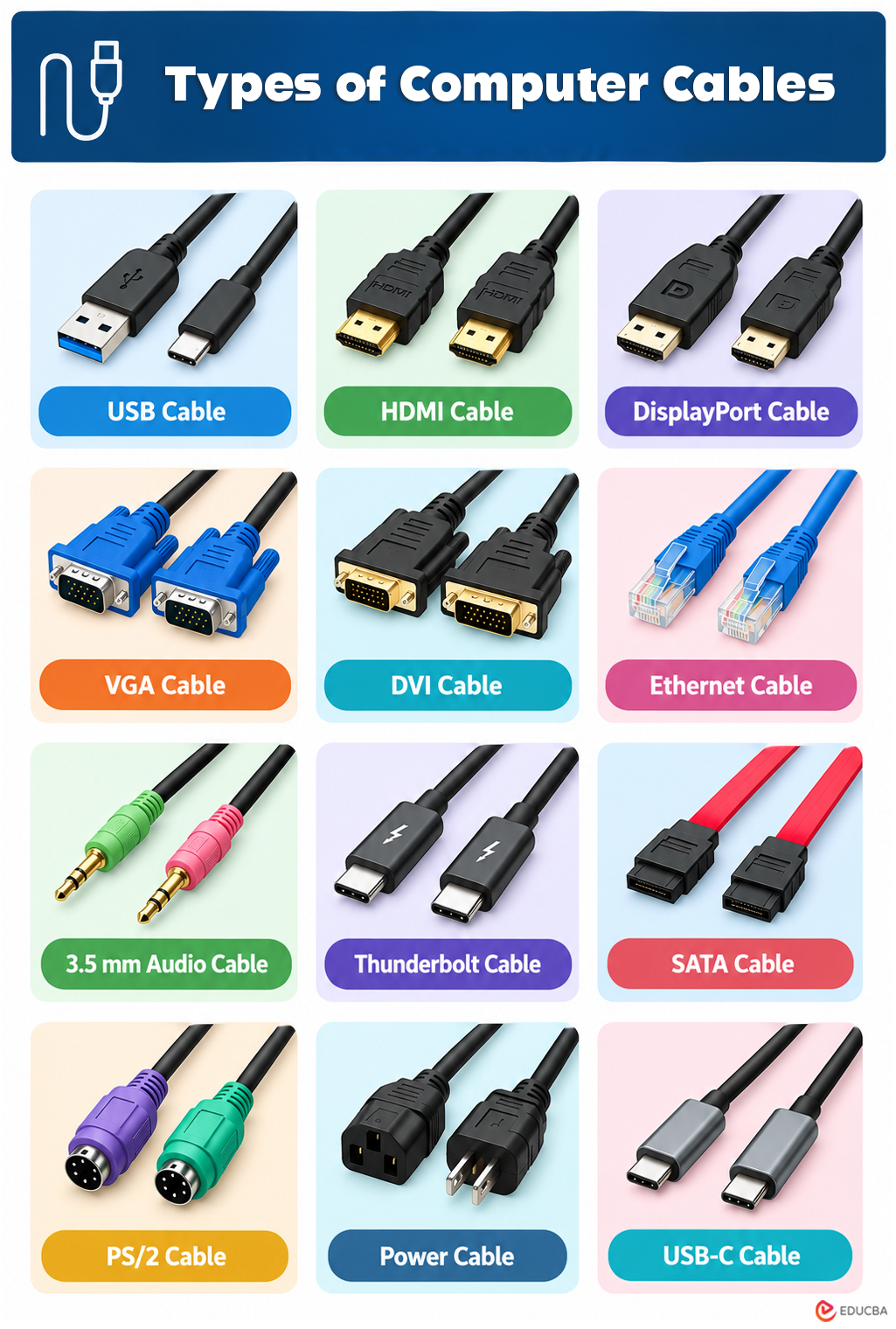
The following are some of the most commonly used computer cable types.
1. USB Cable
The USB (Universal Serial Bus) cable is a standard cable used to connect universal devices or personal computers. It is mainly used for short-distance digital communication. You can transfer digital data using a USB cable. Today, USB cables also charge devices like smartphones, Bluetooth speakers, trimmers, and more.
Sometimes, your USB flash drive does not appear when you connect it to a PC, but you can try a few simple troubleshooting steps. You can use USB cables to connect two devices directly. You can also use USB ports to connect peripherals such as keyboards and mice. Because the device connects through a USB cable, unplugging it while it is running can damage the device, so whenever you need to remove the USB cable, eject it safely first and then remove it from the system.
Uses:
- Connecting keyboards, mice, and printers
- Transferring data between devices
- Charging compatible electronic devices
- Connecting external storage devices
2. HDMI Cable
HDMI (High-Definition Multimedia Interface) is a computer cable that carries high-quality digital video and audio signals. It delivers clear images and sound while maintaining the original signal quality, making it suitable for connecting computers to monitors, TVs, and other display devices.
The HDMI cables connect cable boxes, TVs, DVD players, media streamers, and other electronic devices. You can connect all types of AV devices with one standard HDMI cable. An HDMI cable can carry high-quality audio and video signals simultaneously through a single connection.
Uses:
- Connecting computers to monitors and TVs
- Transmitting digital audio and video
- Connecting computers to projectors
- Supporting multimedia and gaming setups
3. DisplayPort Cable
DisplayPort cables deliver digital audio and high-resolution video from a computer to compatible monitors, projectors, and other display devices. They support high resolutions and refresh rates, making them useful for gaming, video editing, and professional displays. DisplayPort cables can also support multiple monitors in compatible setups.
Uses:
- Connecting computers to monitors
- Transmitting high-quality video and audio
- Supporting high-resolution and high-refresh-rate displays
- Connecting multiple displays in compatible setups
4. VGA Cable
A VGA (Video Graphics Array) cable is another computer cable that sends video signals and connects a monitor to a computer. You can also use a VGA cable with HD televisions. The VGA cable carries all the information displayed on the monitor. The connector has 15 pins, arranged in three rows of five. The cable fits easily into the monitor, and the other end connects to the computer (CPU).
Uses:
- Connecting older computers to monitors
- Connecting PCs to projectors
- Transmitting analog video signals
- Supporting older display equipment
5. DVI Cable
DVI (Digital Visual Interface) cables connect the LCD monitor and the video card. This cable provides high image quality without disturbance. The DVI cable is mostly used in CRT monitors, which have a VGA connection. This cable transmits digital and analog signals to the computer system.
The DVI cable supports both digital and analog connections. You can easily tell whether a DVI cable is analog or digital by checking for a flat pin. If the flat pin has four pins around it, it is DVI analog; if it has only one flat pin, it is DVI digital.
Uses:
- Connecting computers to compatible monitors
- Transmitting digital or analog video signals
- Connecting older graphics cards to displays
- Supporting legacy display systems
6. Ethernet Cable
Ethernet cable is a network cable that provides a wired connection between computers and other network devices. The Ethernet cables connect switches, monitors, and PCs to the LAN (Local Area Network). The length and durability of an Ethernet cable affect connection quality. If the cable is too long or not durable, it can degrade signal quality.
For this reason, different types of Ethernet cables are available on the market. Ethernet cables connect to a computer’s Ethernet port to provide a wired network connection. They resemble telephone cables but are typically thicker and contain more internal wires. A standard Ethernet cable contains eight insulated wires, usually arranged in different color patterns for identification.
Uses:
- Connecting computers to routers and switches
- Providing wired internet access
- Creating local area networks (LANs)
- Connecting network devices
7. 3.5 mm Audio Cable
3.5mm audio cables are computer cables used in computer audio applications. This cable can connect a mini-stereo audio device, PC sound card, or portable CD player to any multimedia speaker. You can also use this cable to connect earphones and headphones to the system. The green port is for headphones and computer speakers. The blue port is for a DVD player or MP3 player, and the pink port is for connecting microphones.
Uses:
- Connecting headphones and earphones
- Connecting external speakers
- Connecting microphones
- Transmitting analog audio signals
8. Thunderbolt Cable
Thunderbolt cables are high-speed computer cables used to transfer data, connect displays, and deliver power through a single connection. They are commonly used with external storage devices, docking stations, monitors, and other high-performance peripherals. Thunderbolt cables use the USB-C connector on newer versions and provide fast data transfer for demanding applications.
Uses:
- Connecting high-speed external storage devices
- Connecting compatible monitors and docking stations
- Transferring large amounts of data
- Providing power to compatible devices
9. SATA Cable
SATA (Serial ATA) cables link internal storage components, including HDDs, SSDs, and optical drives, with the computer’s motherboard. The SATA cables transfer data between the storage device and the computer system. A separate power connection is generally required to supply power to the connected drive.
Uses:
- Connecting internal HDDs and SSDs
- Connecting optical drives
- Transferring data between storage devices and the motherboard
- Supporting internal computer storage
10. PS/2 Cable
The PS/2 cable is a standard cable used to connect a mouse and keyboard to a computer system. The PS/2 cable is long enough for the user to easily connect the mouse and keyboard to the system and use them. PS/2 cables have 6 pins and a round connector. PS/2 cables come in two main sizes. The smaller size is the most common, but some adaptors can convert it to a larger size. USB cables have now replaced this cable because they are universal and can be easily plugged into any system.
Uses:
- Connecting older keyboards to computers
- Connecting older mice to computers
- Supporting legacy input devices
- Providing dedicated keyboard and mouse connections
11. Power Cable
Power cables supply electrical power to computers, monitors, and other compatible devices. They connect the device to a power outlet or power source and provide the electricity needed to operate. Desktop computers generally use power cables to link the power supply unit with a wall socket.
Uses:
- Supplying power to desktop computers
- Connecting monitors to electrical outlets
- Powering compatible computer equipment
- Connecting power supply units to a power source
12. USB-C Cable
USB-C cables are commonly used with modern computers, laptops, smartphones, tablets, and other electronic devices. They can transfer data and, depending on the supported standard, deliver power and transmit audio and video signals. The USB-C connector is reversible, making it easy to plug into compatible devices.
Uses:
- Connecting modern computers and peripherals
- Transferring data between compatible devices
- Charging laptops, smartphones, and other devices
- Supporting video output on compatible devices
Comparison of Computer Cables
| Cable Type | Primary Use | Signal Type | Common Application |
| USB | Data and power | Digital | Peripherals and storage |
| HDMI | Audio and video | Digital | Monitors and TVs |
| DisplayPort | Audio and video | Digital | Monitors and PCs |
| VGA | Video | Analog | Older monitors |
| DVI | Video | Digital/Analog | Older displays |
| Ethernet | Networking | Digital | Internet and LAN |
| 3.5 mm Audio | Audio | Analog | Headphones and speakers |
| Thunderbolt | Data, video, power | Digital | High-speed peripherals |
| SATA | Storage data | Digital | Internal drives |
| PS/2 | Keyboard and mouse | Digital | Legacy peripherals |
| Power Cable | Electrical power | Electrical | Computers and monitors |
| USB-C | Data, power, and video | Digital | Modern devices |
Functions of Computer Cables
Computer cables perform different functions depending on their type. Their main functions include:
- Data Transfer: USB, USB-C, Thunderbolt, and SATA cables transfer data between devices.
- Audio and Video Transmission: HDMI and DisplayPort cables transmit audio and video signals.
- Network Connectivity: Ethernet cables provide wired internet and LAN connections.
- Power Supply: Power, USB, and USB-C cables can supply electrical power to compatible devices.
- Peripheral Connection: USB and PS/2 cables connect keyboards, mice, printers, and other peripherals.
- Display Connection: VGA, DVI, HDMI, and DisplayPort cables connect computers to compatible displays.
Examples of Computer Cables
Common examples of computer cables include USB, HDMI, DisplayPort, VGA, DVI, Ethernet, 3.5 mm audio, Thunderbolt, SATA, PS/2, Power, and USB-C cables. Each type serves a specific purpose, such as data transfer, networking, display output, audio transmission, or power delivery.
Advantages of Computer Cables
Computer cables connect computers with monitors, storage devices, printers, keyboards, and other peripherals. They can transmit digital and analog signals and, depending on the cable type, can also transmit electrical power, such as USB cables. Ethernet cables can connect a computer system to the internet and provide a stable network connection.
Key advantages of computer cables include:
- Easy Connectivity: Connect computers with various devices and peripherals.
- Fast Data Transfer: USB, USB-C, Thunderbolt, and SATA cables support data transfer.
- Audio and Video: HDMI and DisplayPort cables transmit audio and video signals.
- Internet Access: Ethernet cables provide reliable wired internet connectivity.
- Power Delivery: USB and USB-C cables can transfer power to compatible devices.
- Stable Connection: Wired connections offer consistent performance with less interference.
- Wide Applications: Cables support gaming, movies, music, file transfers, printing, and data storage.
Final Thoughts
Every computer cable type has its own advantages and serves a specific purpose. While many cables are widely compatible, not every cable works with every system or port. Cable performance also depends on its type, size, quality, and durability. Choosing the right cable helps ensure reliable connectivity, data transfer, and power delivery.
Frequently Asked Questions (FAQs)
Q1. What are computer cables?
Answer: Computer cables are physical wires used to connect computers to components and external devices while transferring power or signals.
Q2. What is a power cable used for?
Answer: A power cable supplies electrical power to compatible computers, monitors, and other equipment.
Q3. Which cable is used to connect a computer to the internet?
Answer: An Ethernet cable is commonly used to provide a wired internet or LAN connection.
Q4. Which cable is used for audio and video?
Answer: HDMI and DisplayPort cables can transmit digital audio and video signals.
Q5. What is a USB-C cable used for?
Answer: USB-C cables can transfer data, charge compatible devices, and support video output when the connected devices support it.
Recommended Articles
We hope this comprehensive guide to Types of Computer Cables helps you understand their uses and choose the right cable for your devices. Check out these recommended articles for more insights into computer hardware, connectivity, and technology.