
Updated April 24, 2023
Definition of Teradata AMP
Teradata amp is the virtual processor which stores and retrieves data. The abbreviation of Teradata AMP is access module processor; AMP receives the execution plan and data from the parsing engine. It will perform the conversion of data type, filter, aggregation stores, and sorting of the data as per the associated risk. Table records will be distributed among the file system of AMP.
What is Teradata AMP?
- Each Teradata AMP will be associated with the set of disks from which we have stored the data, as we can say that only AMP reads and write the data from disks.
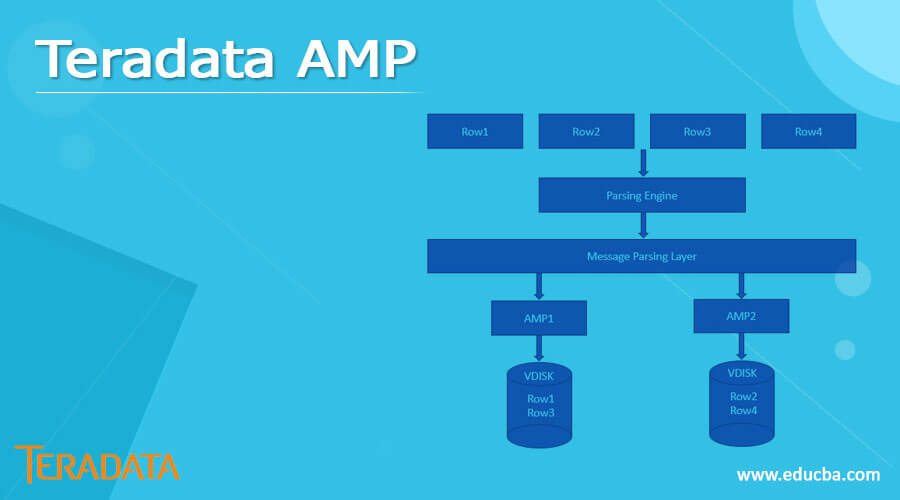
- When running insert queries, the parsing engine will send the records to the BYNET. Then BYNET will retrieve the records and sends them to the target AMP.
- It will store the records on the disk of the database server. The below image shows Teradata storage architecture as follows.
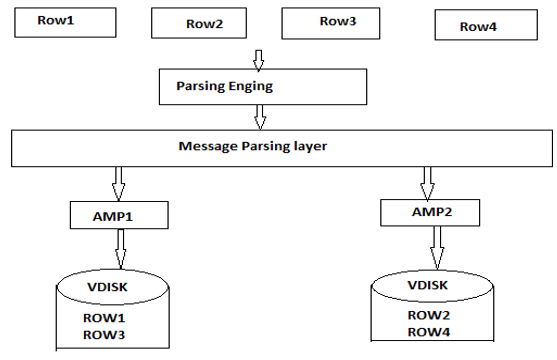
- In the above example, we have used two AMP to segregate the data of table rows. We can see that data is segregated among the AMPS.
- When the client runs a query to retrieve records from the Teradata database, the parsing engine will send a request to Bynet, and Bynet will send the appropriate request to the respective AMP.
- After receiving the request, AMP will search it in parallel disks to identify the specified records and send it again to Bynet.
- AMP will obtain the rows required for request processing as we assume that AMP will be processing the select statement. Finally, Bynet will transmit the message to the parsing engine and AMP. The AMP is sent a single element from the following.
Single AMP. - The selected set of AMP is called a group of dynamic Bynet.
- All the AMP in a system.
- If we access the data using the primary index and the client requests to retrieve a single row, the parsing engine will transmit the steps to the single AMP. On the other hand, if the client requests to retrieve many rows, the parsing engine will broadcast Bynet for all AMP.
- The parsing engine will send a step to the AMP subnets as per the requirement to minimize the database overhead.
- It will be grouped into logical clusters to enhance the capabilities of the Teradata database.
- The AMP vproc will manage the interaction with the Teradata database using the disk subsystem. Each AMP in the Teradata database will work with the shared disk storage.
How to work teradata amp?
- The AMP is a Virtual Processor (vproc) that manages the database, handles file operations, and manipulates the disc subsystem in the Teradata Database’s multi-tasking and perhaps parallel-processing environment.
- Each AMP had its microprocessor, hard drive, and interface of YNET. On a single node, numerous AMPs can exist, and the BYNET controls communication between them.
- A table’s rows are stored and accessed using an index, a physical mechanism. In a relational database, tables’ indexes work similarly to books’ indexes.
- When creating a table, Teradata distributes data based on the main index (PI) we create. A unique primary index will ensure that table rows are distributed across the AMP.
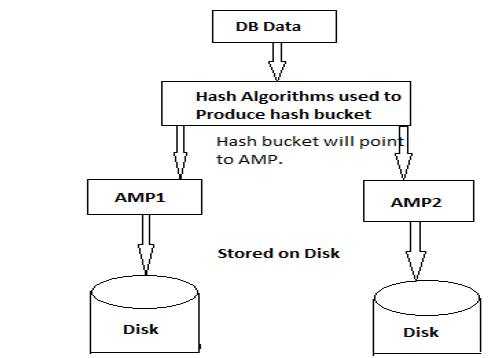
- The Parsing engine delivers records to BYNET when the client performs queries to insert records. Then, the primary index is used to hash the data.
- The hash algorithm generates the hash value and the hash bucket’s value. AMP’s numbers will be in the hash bucket value.
- The BYNET transmits records to the appropriate AMPs based on hash values, which the AMP then stores in its related discs.
- The below figure shows how it will work.
- Teradata stores data in the database by using values of hash. We must use Hash functions to see the distribution of table data.
- These Hash functions are commonly used to determine data distribution over primary index columns.
The below example shows how it will work as follows.
Code –
SELECT HASHAMP (HASHBUCKET (HASHROW (<PRIMARY INDEX>))), COUNT(*)
FROM test_amp
GROUP BY 1;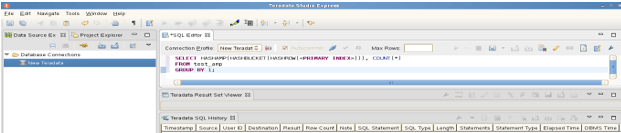
Find the number in the amp
- AMP number in the Teradata database starts from zero. This is because the Teradata hashmap function gives the max number of AMP from the database server. In the example below, we used 1 to find the total number of AMP from the Teradata database.
- The example below shows how to find the total number of AMP from the Teradata database.
Code –
Select HASHAMP() + 1;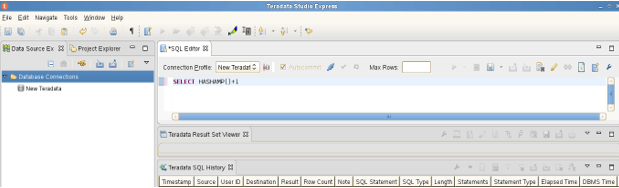
- The above example shows that the total number of AMP in our Teradata database is 4752. Therefore, we need to use the hashmap function to find the number of AMP from the database server.
- When using the Teradata database, we need to know how AMP we use in the database server.
- This is particularly true for AMPs, as we should always strive to distribute any queries or operations we execute AMPS as per the client. This will help us to get the most out of our query’s performance and system resources.
Function of Teradata amp
A virtual processor connected to the parsing engine via BYNET is the Access Module Processor. AMP contains its own disk, which it can read and write on. Shared nothing architecture is the term for this.
When a query is executed, Teradata distributes a table’s rows across all AMPs. Then, the AMP executes any SQL requests in the following steps.
- Lock the table.
- Execute the requested operation.
- End the transaction.
- The hashamp function will return the number of AMP used to store the table row in the virtual drive.
- AMP will charge the table row storage on its virtual disc. It accepts the input HASHBUCKET# and outputs the AMP number.
- The AMP vproc manages the interactions of the Teradata Database with the disc subsystem. Each AMP is responsible for a portion of the disc storage. AMP function will include the following.
- Management task of the database.
- Management of file system.
- Each PE runs database software that handles sessions, decomposes SQL commands into stages, and provides the answer rows to the asking client, perhaps in parallel.
Conclusion
Each Teradata AMP will be associated with the set of disks from which we have stored the data, as we can say that only AMP reads and write the data from disks. Teradata amp is the virtual processor which stores and retrieves data.
Recommended Articles
This is a guide to Teradata AMP. Here we discuss the Definition, What Teradata AMP is, How to work Teradata amp, and examples with code implementation. You may also have a look at the following articles to learn more –

