
Updated April 6, 2023
Introduction to Swift Package Manager
The swift package manager acts like a tool for managing and distributing the swift codebase in a uniform manner. It has an integrated inbuild system for swift to automate and make the entire process of compiling, linking and downloading more agile and efficient. All the modules consist of some special source files and manifest files that are used exclusively for product implementation and its dependencies. The manifest file present within the swift package manager known as Package. Swift defines the package name, and the other package description module comprises of the actual content.
How does Package Manager work in Swift?
- There are some conceptual pattern and way in which package manager works in Swift as this concept of package manager in Swift is supported and included in swift version 3.0 and above.
- There are some modules in Swift which are used for organizing the entire code base of swift into modules, and each module in swift has significance in a manner where the code can be used for namespaces and enforces each of the access controls outside the module.
- Many times, one code might have a single module for importing code, but then the dependencies also exist, which is used for handling many system-related modules such as macOS, Darwin, 0r Glibc on Linux.
- These modules are helpful in a way that they can be used as reusable code for solving any problem where the requirement might come out to be the same.
- The same modules can also be shared with respect to the same set of the code base of swift as both will need a swift package manager to solve it properly.
- A target-present within it can be built using a library or an executable as part of the product in which the swift package manager is present.
- Executable as part of the swift language can be run by any operating system of macOS, Darwin etc., which support swift 3.0 and above.
- A target present in it also contains the dependencies that are required by the code base in the package, and that dependency consists of relative and absolute URL to the source package and also has a set of requirements necessary to support the version of it.
- Based on a scenario, we might need to edit the dependencies related to the project and might dig down to the package manager and its associated granularity by providing all the relevant information required for managing the versions and dependencies.
- Integration with XCode also plays a pivotal role as it helps in making the execution with package manager and application smoothly and efficiently.
- There are many managing dependencies and troubleshooting dependencies that plays an important role when it comes to packaging the entire codebase for execution. Also, both these dependencies help a lot to the programmers in terms of brainstorming and problem solving rather than debugging with the aspects of software or hardware.
Examples of Swift Package Manager
Given below are the examples mentioned:
Example #1
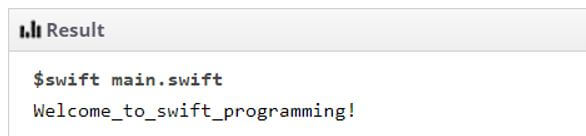
This program demonstrates the printing of Welcome_to_swift_programming on successful execution of the program once the import of the inbuild swift package manager is made using import swift statement as shown in the code and output below.
Code:
import Swift
print("Welcome_to_swift_programming!")
Output:
Example #2
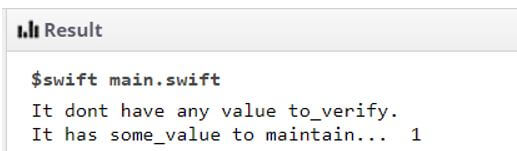
This program demonstrates the usage of package manager with import foundation, which is slightly different than swift import package manager which means even if the swift import is not made, then also the foundation import will manage all the basic needs of the swift import as Foundation package acts as a framework for importing the necessary manifest files and folders for compiling the code as shown in the output.
Code:
import Foundation
var sm_val:Int?
var sm_anthr_val:Int! = 1
if sm_val != nil
{
print("It has some_value to maintain... \(sm_val!)")
}
else
{
print("It dont have any value to_verify.")
}
if sm_anthr_val != nil
{
print("It has some_value to maintain...  \(sm_anthr_val!)")
}
else
{
print("It don't have any_val to verify.")
}
Output:
Example #3
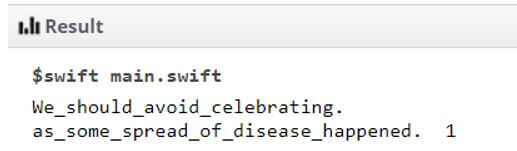
This program demonstrates the usage of import Glibc, which is used to replace the Darwin package manager module to support the Linux environment and maintain or test the entire package manager for its usage and working efficiently as shown in the below codebase and output as shown.
Code:
import Foundation
import Glibc
var sm_val:Int?
var sm_anthr_val:Int! = 1
if sm_val != nil
{
print("Lets_celebrate_festival \(sm_val!)")
}
else
{
print("We_should_avoid_celebrating.")
}
if sm_anthr_val != nil
{
print("as_some_spread_of_disease_happened.  \(sm_anthr_val!)")
}
else
{
print("So_be_safe&enjoy.")
}
Output:
Advantages
Given below are the advantages mentioned:
- The main aim of the Swift package manager is to reduce the overall costs of the resources used, that is, resource management.
- It helps in automating and streamlining the entire process of building, packaging and downloading all the dependencies related to the project.
- It indeed helps make the entire process as efficient as a recursive process by helping the dependencies take their own dependency for working entirely.
- It forms a dependency graph that gives an overview to the programmers to sort out most of the modules and their dependency to work and manage effectively.
- The package manager has some inbuild systems and packages with modules that help in providing the builds to satisfy and manage the entire dependency within the graph for the flow to be maintained.
Conclusion
It plays a pivotal role in the entire swift programming language. It helps form a container that is used to keep the entire content and modules with dependencies organized and managed to ensure a proper overview for all to maintain the format and paradigm in execution.
Recommended Articles
We hope that this EDUCBA information on “Swift Package Manager” was beneficial to you. You can view EDUCBA’s recommended articles for more information.

