


Updated June 30, 2023

Introduction to SQL Pattern Matching
We can match the string and check for its matching with different patterns using the LIKE operator in SQL, which is a logical operator that compares the string and searches for the part that satisfies and matches the pattern that is specified using a collection of various regular and wildcard characters. The strings, texts, and column values or variables containing data of binary type, varchar type, and files can be used for matching them with regular expressions. In this article, we will learn about matching the values or contents of columns and variables using the LIKE operator, its syntax, and some examples demonstrating its implementation.
Syntax
The syntax of the LIKE operator is as shown below:
column name or expression LIKE pattern [ESCAPE character to be escaped]Explanation: column name or expression can be the name of the column of the particular table that you want to match with the pattern or any variable or combination of different functions and columns or variables that result in a certain expression whose final value is to match the pattern. The LIKE operator allows us to match patterns in query statements, including SELECT, INSERT, UPDATE, and DELETE statements. We need to specify the pattern we want to match to use the LIKE operator.
How does SQL Pattern Matching work?
Below is the working of SQL Pattern Matching:
Pattern specification
The pattern we have to match the expression can be a sequence of regular and wildcard characters. The wildcard characters provide flexibility and variety in matching the expressions. Regular characters are the string of alphabets and numbers that we want to search for, while wildcard characters can be one of the following:
The underscore character can be used to specify that there can be an occurrence of any of the single characters at the place where the single underscore wildcard character is specified (_). We can specify the list of the characters that can be allowed for a single occurrence at that place by mentioning them inside the square brackets [comma-separated list of allowed characters].
We can even specify the range between which we can allow the single occurrence of the character within a specified range by mentioning the starting and ending character within the range inside square brackets [starting character – ending character]. Alternatively, we can also allow the presence of a single character that is not within the specified range by mentioning the range to be excluded between square brackets, prefixing the range with ^ character [^].
Examples to Implement SQL Pattern Matching
Below are the examples mentioned:
Example #1: Escape character
We can optionally specify one character as the escape character. We can use the escape character to mention a wildcard character as a regular character in a pattern. By prepending the escape character to the wildcard character occurrence, we can indicate that the wildcard character should be treated as a literal character rather than a wildcard. Only one escape character can be specified when using LIKE for matching the expressions with the pattern.
Step 1: Let us consider the example by using a table named dictionary that contains the following records:
Code:
SELECT * FROM dictionary;Output:
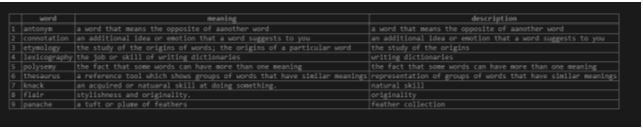
Step 2: Now, we have to search for the records that contain the “word” string in their column values of meaning. For this, we will use the following query containing the LIKE function.
Code:
SELECT * FROM dictionary WHERE meaning LIKE "%word%";Output:

Step 3: Using underscore (_) wildcard character to specify the single occurrence of any character between the specified strings or characters, we will consider one example where we will only get the records from the dictionary table that match the pattern that contains as many strings before and after the occurrence of I and I lying in between which can have any character in between the two I’s and specify _ underscore in between. Our pattern will be “%i_i%,” and the query statement will be as follows:
Code:
SELECT * FROM `dictionary` WHERE meaning LIKE "%i_i%";Output:

Explanation: The output was retrieved because it contained records where certain words like “additional,” “origins,” “writing,” “similar,” and “originality” had only one character between two “I” characters. The pattern used to define this specific condition included the ‘%’ wildcard character, which allows for any words or characters before and after that pattern.
Example #2: Matching with the specification of the escape character
Step 1: Consider the following table named questions that contain the column named question having the following content in it as shown in the output:
Code:
SELECT * FROM questions;Output:
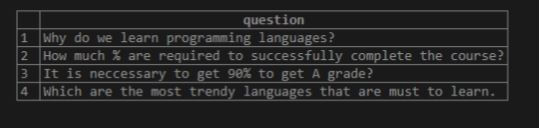
Step 2: Now, we must search for all the records with a percentile character. But as the % character is a wildcard character, we will use an escape character, say /. Our query is as follows:
Code:
SELECT * FROM questions WHERE question LIKE "%/%%" ESCAPE "/";Output:

Conclusion
The strings, column values, and expressions can be matched with a particular pattern by using the LIKE operator in SQL that helps us specify the pattern, which is the collection of different regular and wildcard characters. The use of wildcard characters makes the matching and pattern specification more flexible and easy.
Recommended Articles
We hope that this EDUCBA information on “SQL Pattern Matching” was beneficial to you. You can view EDUCBA’s recommended articles for more information.

