

Updated March 16, 2023

Introduction on SQL Insert Query
In SQL, the ‘Insert’ command is used to add new records into the table in a database. An ‘Insert’ statement can be used to insert single row records or multiple rows of records, depending on the requirement. Insert command can also be used along with the select command when there is a need to make a copy of records from one table and insert those records into another table in the database.
Syntax
We can add new rows of data to the existing table by using the INSERT queries in SQL. Below is the syntax used for inserting values to a table with the specific columns we want certain values to be inserted.
INSERT INTO table_name (column1, column2, column3 ...columnN) VALUES (value1, value2, value3.....valueN);Here we want to insert data for columns: column1, column2, column3, and so on, and the values to be inserted are: value1, value2, value3, etc.
Also, if we want to insert values to all the columns of a table, there is no need to specify the column names in the INSERT query. However, we should be careful in maintaining the order of the columns, which should be the same as the columns in the table. The following syntax can achieve this:
INSERT INTO table_name VALUES (value1, value2, value3....valueN);It is also possible to insert data into one table from another. For example, we can insert the data from another table by using the Select statement inside the Insert query.
If we want to populate the data of all the columns from the second to the first table, we can use the below syntax.
INSERT INTO table_name_1 SELECT * FROM table_name_2;
We can insert data from the second table to the first table and the columns specified will be inserted to the first table with the values from the second table below.
INSERT INTO table_name_1 (column1, column2,column3....columnN) SELECT (column1, column2, column3.....columnN) FROM table_name_2;How does Insert Query work in SQL?
Insert operation results in addition to one or more rows to the existing rows in a table. Thus, insert queries can be used to insert specific column values or values to all the columns in a table. Also, with the usage of the SELECT statement in the INSERT query, we can add or populate the data or add values from another table to a particular table. But we should be careful in taking into consideration the table structure in such cases where there might be any discrepancy in the columns of the two tables in question.
How to Use Insert Query in SQL?
The insert query must contain the keyword INSERT. Also, the columns and values must be in proper order. In the case that the columns are of characters or strings, the values to be inserted need to be specified within quotes. If the columns of the table to which the data is to be inserted are not defined in the query, then the values will be inserted to all the columns in that table.
Examples of SQL Insert Query
Let us see how the insert queries work.
For example, we have the below EMPLOYEE table.

Now, we want to add values to the above table, and it can be done as below:
INSERT INTO EMPLOYEE (ID, NAME, AGE, SALARY) VALUES (‘7899’, ‘Raj’, ‘34’, ‘35890.00’);After running the above query, we will get the below result:
Select * from EMPLOYEE;
As we are inserting the values to all the columns in the table, we can use the below query for the same operation.
INSERT INTO EMPLOYEE VALUES (‘7899’, ‘Raj’, ‘34’, ‘35890.00’);If we want to insert values only to specific columns, it can be achieved by the below query.
INSERT INTO EMPLOYEE (ID, NAME) VALUES (‘7899’, ‘Raj’);After running the above query, we will get the below result:
Select * from EMPLOYEE;
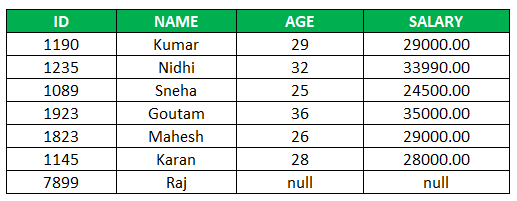
Here we can see that the column for which no value is inserted has a null value.
Let us see how we can insert data from a second table, ‘DETAILS’, to the existing table ‘EMPLOYEE’. Below is the table ‘DETAILS’.

In order to insert the data from the table Details to EMPLOYEE, we can use the below query.
INSERT INTO EMPLOYEE SELECT * FROM DETAILS;Here the data from the table DETAILS will be added to the EMPLOYEE table as below.
Select * from EMPLOYEE;
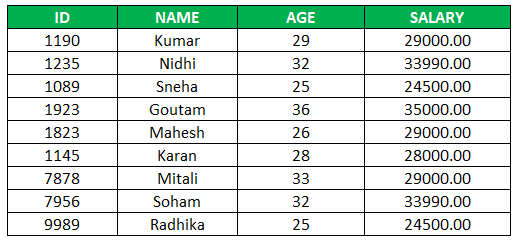
Similarly, the data for specific columns from the table DETAILS can be populated to the EMPLOYEE table accordingly.
Conclusion
Insert query in SQL can be used to add new rows of data to the existing table. The insert statements can be used to add values for specific or all the columns of a table. We should be careful in maintaining the order of the columns, data types while inserting the values to the columns.
Recommended Articles
This is a guide to SQL Insert Query. Here we discuss the basic concept and how Insert Query Works in SQL and Examples of SQL Insert Query. You may also look at the following articles to learn more –

