
Updated March 16, 2023
Introduction to Scikit Learn Classifiers
Scikit learn classifiers is a point of example illustrating the decision boundary of multiple classifiers. The scikit learn classifiers are taken from the salt grain as the institution is conveyed from the real dataset in the spaces where high dimensional data is easily separated linearly in SVM and naive bayes classifiers. The plot displays the training spots in solid color where we are testing.
Key Takeaways
- Scikit learn classifier provides easy ways for accessing the classification algorithm for all the classifiers. We can use multiple scikit learn classifier algorithms in python.
- The decision tree classifier in scikit learn will break the dataset in numerous smaller subsets using the different criteria.
What is Scikit Learn Classifiers?
The scikit learn classifier is a systematic approach; it will process the set of dataset questions related to the features and attributes. The classifier algorithm of a decision tree is visualized by using a binary tree in the root and each of the internal nodes. The tree leaves refer to the classes from which the dataset is splitting.
The support vector machine classifier supports the efficient classification method when the feature vector is optional. In scikit learn classifier, we can specify the function of the kernel. The classifier task is any task from which we put an example in one or multiple classes. As per the classification task, we are using different classifiers in scikit learning.
The naive bayes classifiers determine the probability of which example belongs to some class, calculating the likelihood of which event will occur when some input is given. When doing this type of calculation, we need to assume that all the predictors class contains the same effect and which predictors are independent of each other. The LDA will work by reducing the data set dimensionality and the line of the data points. Then it will combine those points by using classes as per the distance.
How to Use Scikit Learn Classifiers?
As we know that we are using various classifiers on which scikit learn is providing access. The below steps show how we can use the same in scikit learn:
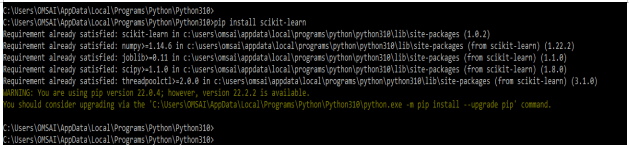
To use the classifier in scikit learn, first, we need to install sklearn in our system.
1. In the first step, we install the sklearn module in our system. We are using the pip command to install this module. Also, we can use any other command to install the same module in our system.
Code:
pip install scikit-learnOutput:
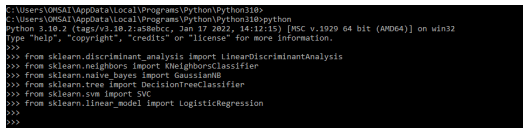
2. We are importing the classifier using the sklearn module in this step. We are importing all the classifier which was present in scikit learn.
In the below example, we are importing the linear discriminant analysis, logistic regression Gaussian NB, SVC, decision tree classifier, and logistic regression as follows.
Code:
from sklearn.discriminant_analysis import LinearDiscriminantAnalysis
from sklearn.neighbors import KNeighborsClassifier
from sklearn.naive_bayes import GaussianNB
from sklearn.tree import DecisionTreeClassifier
from sklearn.svm import SVC
from sklearn.linear_model import LogisticRegression
Output:
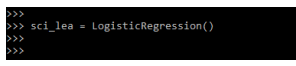
3. After importing the classifier, now, in this step, we are instantiating the classifier. Instantiation process brings the classifier in the existing code for creating the object. It is done by creating the variable; in the below example, we are creating the variable name as sci_lea.
Code:
sci_lea = = LogisticRegression()Output:
4. After instantiating the classifier in this step we are loading the dataset as follows. We are loading the iris dataset.
Code:
sci = datasets.load_iris()Output:
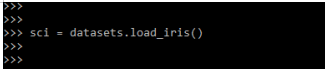
5. After loading the dataset in this step we are defining the features of s and y labels as follows.
Code:
X = sci.data
y = sci.target
Output:
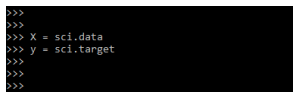
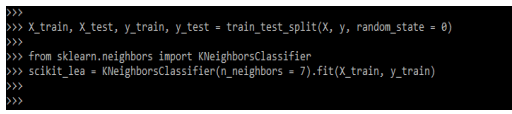
6. After defining the label in this step we are dividing the x and y in train and test data as follows also we are training the classifier as follows.
Code:
X_train, X_test, y_train, y_test = train_test_split()
from sklearn.neighbors import KNeighborsClassifier
scikit_lea = KNeighborsClassifier()
Output:
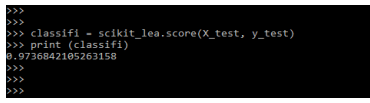
7. After training the classifier in this step we are printing the accuracy of the classifiers as follows.
Code:
classifi = scikit_lea.score (X_test, y_test)
print (classifi)
Output:
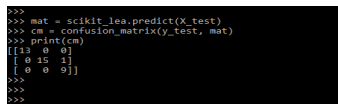
8. After printing the accuracy in this step we are creating the confusion matrix as follows.
Code:
mat = scikit_lea.predict (X_test)
cm = confusion_matrix (y_test, mat)
print (cm)
Output:
Scikit Learn Classifiers Showdown
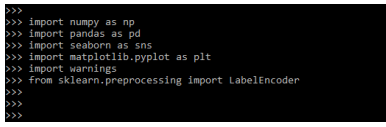
When working with the scikit learn classifier, the most important thing is which classifier we need to choose properly. In the below example, we are importing the modules as follows:
Code:
import numpy as np
import pandas as pd
import seaborn as sns
import matplotlib.pyplot as plt
import warnings
from sklearn.preprocessing import LabelEncoder
Output:
We are splitting our data in test and train split, which is necessary for dataset.
Code:
X_train, X_test ()
from sklearn.neighbors import KNeighborsClassifier
scikit_lea = KNeighborsClassifier(n_neighbors = 7).fit(X_train, y_train)
Output:

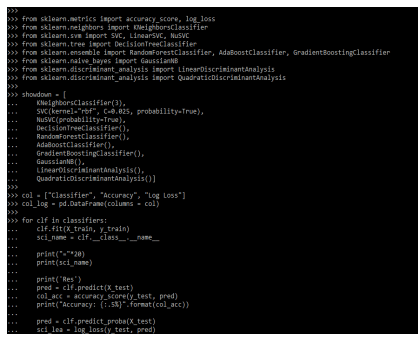
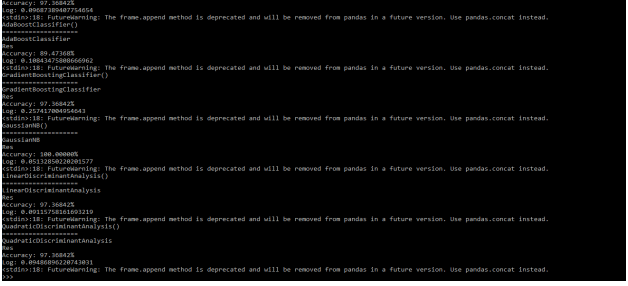
The below example shows all the classifiers available in scikit learn; we are looping the classifier as follows.
Code:
from sklearn.metrics import accuracy_score, log_loss
from sklearn.neighbors import KNeighborsClassifier
from sklearn.svm import SVC, LinearSVC, NuSVC
from sklearn.tree import DecisionTreeClassifier
from sklearn.ensemble import RandomForestClassifier, AdaBoostClassifier, GradientBoostingClassifier
from sklearn.naive_bayes import GaussianNB
from sklearn.discriminant_analysis import LinearDiscriminantAnalysis
from sklearn.discriminant_analysis import QuadraticDiscriminantAnalysis
showdown = [
  KNeighborsClassifier(3),
  SVC(kernel="rbf", C=0.025, probability=True),
  NuSVC(probability=True),
  DecisionTreeClassifier(),
  RandomForestClassifier(),
  AdaBoostClassifier(),
  GradientBoostingClassifier(),
  GaussianNB(),
  LinearDiscriminantAnalysis(),
  QuadraticDiscriminantAnalysis()]
col = ["Classifier", "Accuracy", "Log Loss"]
col_log = pd.DataFrame(columns = col)
for clf in classifiers:
  clf.fit (X_train, y_train)
  sci_name = clf.__class__.__name_
print ("="*20)
print (sci_name)
print ('Res')
pred = clf.predict (X_test)
col_acc = accuracy_score(y_test, pred)
print("Accuracy: {:.5%}".format(col_acc))
pred = clf.predict_proba (X_test)
sci_lea = log_loss(y_test, pred)
print("Log: {}".format(sci_lea))
log_en = pd.DataFrame ()
col_log = col_log.append (log_en)
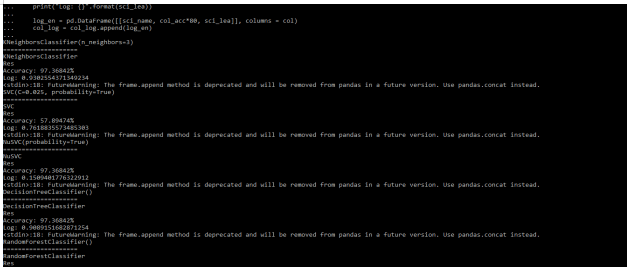
Output:
Examples of Scikit Learn Classifiers
Given below are the examples mentioned:
Example #1
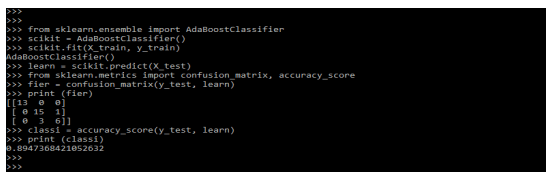
Below is the example of scikit learn classifier as follows. In the below example, we are defining the adaboost classifier as follows.
Code:
from sklearn.ensemble import AdaBoostClassifier
scikit = AdaBoostClassifier()
scikit.fit(X_train, y_train)
learn = scikit.predict(X_test)
from sklearn.metrics import confusion_matrix, accuracy_score
fier = confusion_matrix(y_test, learn)
print (fier)
classi = accuracy_score(y_test, learn)
print (classi)
Output:
Example #2
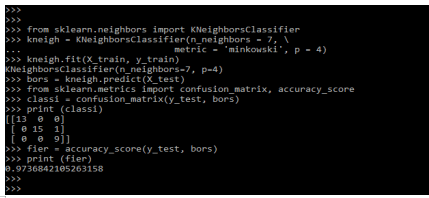
In the below example we are defining the KNeighbors Classifier as follows.
Code:
from sklearn.neighbors import KNeighborsClassifier
kneigh = KNeighborsClassifier(n_neighbors = 7, \
metric = 'minkowski', p = 4)
kneigh.fit(X_train, y_train)
bors = kneigh.predict (X_test)
from sklearn.metrics import confusion_matrix, accuracy_score
classi = confusion_matrix(y_test, bors)
print (classi)
fier = accuracy_score(y_test, bors)
print (fier)
Output:
FAQ
Given below are the FAQs mentioned:
Q1. Why are we using scikit learn classifier in python?
Answer:
There are multiple reasons for using scikit learn in python. By using classifier, we are defining the different datasets.
Q2. How many types of classifiers are available in scikit learn in python?
Answer:
There are mainly 10 classifiers available in scikit learn python, i.e., KNN, decision tree classifiers, support vector machines, naive bayes, logistic regression, and linear discriminant analysis.
Q3. How can we implement the classifier in scikit learn?
Answer:
Python provides multiple tools for implementing the classifier. We need to load the different libraries while implementing the classifier.
Conclusion
Naive Bayes classifiers calculate the probability that an example belongs to a class that estimates the likelihood that an event will happen at the time when some input will be given. The scikit learn classifiers are taken from salt grain as the institution is conveyed from the real dataset.
Recommended Articles
This is a guide to Scikit Learn Classifiers. Here we discuss the introduction, how to use scikit learn classifiers? examples and FAQs. You may also have a look at the following articles to learn more –

