
Introduction to Remote Collaboration Tools
Remote collaboration tools are digital platforms that enable teams to communicate, coordinate, and complete tasks efficiently from different locations. They support essential functions such as messaging, video conferencing, project management, file sharing, and time tracking, helping organizations maintain productivity and streamline workflows in remote or hybrid work environments. In this article, we will explore the important categories of remote collaboration tools that support efficient teamwork and productivity.
Key Takeaways:
- Remote collaboration tools enable teams to communicate effectively and work together seamlessly.
- Different categories of tools support messaging, meetings, projects, files, and productivity tracking.
- Remote tools enable seamless collaboration regardless of geographical location and time differences.
- Careful selection of integrated tools reduces complexity and improves efficiency in remote workflows.
Categories of Remote Collaboration Tools
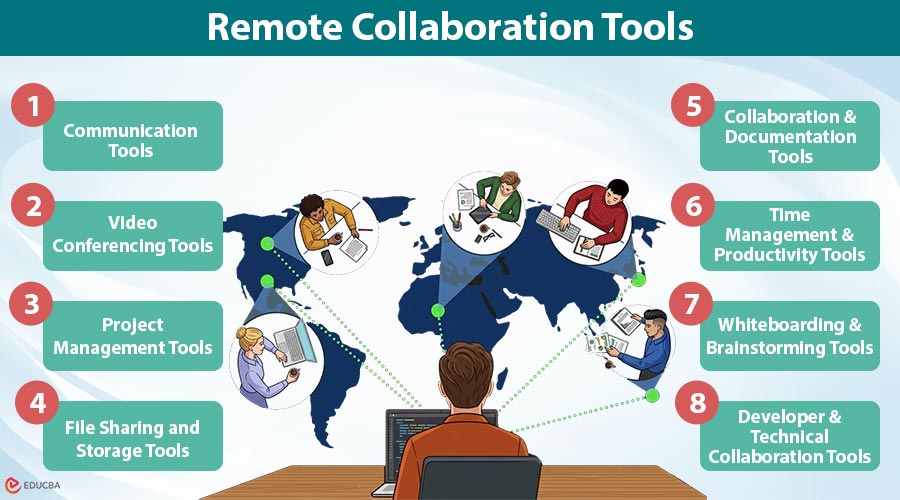
Below are the major categories of remote collaboration tools that help teams communicate, manage work, and collaborate efficiently in distributed environments.
- Communication Tools
- Video Conferencing Tools
- Project Management Tools
- File Sharing and Storage Tools
- Collaboration and Documentation Tools
- Time Management and Productivity Tools
- Whiteboarding and Brainstorming Tools
- Developer and Technical Collaboration Tools
#1. Communication Tools
Communication tools are online platforms that allow remote teams to chat instantly, hold group discussions, and share information, making conversations easier, reducing email, improving teamwork, and helping teams make decisions more quickly in today’s global workplaces.
Popular Tools:
- Slack
- Microsoft Teams
- Google Chat
- Discord
- Chanty
Key Features:
- Instant messaging and group chats
- Channels for organized discussions
- File sharing within conversations
- Integration with third-party apps
#2. Video Conferencing Tools
Video conferencing tools are online platforms that enable virtual meetings with video and audio, helping remote teams work together, give presentations, host webinars, and stay connected even when they are far apart, ensuring clear communication and interaction in professional settings worldwide.
Popular Tools:
- Zoom
- Google Meet
- Microsoft Teams (Video)
- Cisco Webex
- Whereby
Key Features:
- High-quality video and audio calls
- Screen sharing
- Meeting recording
- Virtual backgrounds
#3. Project Management Tools
Project management tools are software applications engineered to help teams plan, organize, assign, and track tasks efficiently, ensuring timely project completion, improved collaboration, workflow automation, and better visibility into progress, deadlines, and responsibilities across multiple projects within distributed teams effectively.
Popular Tools:
- Trello
- Asana
- Monday.com
- ClickUp
- Wrike
Key Features:
- Task assignment and tracking
- Workflow automation
- Kanban boards and timelines
- Progress tracking
#4. File Sharing and Storage Tools
File sharing and storage tools are cloud-based platforms that allow users to store, access, manage, and share files securely from any location, ensuring data availability, collaboration, version control, and seamless synchronization across devices for individuals and teams working remotely worldwide.
Popular Tools:
- Google Drive
- Dropbox
- OneDrive
- Box
- iCloud
Key Features:
- Cloud storage
- File synchronization
- Permission controls
- Version history
#5. Collaboration and Documentation Tools
Collaboration and documentation tools enable teams to create, edit, and manage documents in real time, supporting knowledge sharing, content creation, centralized information storage, and seamless communication through comments, suggestions, and collaborative editing across distributed work environments.
Popular Tools:
- Notion
- Confluence
- Google Docs
- Coda
- Evernote
Key Features:
- Real-time editing
- Document sharing
- Knowledge base creation
- Comments and suggestions
#6. Time Management and Productivity Tools
Time management and productivity tools help individuals and teams track work hours, analyze productivity patterns, manage tasks efficiently, and improve focus, enabling better performance monitoring, accountability, and time-use optimization in remote and hybrid work environments globally.
Popular Tools:
- Toggl Track
- Clockify
- RescueTime
- Hubstaff
- Time Doctor
Key Features:
- Time tracking
- Productivity analysis
- Reports and insights
- Activity monitoring
#7. Whiteboarding and Brainstorming Tools
Whiteboarding and brainstorming tools are digital platforms that simulate interactive visual workspaces, allowing teams to share ideas, create diagrams, use virtual sticky notes, and collaborate creatively in real time, thereby effectively enhancing innovation, planning, and problem-solving in remote and distributed team environments.
Popular Tools:
- Miro
- MURAL
- Jamboard
- Lucidspark
- FigJam
Key Features:
- Digital whiteboards
- Sticky notes and diagrams
- Real-time collaboration
- Templates for ideation
#8. Developer and Technical Collaboration Tools
Developer and technical collaboration tools are specialized platforms that enable software teams to collaborate on code, manage version control, track issues, and automate development workflows, ensuring efficient coordination, faster deployment, and high-quality software delivery across distributed development environments.
Popular Tools:
- GitHub
- GitLab
- Bitbucket
- Jira
- Visual Studio Live Share
Key Features:
- Version control
- Code collaboration
- Issue tracking
- Continuous integration and deployment
Final Thoughts
Remote collaboration tools are essential for modern work environments, enabling seamless communication, efficient project management, and real-time collaboration. By selecting right combination of tools based on your team’s needs, you can enhance productivity, improve coordination, and build a successful remote work ecosystem. Choosing the right tools is not about using the most platforms—it is about using the right ones effectively.
Frequently Asked Questions (FAQs)
Q1. Are free collaboration tools sufficient?
Answer: Free tools are suitable for small teams but may lack advanced features required by larger organizations.
Q2. How many tools should a team use?
Answer: Ideally, use a minimal set of integrated tools to avoid complexity and improve efficiency.
Q3. Which tools are best for beginners?
Answer: Beginner-friendly tools include Slack, zoom, and Google Docs, as they are easy to use and support quick collaboration.
Recommended Articles
We hope that this EDUCBA information on “Remote Collaboration Tools” was beneficial to you. You can view EDUCBA’s recommended articles for more information.


