


Introdution to Python 3 GUI
Python 3 GUI includes Tkinter, a Tcl/Tk widget set object-oriented interface. This is arguably the most straightforward to set up and use because it’s included in most Python binary distributions. Tcl/Tk is cross-platform, running on macOS, Windows, and UNIX. There are various options available depending on whatever platform we want to use. For creating graphical user interfaces, python offers a variety of possibilities (GUIs).
What is Python 3 GUI?
- TkInter, traditionally packaged with python, uses Tk for various alternative solutions specific to the platform, sometimes known as native technologies.
- Many additional cross-platform technologies were maintained by Python bindings, including GTK, Qt, Tk, and wxWidgets. Tkinter is the only GUI framework included in the standard library of python. In comparison to other frameworks, Tkinter is light and easy to use.
Python 3 GUI Programming
- Tkinter is endowed with several advantages. First, the code is cross-platform, so it runs on Windows, Mac OS X, and Linux. Second, Tkinter-based apps seem to belong on the platform they’re running on because they produce visual elements using OS elements.
- This makes it an attractive choice for creating applications of GUI, especially for projects where a current shine isn’t required, and the primary goal is to construct something that works across platforms quickly.
- Tkinter is a Python GUI toolkit that is both open-source and widely used. Because of its simplicity and the fact that it has a long and active community, TKinter is immensely popular. Most Python binary distributions contain it as well. For Macintosh, Windows, and Linux, TKinter is completely functional.
- Because TKinter is typically used for small-scale GUI projects, it’s an excellent toolkit to start with.
- The Python GUI library Tkinter is the industry standard. When Python and Tkinter are used together, creating graphical user interfaces is a breeze.
- The Tk GUI toolkit is accessed using Tkinter, a sophisticated object-oriented interface.
- Tkinter makes it simple to make a graphical user interface.
- Tkinter must be imported.
- Make the main window for the GUI program.
- To the GUI program, add one or more of the widgets shown above.
- Python with Tkinter makes it simple to design graphical user interfaces. In addition, Tkinter gives the Tk GUI toolkit a rich object-oriented interface.
- It’s simple to create a GUI application with Tkinter. However, Tkinter is a module that needs to be imported.
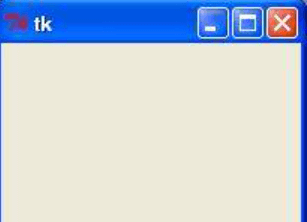
- Below is the example of python 3 GUI programming as follows.
Code:
import tkinter
top = tkinter.Tk ()
top.mainloop ()
Output:
- The GUI toolkit runs an event loop, an infinite loop that runs beneath the surface. The event loop waits for events to happen before acting on them as the developer intended. So when the application doesn’t catch an event, it’s as if the event didn’t happen at all.
- The app is focused, or events occur when users press a button or other widget with their mouse.
Python 3 GUI Features
- The initial impression of our software is its user interface. We will need a variety of graphical elements, including buttons, tooltips, and more – everything our user needs to engage with the functionality given by our application.
- A developer’s life is made easier by development frameworks. They facilitate the creation of a specific type of application or the use of a particular programming language. For example, python makes creating a user interface for our program significantly easier than writing it from scratch.
- In a GUI context, an application skeleton is the interface of users with no event handlers. Prototyping can be done with these. Before we spend a lot of effort on the backend logic, we develop the GUI and give it to our stakeholders for approval.
- The Python GUI Project, often known as the PyGUI framework, is a basic API that allows developers to design user interfaces for Python applications utilizing native elements because it is a lightweight API requiring considerably less code between the app and the target platform.
Python 3 GUI widgets
Below is the python 3 widgets for GUI as follows.
1. Tkinter
Below is the sample code of python 3 GUI widgets as follows.
Code:
from tkinter import *
py_tk = tkinter.py_tk ()
top.mainloop ()
Output:

For Macintosh, Windows, and Linux, TKinter is completely functional. In addition, because TKinter is typically used for small-scale GUI projects, it’s an excellent toolkit to start with.
2. PyQT
- The PyQt toolkit is a QT framework wrapper. PyQt is a popular cross-platform Python connector for the QT framework that uses C++ to implement the QT library.
- PyQT can be used to create large-scaled GUI applications because developing the GUI requires no time.
- The window may be easily designed and converted using the QT designer. After that, logic can be bound to each widget by converting UI code to.PY code.
- Below is the sample example of PyQT as follows.
Code:
import sys
from PyQT.QtCore import Qt
if __name__ == "__main__":
py_app = app (sys.argv)
label = QLabel ("Hello World")
py.show ()
sys.exit (apy_app.exec_())
Output:

3. PySide
- PySide is a Python binding for the Qt GUI toolkit, which is cross-platform. After updating its likening terms to include LGPL as an alternative license, it released PySide as the LGPL license.
- Below is a simple example of PySide as follows.
Code:
import sys
from PySide6.QtCore import Qt
if __name__ == "__main__":
py_app = app (sys.argv)
label = QLabel("Hello World")
py.show ()
sys.exit(apy_app.exec_())
Output:

4. PyGTK
- PyGTK is a free and open-source application licensed under the LGPL. PyGTK is a widget toolkit that may be used on any platform. PyGTK is GNOME’s official toolkit. PyGTK is used to create many GUIs on the Linux platform.
- The below example shows PyGTK are as follows.
Code:
import gi
from gi.repository import Gtk
window = Gtk.Window (py="Hello World")
window.show ()
window.connect ("destroy", Gtk.main_quit)
Gtk.main ()
Output:

Conclusion
Tkinter is the GUI framework python, although it isn’t without its detractors. Tkinter-based GUIs have been criticized for looking old. Tkinter might not be what we are searching for if we want a gleaming, modern interface. Tkinter is a graphical interface wrapper for the TCL/TK language.
Recommended Articles
This is a guide to Python 3 GUI. Here we discuss the definition, programming, features, and widgets for python 3 Gui, along with code and explanation. You may also have a look at the following articles to learn more –

