


Updated May 3, 2023

Introduction to PostgreSQL UNION ALL
The PostgreSQL UNION ALL operator provides the combined result sets of more than one SELECT statement. The result contains all rows from the query without removing duplicate rows between multiple SELECT statements. Generally, the UNION operator is used in the reporting or data warehouse system to combine the rows from similar tables that are not normalized.
Syntax:
SELECT
expression_1,
expression_2
…
expression_n
FROM
table_name_1
[WHERE conditions]
UNION ALL
SELECT
expression_1,
expression_2
…
expression_n
FROM
table_name_2;
[WHERE conditions]
Explanation:
- It defines the list of column names or calculations we want to fetch using expression_1, expression_2 … expression_n, etc.
- Also, it defines the name of the tables from which you want to fetch the record. There should be at least one table name specified in the FROM clause.
- The WHERE clause is optional; you can specify the conditions that should be met for selecting a record.
- Define the UNION ALL keywords between the two SELECT statements.
How UNION ALL clause works in PostgreSQL?
- The result of the SELECT statements defined in UNION ALL combined.
- UNION ALL does not remove duplicate rows from the result set; if the SELECT statement contains duplicate rows in the result set, the UNION ALL operator considers the same row while combining the result set.
- If you want to sort the result set, specify the ORDER BY clause at the end of the query.
Examples of PostgreSQL UNION ALL
Let us consider the following table structure to understand the examples of the UNION ALL operator.
Profit2020Q1: This table stores the profit of quarter 1 for the year 2020 for an organization.
Profit2020Q2: This table stores the profit of quarter 2 for the year 2020 for an organization.
CREATE TABLE Profit2020Q1(
unit_name VARCHAR (50) NOT NULL,
total_amount numeric(10,2)
);
CREATE TABLE Profit2020Q2(
unit_name VARCHAR (50) NOT NULL,
total_amount numeric(10,2)
);
The above statements will create both Profit2020Q1and Profit2020Q2 tables; now insert some data in the above table as follows:
INSERT INTO Profit2020Q1 (unit_name, total_amount)
values
('Production', 10025530.23),
('Marketing', 20025530.35),
('R&D', 30025530.21),
('HR', 24325530.35),
('Accounting', 76025530.35),
('Finance', 89025530.35),
('Purchasing', 33325530.35);
INSERT INTO Profit2020Q2 (unit_name, total_amount)
values
('Production', 20025530.23),
('Marketing', 30025530.35),
('R&D', 40025530.21),
('HR', 34325530.35),
('Accounting', 86025530.35),
('Finance', 99025530.35),
('Purchasing', 33325530.35);Now verify the inserted data by retrieving the data from both of the tables as follows:
select * from Profit2020Q1 ;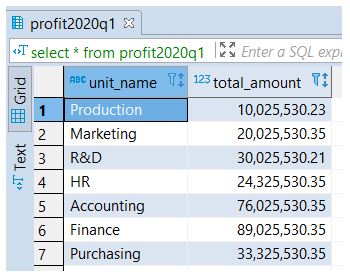
select * from Profit2020Q2 ;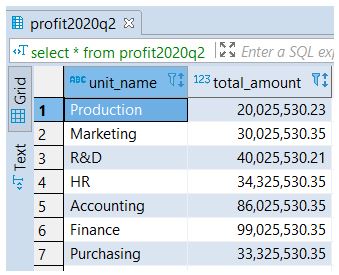
Example #1: UNION ALL
The following PostgreSQL example returns all columns from both tables, including duplicate values as well.
SELECT *
FROM
Profit2020Q1
UNION ALL
SELECT *
FROM
Profit2020Q2;
Verify the result of the above statement with the help of the following snapshot:
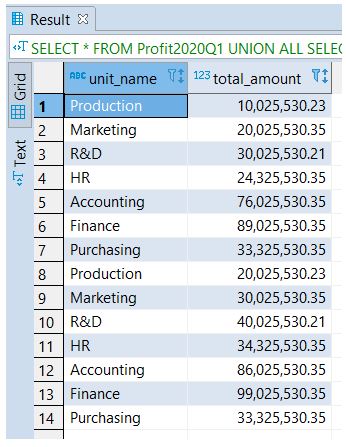
You can see the column ‘Purchasing’, duplicated in both Profit2020Q1 and Profit2020Q2tables, is also returned; this is the UNION ALL operator does not remove duplicates. If you want to remove duplicate rows, use the PostgreSQL UNION operator instead of UNION ALL operator.
Example #2: UNION ALL with ORDER BY
The following example demonstrates the UNION ALL operator with the ORDER BY clause. The following statement’s combined result will be in sorted order as specified in the ORDER BY clause. We need to add the ORDER BY clause at the end of the statement to fetch the result set in a sorted manner.
SELECT *
FROM
Profit2020Q1
UNION ALL
SELECT *
FROM
Profit2020Q2
ORDER BY
unit_name ASC,
total_amount DESC;
Verify the result of the above statement with the help of the following snapshot:
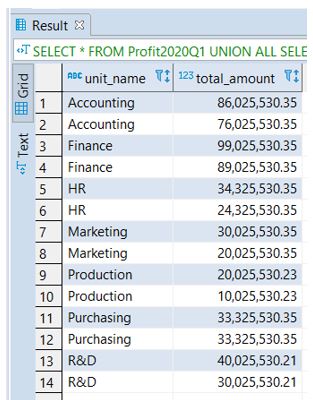
You can specify the ORDER BY clause at the end of each statement, but the combined result set will not have the sorted order we wanted. The reason behind this is the UNION operator combines the sorted result sets from each statement, and as a result, the order of the rows is not guaranteed.
Rules and regulations for UNION ALL in PostgreSQL
- Both of the SELECT statements must return the same number of expressions.
- Each corresponding expression or column should have compatible data types.
- The result set will have the column names defined in the first SELECT statement. You can use the ORDER BY clause to sort the rows in the combined result set by a defined column.
Conclusion
Here we have seen how to use the PostgreSQL UNION ALL operator. We also learned the working PostgreSQL UNION ALL operator to combine the result sets from multiple statements into a single result set. We have also seen the rules and regulations for the UNION ALL operator in PostgreSQL.
Recommended Articles
We hope that this EDUCBA information on “PostgreSQL UNION ALL” was beneficial to you. You can view EDUCBA’s recommended articles for more information.

