

Updated May 8, 2023

Introduction to PostgreSQL SERIAL
PostgreSQL serial data type is used to define the auto-increment number of column in a table; PostgreSQL serial will generate a serial sequence of integer numbers. We can also restart serial no after the creation of the table using alter command, the storage size of the serial data type is 4 bytes, and the range of serial data type in PostgreSQL is 1 to 2, 147, 483, 647. Using a serial data type, we can store up to 2, 147, 483, and 647 numbers in our table. If we use bigserial, then the range of this serial data type is 1 to 9, 223, 372, 036, 854, 775, and 807, and the storage size is 8 bytes.
Syntax:
Below is the syntax:
CREATE TABLE table_name (Table name that we have used to create new table) (column_name1(Column name on which we have creating a Serial data type)SERIAL, column_name2 data_type,column_nameN data_type ()Data type that we defined to column);Serial is equivalent to the following statement(Sequence) in PostgreSQL.
CREATE SEQUENCE(Create new sequence) table_name_id_seq (Sequence name );CREATE TABLE table_name (Table name that we have used to create new table)
(Column_nameinteger (Data type) NOT NULL (Defined not null constraint to the column) DEFAULTNextval ('table_name_id_seq'));ALTER SEQUENCE (Alter sequence using alter command) table_name_id_seq
OWNED BY table_name.column_name;Parameter description of the above syntax is as follows:
- Create: Create a table by using serial data type in PostgreSQL. We can define serial data type in a table column.
- Column 1 to column N: Column name used while creating a column in PostgreSQL. In this column, we have defined the serial data type.
- Data type: Data type defines the type of data we have stored in the table. A data type is most important while creating a table.
- Table name: Table name on which column we have defining serial data type.
- Serial: Data type is used to define auto increment number of column in a table; PostgreSQL serial will generate a serial sequence of integer numbers.
- Sequence: Equivalent to a serial data type, we have created a sequence in PostgreSQL.
- Sequence name: We have created a new sequence equivalent to a serial data type in PostgreSQL.
- Alter sequence: We have altered the sequence and changed the sequence number in PostgreSQL.
How PostgreSQL SERIAL Function Works?
- After defining a serial data type to the column, postgresql will first create a sequence and set the next value generated by this sequence.
- The second time it will add a not-null constraint on the serial column because it always generates an integer value.
- The third time it assigned the owner to the column. We can change the owner of the sequence using alter command.
- PostgreSQL will provide three serial types: SMALLSERIAL, SERIAL, and BIGSERIAL.
- The serial data type’s storage size is 4 bytes, and the range of serial data type in PostgreSQL is 1 to 2, 147, 483, 647. We can store up to 2, 147, 483, and 647 numbers in our table using a serial data type.
- If we use bigserial, then the range of this serial data type is 1 to 9, 223, 372, 036, 854, 775, and 807, and the storage size is 8 bytes.
- If we use data type as a small serial, then the range of serial data type is 1 to 32, 767.
- PostgreSQL serial data type is used to define the auto increment number of columns in a table; it will generate a serial sequence of integer numbers.
- Using serial data type will not automatically create the index on the column; we need to create it explicitly.
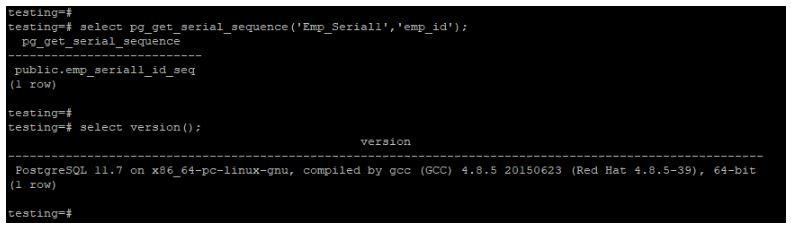
- We can check the existing sequence by using the pg_get_serial_sequence function.
- The figure below shows the emp_serial1_id_seq function by using the pg_get_serial_sequence function.
- We need to pass the table name in the first argument and the column name in the second argument in the same function.
Code:
select pg_get_serial_sequence('Emp_Serial1','emp_id');Output:
Examples of PostgreSQL SERIAL
Given below are the examples:
Example #1
Define serial data type at the time of table creation.
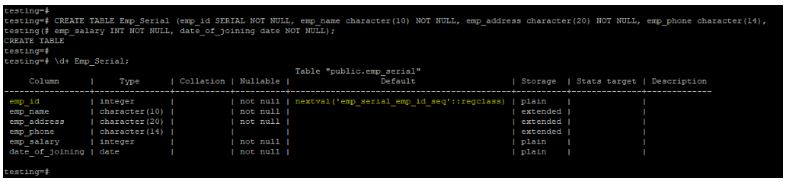
- The example below defines a serial data type to the column at the table creation time.
- We have defined the serial data type on the emp_id column at the time of table creation. Creating this data type on the column “emp_serial_emp_id_seq” is automatically created.
Code:
CREATE TABLE Emp_Serial (emp_id SERIAL NOT NULL, emp_name character(10) NOT NULL, emp_address character(20) NOT NULL, emp_phone character(14), emp_salary INT NOT NULL, date_of_joining date NOT NULL);Output:
Example #2
Alter the table to add serial data type after table creation.
- The below example shows define a serial data type to the column after table creation.
- We have defined the serial data type on the emp_id column after the creation of the table.
Code:
ALTER TABLE Emp_Serial drop column emp_id;Output:

Code:
ALTER TABLE Emp_Serial ADD column emp_id SERIAL;Output:

Code:
\d+ Emp_Serial;Output:

Example #3
Create serial data type using creating a sequence.
- We have created a serial data type using a sequence. We have created the sequence name as emp_serial1_id_seq.
- After sequence creation, we created the table name emp_serial1 and defined the next value as a sequence name.
- After creating a table, we have altered a sequence name and defined a table name and column name for this sequence.
Code:
CREATE SEQUENCE EMP_SERIAL1_id_seq;Output:

Code:
CREATE TABLE Emp_Serial1 (emp_id integer NOT NULL DEFAULT Nextval ('Emp_Serial1_id_seq'));Output:

Code:
ALTER SEQUENCE EMP_SERIAL1_id_seq OWNED BY Emp_Serial1.emp_id;Output:

Example #4
Alter table to restart value of serial data type.
- The below example shows that we have to alter the Emp_Serial table after inserting the first value. After inserting the first value, we have altered the serial value of the table.
Code:
INSERT INTO Emp_Serial (emp_name, emp_address, emp_phone, emp_salary, date_of_joining) VALUES ('ABC', 'Pune', '1234567890', 20000, '01-01-2020');Output:

Code:
ALTER SEQUENCE emp_serial_emp_id_seq RESTART WITH 51;Output:

Code:
INSERT INTO Emp_Serial (emp_name, emp_address, emp_phone, emp_salary, date_of_joining) VALUES ('ABC', 'Pune', '1234567890', 20000, '01-01-2020');Output:

Code:
select * from Emp_Serial;Output:

Conclusion
PostgreSQL serial data type is used to define the auto increment number of column in a table; PostgreSQL serial will generate a serial sequence of integer numbers. We can also restart the serial number after creating a table using alter command in PostgreSQL; the serial data type’s storage size is 4 bytes.
Recommended Articles
We hope that this EDUCBA information on “PostgreSQL SERIAL” was beneficial to you. You can view EDUCBA’s recommended articles for more information.

