
What is Port Scanning?
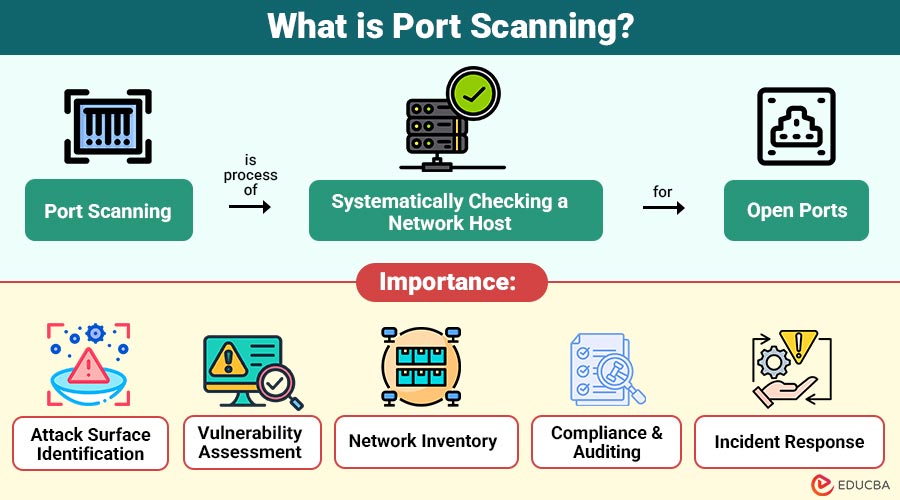
Port scanning is the process of systematically checking a network host for open ports. In simpler terms, computers and network devices use ports to communicate, similar to doors in a building. Some doors are always open, some are locked, and others may be monitored. A port scan identifies which doors (ports) are open, closed, or filtered.
Each network service—such as web, email, or FTP servers—listens on a specific port number. For instance:
- HTTP uses port 80
- HTTPS uses port 443
- FTP uses port 21
- SSH uses port 22
By scanning these ports, cybersecurity experts can detect running services, evaluate security configurations, and identify vulnerabilities that could be exploited.
Table of Contents:
Key Takeaways:
- Port scanning identifies open, closed, or filtered network ports, revealing active services and potential vulnerabilities.
- Ethical port scanning helps organizations assess security, maintain inventory, and ensure effective compliance with regulations.
- Various scanning techniques, such as TCP, SYN, and UDP, balance stealth, speed, and detection accuracy.
- Unauthorized scanning can be malicious, aiding attackers, while responsible scanning strengthens security and reduces attack surfaces.
Why is Port Scanning Important?
Port scanning serves as a foundational activity in cybersecurity for several reasons:
1. Attack Surface Identification
Uncovers all open ports and services on a network, highlighting potential vulnerabilities that attackers might exploit to gain unauthorized access.
2. Vulnerability Assessment
By scanning for open ports, outdated or misconfigured services are detected, allowing security teams to fix weaknesses before they are exploited.
3. Network Inventory
Helps organizations maintain an accurate inventory of active devices and running services, ensuring full visibility of network assets.
4. Compliance and Auditing
Regular port scanning verifies that network configurations meet security policies and regulatory standards, supporting audits and risk management requirements.
5. Incident Response
Identifies unauthorized services or unusual activity, aiding in detecting breaches and guiding rapid response to security incidents.
How Does Port Scanning Work?
Port scanning works by sending network packets to the target system and analyzing the response. The response indicates whether a port is:
1. Open
The port responds positively, confirming an active service that accepts connections and may be accessible to external network requests.
2. Closed
The port replies, indicating no service is listening, meaning connections are rejected, and the port is not currently usable.
3. Filtered
The port does not respond clearly because firewalls or security controls block packets, hiding the service status.
The type of response helps the scanner infer the network’s configuration and potential vulnerabilities.
Step-by-Step Process:
1. Target Identification
Identify specific IP addresses or network ranges to scan to define the scope and ensure scans focus only on authorized systems.
2. Port Selection
Choose which ports to scan, such as common ports, all available ports, or specific custom ports based on security needs.
3. Scanning Technique
Select appropriate scanning methods, such as TCP, UDP, or stealth scans, to balance accuracy, speed, and detection risk.
4. Analysis
Analyze scan responses to determine which ports are open, closed, filtered, or running vulnerable services needing attention.
5. Reporting
Document the scan results clearly, outlining risks, affected systems, and recommended remediation, monitoring, or further security testing.
Types of Port Scanning Techniques
Here are common port-scanning techniques, each used to identify open ports with varying levels of speed, accuracy, and stealth.
1. TCP Connect Scan
This scan completes the full TCP three-way handshake, offering reliable results but generating logs and alerts on target systems.
2. SYN Scan (Half-Open Scan)
Sends a SYN packet and studies responses without completing the handshake, making it faster, quieter, and more stealthy than TCP scans.
3. UDP Scan
Identifies open UDP ports that lack handshakes, making scans slower and less reliable, but necessary for services like DNS discovery.
4. FIN, NULL, and Xmas Scans
These techniques send abnormal TCP flags to evade simple firewalls, effectiveness varying based on the target operating system behavior and implementations.
5. Idle Scan
Uses a third-party zombie host to probe targets indirectly, concealing scanner identity and enabling extremely stealthy reconnaissance operation techniques.
Common Port Scanning Tools
Several tools are widely used by security professionals and ethical hackers for port scanning and network discovery:
1. Nmap (Network Mapper)
With comprehensive detection, scripting, automation, service discovery, and OS system fingerprinting features, this tool is the most widely used and adaptable.
2. Masscan
Designed for extremely fast scanning, Masscan efficiently scans large networks, making it ideal for internet-wide security research.
3. Angry IP Scanner
A lightweight, cross-platform GUI-based port scanner used for quick network checks, host discovery, and basic administrative task execution.
4. Wireshark
Although not a scanner, Wireshark captures and analyzes network packets, helping professionals inspect port-scanning behavior and traffic patterns.
Legitimate Use Cases of Port Scanning
Here are the legitimate and authorized use cases that help maintain, test, and secure network systems.
1. Network Security Audits
Organizations routinely scan their infrastructure to discover exposed services, close unnecessary ports, and reduce overall network attack-surface risk.
2. Penetration Testing
Ethical hackers conduct authorized scans that simulate real attacks, helping organizations assess defenses, vulnerabilities, and overall security readiness.
3. System Administration
System administrators use port scanning to verify service availability, troubleshoot connectivity issues, and validate network configuration settings.
4. Compliance Checks
Regular port scanning ensures only approved services remain accessible, supporting regulatory compliance, audits, and adherence to security standards.
Malicious Use of Port Scanning
While port scanning itself is not illegal, it is often the first step in cyberattacks, including:
1. Reconnaissance for Malware Deployment
In order to successfully install malware or infiltrate computers, hackers search networks for open ports and susceptible services.
2. Identifying Targets for Brute-Force Attacks
Reveals services like SSH or FTP, helping attackers select targets for automated password guessing and unauthorized access attempts.
3. Mapping Vulnerable Services for Exploitation
Attackers use scans to map running services and their versions, identifying weak points to exploit for unauthorized system control.
4. Preparing for Denial-of-Service Attacks
Scanning uncovers active ports and services, enabling attackers to plan denial-of-service attacks that overwhelm and disrupt network availability.
Advantages of Port Scanning
Here are the key advantages for organizations, helping strengthen security, visibility, and incident response.
1. Proactive Security
Helps identify network vulnerabilities and weaknesses early, allowing organizations to fix issues before attackers exploit them maliciously.
2. Improved Visibility
It provides a comprehensive view of all active network services, ports, and exposure, enhancing understanding of the network’s security posture.
3. Cost-Effective Risk Reduction
Early detection of open or vulnerable ports prevents potential breaches, reducing financial losses and minimizing resources needed for security incidents.
4. Supports Incident Response
Helps detect unauthorized, rogue, or suspicious services quickly, enabling faster investigation, containment, and remediation during security incidents.
Limitations of Port Scanning
Here are the key limitations that organizations should consider when planning security assessments.
1. False Positives
Firewalls and network latency can cause inaccurate scan results, incorrectly marking ports as open, closed, or filtered during security testing.
2. Legal and Ethical Concerns
Scanning networks without proper authorization may violate laws, regulations, or organizational policies, leading to penalties, legal consequences, and liabilities.
3. Detection by Security Systems
Aggressive port scans can trigger intrusion detection alerts, firewall blocks, or IP blacklisting, revealing scanning activity quickly to security teams.
4. Limited Context
Only shows service availability and open ports, not whether services are misconfigured, exploitable, or truly vulnerable in practice.
Difference Between Port Scanning and Vulnerability Scanning
Here is a clear comparison of port scanning and vulnerability scanning.
| Aspect | Port Scanning | Vulnerability Scanning |
| Purpose | Discover open ports | Identify known vulnerabilities |
| Depth | Surface-level | In-depth analysis |
| Speed | Fast | Slower |
| Output | Port and service list | Vulnerability reports |
| Use Case | Reconnaissance | Risk assessment |
Real-World Example
Here is a real‑world example that shows how port scanning helps identify and prevent security risks in practice.
An enterprise discovers repeated failed login attempts on its servers. A port scan reveals that an outdated FTP service is running on port 21 and is exposed to the internet. The service is disabled, credentials are rotated, and firewall rules are updated—preventing a potential breach.
Final Thoughts
Port scanning is a core network security technique for discovering open ports, exposed services, and potential vulnerabilities. Often misunderstood as malicious, it is a vital tool for ethical cybersecurity when performed responsibly. To improve defenses, lower attack surfaces, and maintain robust, secure networks, IT professionals, system administrators, and security teams must become proficient in port scanning.
Frequently Asked Questions (FAQs)
Q1. Is port scanning illegal?
Answer: Port scanning is legal when performed on systems you own or have permission to test. Unauthorized scanning may be illegal.
Q2. Can firewalls block port scans?
Answer: Yes, firewalls and IDS/IPS systems can detect and block scanning attempts.
Q3. Is port scanning enough to secure a system?
Answer: No. It should be combined with vulnerability scanning, patching, and monitoring.
Q4. How often should port scanning be done?
Answer: Regularly—especially after infrastructure changes or deployments.
Recommended Articles
We hope that this EDUCBA information on “Port Scanning” was beneficial to you. You can view EDUCBA’s recommended articles for more information.


