
What is Operating System?
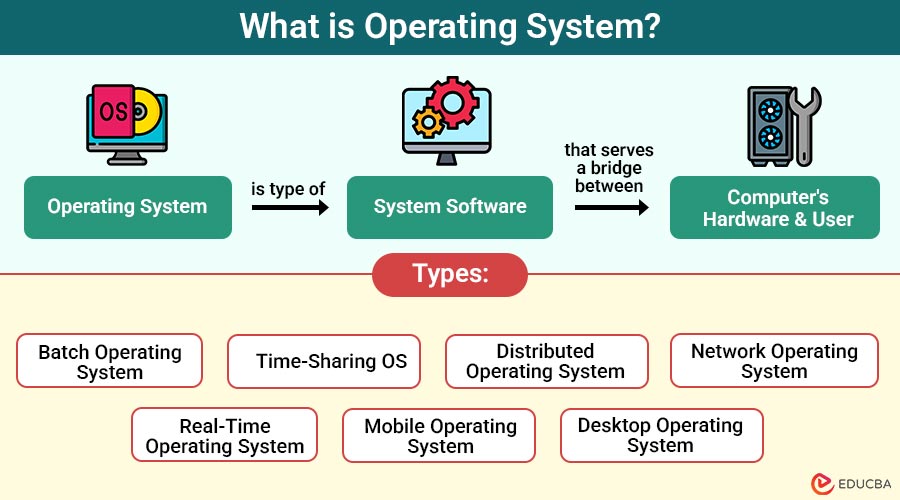
An operating system is a type of system software that serves as a bridge between the computer’s hardware and the user. It handles hardware resources and offers essential services to software applications, allowing users to operate their devices smoothly and efficiently.
At its core, the OS is responsible for the following:
- Managing computer hardware like the CPU, memory, storage devices, and input/output peripherals.
- Providing a user interface (UI), often graphical (GUI), to facilitate user interaction.
- Executing and managing application software.
- Ensuring system security and user authentication.
- Coordinating between multiple programs and users.
Table of Contents:
Key Takeaways:
- Operating systems coordinate system activities, allowing seamless communication between software applications and hardware components.
- Every modern digital device relies on an OS to function, manage processes, and ensure stability.
- From smartphones to servers, OSes enable task automation, user interaction, and secure system operations.
- Future OS trends emphasize AI, security, cloud scalability, and adaptability to connected smart environments.
Importance of Operating Systems
Operating systems are fundamental to computing. Here is why:
1. Resource Management
An operating system efficiently manages and allocates hardware resources, such as CPU, memory, and input/output devices, to ensure smooth and optimal system performance.
2. User Convenience
It provides a user-friendly interface, either graphical or command-line, that allows users to interact easily with the system and execute desired tasks efficiently.
3. Application Platform
The operating system serves as a foundation for software applications, providing essential services and APIs that enable program execution, ensure compatibility, and facilitate communication with hardware.
4. Security Enforcement
It ensures system security by managing user authentication, access controls, and protection mechanisms to safeguard data, prevent unauthorized access, and maintain system integrity.
5. Multitasking Capability
Operating systems enable the simultaneous execution of multiple applications, efficiently managing system resources to ensure smooth switching and responsiveness among active processes or tasks.
How do Operating Systems work?
Operating systems work through continuous communication with both the hardware and application software. Here is how it typically works:
1. Startup Process
When you power on the device, the BIOS or UEFI initializes the hardware and loads the operating system from the disk into RAM for execution.
2. Kernel Activation
Once loaded, the kernel takes control of system resources, managing memory, processes, and hardware communication, forming the core of the operating system’s functionality.
3. System Initialization
The OS loads the necessary device drivers and starts essential background services, preparing the system for user interaction and application operation after booting is complete.
4. User Login
After initialization, the OS prompts the user to log in, verifies credentials, and loads personal settings, profiles, and configurations into the active session.
5. Application Execution
When an application is launched, the OS allocates memory, assigns processor time, and handles input/output operations to ensure the program runs correctly and efficiently.
Functions of an Operating System
The OS is essentially the “manager” of a computing device. Its functions include:
1. Process Management
Manages processes in a system, including process creation, scheduling, and termination. It ensures fair allocation of CPU time to various applications and background tasks.
2. Memory Management
Allocates and deallocates memory spaces as needed by different applications, ensuring optimum use of RAM.
3. File System Management
Maintains a record of the location and arrangement of files on a disk. It also controls access and permissions.
4. Device Management
Controls and coordinates the use of input/output devices, including keyboards, mice, printers, and external drives.
5. Security and Access Control
Prevents unauthorized access to the system, manages user roles, and ensures data confidentiality and integrity.
6. User Interface
Provides graphical or command-line interfaces, allowing users to interact with the system.
Components of an Operating System
An OS is a complex piece of software comprising various components, including:
1. Kernel
The kernel is the OS core, directly managing hardware. It controls memory, processes, and devices, ensuring low-level coordination between hardware and system operations.
2. Shell
The shell provides a user interface through text commands (CLI) or visible components (GUI), such as folders and menus, for interacting with the operating system.
3. File System
Manages how data is stored, named, retrieved, and organized on storage devices, ensuring efficient and secure access to files and directories by applications.
4. Device Drivers
Device drivers are specialized software modules that allow the operating system to interact with hardware, like as graphics cards, printers, and keyboards, in order for them to function properly.
5. System Libraries
System libraries are reusable code collections that provide standard functions for applications and the OS, simplifying tasks like file handling, memory access, or output operations.
Types of Operating Systems
There are several varieties of operating systems, each intended to support a particular kind of computing environment:
1. Batch Operating System
Processes batches of jobs automatically without user interaction. Common in early computers for executing repetitive tasks, such as payroll or transaction processing.
2. Time-Sharing OS
Permits several users to use system resources simultaneously, effectively sharing CPU time through time slots. Often used in mainframes and other large systems.
3. Distributed Operating System
Coordinates a group of independent computers to function as a single system, sharing tasks and resources across networked machines seamlessly and efficiently.
4. Network Operating System
Manages network resources, including servers, printers, and files, enabling multiple computers to communicate and share data across local or wide-area networks.
5. Real-Time Operating System
Designed for systems requiring immediate response, such as embedded devices in robotics, automotive systems, and critical medical or industrial control applications.
6. Mobile Operating System
Designed for use with portable electronics, such as tablets and smartphones. Manages touchscreen input, mobile apps, and power efficiency.
7. Desktop Operating System
Runs on personal computers and laptops. Supports GUI, multitasking, and general applications. Common examples are Windows, macOS, and various Linux distributions.
Examples of Operating Systems
Here are some of the most widely used and influential operating systems across different platforms:
1. Microsoft Windows
With a graphical user interface and support for a large number of apps, it is among the most popular operating systems worldwide.
2. macOS
Developed by Apple Inc., macOS is renowned for its sleek interface and robust performance, particularly in creative industries.
3. Linux
An open-source OS is known for its stability, security, and flexibility. Distributions like Ubuntu, Fedora, and Debian are popular among developers and enterprises.
4. Android
The most popular mobile operating system globally, built on the Linux kernel and developed by Google.
5. iOS
Apple’s mobile OS, used in iPhones and iPads, is known for its smooth performance and tightly controlled ecosystem.
Challenges in Operating System Development
Creating an operating system is complex. Some challenges include:
1. Security Threats
Operating systems must continually defend against evolving malware, cyberattacks, and vulnerabilities to maintain system integrity and protect sensitive user and organizational data.
2. Hardware Compatibility
Developers must ensure the OS works seamlessly with diverse hardware components, including CPUs, GPUs, peripherals, and custom devices, across various brands and architectures.
3. Performance Optimization
Balancing system speed, responsiveness, and energy efficiency is crucial, particularly for mobile and embedded devices that require extended battery life and real-time processing.
4. User Expectations
Users demand intuitive interfaces, rich features, and reliable performance, requiring developers to deliver consistent quality without compromising system stability or resource management.
Future Trends in Operating Systems
Operating systems continue to evolve in response to technological advancements. Emerging trends include:
1. AI Integration
AI-powered operating systems are more responsive and efficient because they maximize performance, intelligently manage resources, and adjust to user behavior.
2. Cloud OS
Designed specifically for cloud computing, these operating systems manage distributed resources and ensure scalability, availability, and seamless remote access.
3. IoT OS
Lightweight, efficient operating systems tailored for Internet of Things devices, focusing on minimal resource usage, connectivity, and real-time processing.
4. Security-First OS
These systems prioritize built-in security features, providing robust protection against cyber threats through encrypted communication, access control, and secure boot mechanisms.
Final Thoughts
The operating system is the backbone of modern technology, enabling seamless interaction between users and machines. It powers everything from smartphones to enterprise servers and cloud systems. Understanding its functions helps users troubleshoot issues, optimize performance, and make informed decisions when choosing platforms. Whether it is Windows, Linux, Android, or macOS, the OS ensures smooth computing experiences and efficient resource management across various devices and environments.
Frequently Asked Questions (FAQs)
Q1. Can a computer work without an operating system?
Answer: No. Without an OS, a computer cannot function, as it would not be able to manage hardware or run applications.
Q2. How is an OS different from regular programs?
Answer: The OS manages hardware and system functions, while regular programs depend on it to run.
Q3: What is the fastest operating system?
Answer: Real-Time Operating Systems (RTOS) are the fastest in terms of responsiveness. Among desktop OSes, lightweight Linux distros are generally quicker.
Q4. Why are updates important in an OS?
Answer: Updates fix security flaws, improve performance, and sometimes add new features or compatibility with newer applications or hardware.
Recommended Articles
We hope that this EDUCBA information on “Operating System” was beneficial to you. You can view EDUCBA’s recommended articles for more information.

