
Updated March 13, 2023

Definition of Nginx uWSGI
Nginx uwsgi is an application server container that aims for providing the full stack for deploying and developing the services and web applications. The main component of uwsgi is the application server and it is handling the application for different languages. It will communicate with the application by using a method that was defined in the uwsgi specification and by using other servers by using a variety of protocols.
What is Nginx uWSGI?
The uwsgi is the piece that was used to translate the requests from the web server of conventional into a specified format on which the application is processing. The uwsgi is a binary protocol that was implemented by the uWSGI server for communicating with the more featured server. The uwsgi is not a transport protocol is a wire protocol. It is the preferred way of speaking to web servers that were proxying requests to the uWSGI. Nginx uwsgi is a good choice for web application deployment. As we know that nginx is an open-source and high-performance web server used in reverse proxy.
How to Set Up Nginx uWSGI?
The below steps show how we can set up uwsgi as follows. To set up uwsgi we need to install nginx in our system, we can install the server by using source, rpm as well as source installation.
- In the first step of the uwsgi setup, we are installing the server. We can install the server of nginx by using the apt-get command in the ubuntu system. If suppose we are using another Linux flavor then we can also use rpm or yum command to install the nginx server.
apt-get install nginx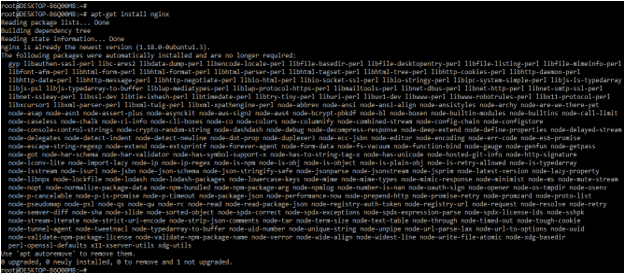
- The nginx server is not started by default after installing the same on the ubuntu system we need to start it manually we can start the server by using “service nginx start” command. After starting the server we can check the status of the server by using “service nginx status” command. In the below example, we can see the version of the nginx server, and also we can see the module which was we included in the server.
service nginx start

service nginx status

nginx –V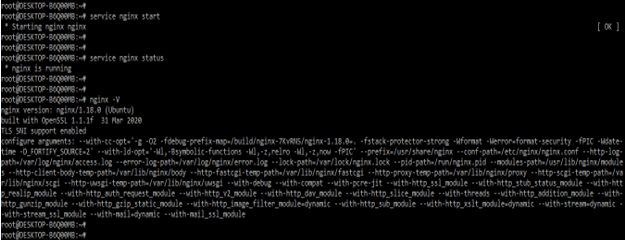
- After creating directory and configuration files now we are opening the configuration files for the setup ofuwsgi as follows.
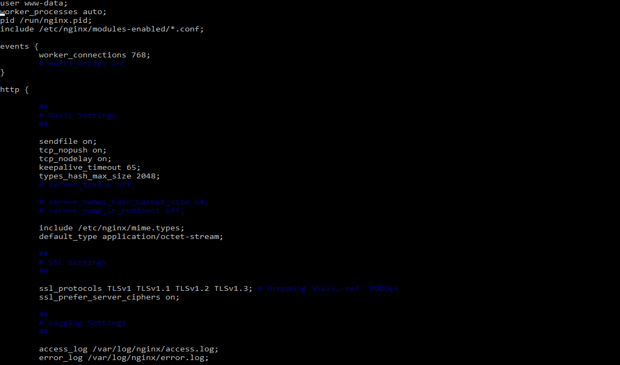
- After opening the file we are adding below server and location directive in our configuration file. In listen directive we are listening from port 80 and forwarding traffic through the specified file.
Code –
server {

listen 80;

server_name nginx.com www.nginx.com;

location / {

include uwsgi_params;

uwsgi_pass unix:///var/www/nginx.sock;

}

}


- After adding the server and location directive, in this step we are linking this configuration for sites enabled as follows. We are linking two configurations by using the ln command.
ln -s /etc/nginx/sites-available/nginx.conf /etc/nginx/sites-enabled/nginx.conf
- After linking the configuration sites-enabled now we are checking the syntax of the config file and taking restart the server. We are checking the syntax of the configuration file by using the nginx –t command.
nginx –t

service nginx restart
How to use?
Basically, uwsgi is an application server that aims to provide full-stack development and deployment. The flask will act as an http server, it is not developed for scalability, security, and efficiency. It is a framework to build applications. The uwsgi is developed as a fully functional web server and it will solve many problems of the flask.
The nginx uwsgi is handling the maintenance and creation of the multiple processes so we have concurrent apps in one environment. We can also use the uwsgi in instances of cluster. Nginx uwsgi is used to balance the load request of different processes. Uwsgi is providing functionality for monitoring the performance and the utilization of resources. Nginx uwsgi contains a huge variety of configuration options available. To use nginx uwsgi we need to install the nginx and uwsgi package in our system.
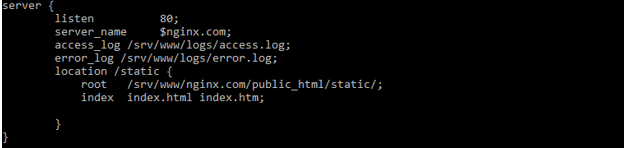
After installing the nginx and uwsgi we are creating the nginx.com file and adding the server and location directive to it.
Code –
server {

listen          80;

server_name     $nginx.com;

access_log /srv/www/logs/access.log;

error_log /srv/www/logs/error.log;

location /static {

root   /srv/www/nginx.com/public_html/static/;

index  index.html index.htm;

}

}
After adding the server and location directive, now we are linking the file and taking the restart of the nginx server.
ln -s /etc/nginx/sites-available/nginx.com /etc/nginx/sites-enabled/nginx.com
nginx –tservice nginx restart


Configuration
The below steps show how we can configure the nginx with uwsgi as follows. First, we need to install uwsgi to configure it with nginx.
- Install the uwsgi onto the ubuntu system by using the apt-get command. In the below example, we are installing the uwsgi.
apt-get install uwsgi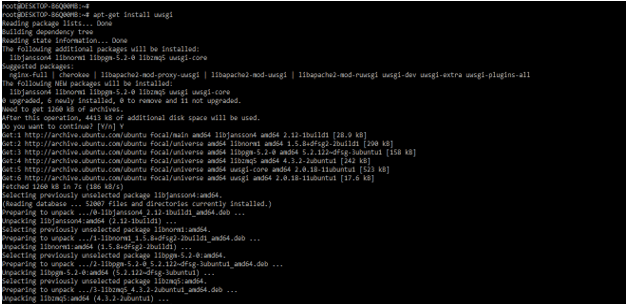
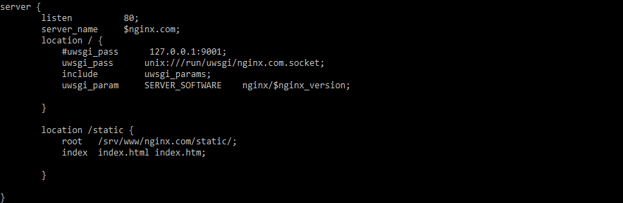
2. After installing the uwsgi now we are creating the virtual host file and adding the below content into that file.
server {

listen          80;

server_name     $nginx.com;

location / {

#uwsgi_pass      127.0.0.1:9001;

uwsgi_pass      unix:///run/uwsgi/nginx.com.socket;

include         uwsgi_params;

uwsgi_param     SERVER_SOFTWARE    nginx/$nginx_version;

}

location /static {

root   /srv/www/nginx.com/static/;

index  index.html index.htm;

}

}
3. After adding the server and location directive, now we are linking the file and taking the restart of the nginx server.
ln -s /etc/nginx/sites-available/nginx.com /etc/nginx/sites-enabled/nginx.com


4. Then we need to create directories for uwsgi configuration.
mkdir -p /srv/www/nginx.com/static

mkdir  /srv/www/nginx.com/application

mkdir  /srv/www/nginx.com/logs
5. Now we are creating the uwsgi configuration file.
vi /etc/uwsgi/apps-available/nginx.com.xml


6. Now we are linking the configuration.
ln -s /etc/uwsgi/apps-available/nginx.com.xml /etc/uwsgi/apps-enabled/nginx.com.xml
7. Restart the nginx server.
nginx –t
service nginx restart

Conclusion
Nginx uwsgi is the preferred way for speaking to web servers which were proxying requests to the uWSGI. Nginx uwsgi is an application server container that aims for providing the full stack for deploying and developing the services and web applications.
Recommended Articles
This is a guide to Nginx uWSGI. Here we discuss the Definition, What is Nginx uWSGI, How to Set Up Nginx uWSGI, and examples with code implementation. You may also have a look at the following articles to learn more –

