
Updated June 2, 2023

Introduction to MySQL Grant
MySQL Grant is used to grant privileges to the user account. At first, when we create a new user, he doesn’t have any privileges, such as selecting a database and querying data from the table. The superuser will allow the user to select, insert, update, and so on. Usually, the superuser has all the privileges. The privilege levels are off.
- Global
- Database
- table
- column
- stored routine
- proxy
The global-level privilege applies to all databases in the MySQL servers. We use*.* in syntax, which mentions all. Database-level privilege is used to apply to all the objects in the database. We must specify the database name in the syntax. Table-level privilege is applied to all the columns in a table. We select the table name in the syntax. Column level privilege is to give privilege to specified columns in a table. We must specify the column names in the syntax. Stored level privilege is to provide privilege to stored procedures and stored functions. Proxy level privilege is to allow the proxy of one user to another. In this session, let us see the GRANT and the example in detail.
Syntax:
Below is the syntax:
GRANT [privilege_1] [,privilege 2],..
ON privilege_item
TO user_name;
How does MySQL Grant work?
Now let us see the privilege level for each with an example:
1. Global-level privilege
Code:
GRANT privilege / * - - - - -  global Level privilege - - - - * /
ON *.*
TO user_name;
Explanation: Here, we provide the select privilege to all the databases in the MySQL server. The global level of privilege applies to all databases in the MySQL server. We use *.* in syntax, which mentions all.
2. Database-level privilege
Code:
GRANT privilege/ * - - - - -  database Level privilege - - - - * /
ON database_name.*
TO user_name;
Explanation: Here, we provide the select privilege to all tables in the mentioned database in the MySQL server. Database-level privilege is used to apply to all the objects in the database. We must specify the database name in the syntax.
3. Table-level privilege
Code:
GRANT privilege/ * - - - - -  table Level privilege - - - - * /
ON database_name.table_name
TO user_name;
Explanation: Here, we provide the select privilege to the table in the mentioned database in the MySQL server. Table-level privilege is applied to all the columns in a table. We specify the table name in the syntax.
4. Column-level privilege
Code:
GRANT privilege_1 (col1, col2, . . , coln)/ * - - - - -  column Level privilege - - - - * /
ON table_name
TO user_name;
Explanation: Here, we are providing the select privilege to all columns mentioned above from the table mentioned in the MySQL server. Column level privilege is to give privilege to specified columns in a table. We must specify the column names in the syntax.
5. Stored-level privilege
Code:
GRANT privilege/ * - - - - -  stored Level privilege - - - - * /
ON PROCEDURE procedure_name
TO user_name;
Explanation: Here, we provide the execute privilege to the mentioned stored procedure or stored function in the MySQL server. Stored level privilege is to give privilege to stored procedures and stored functions.
6. Proxy Level privilege
Code:
GRANT PROXY / * - - - - -  Proxy Level privilege - - - - * /
ON ROOT
TO user_name;
Explanation: Here, we are providing the PROXY privilege to the mentioned ROOT in the MySQL server for the mentioned user. Proxy level privilege is to allow the proxy of one user to another.
Examples to Implement MySQL Grant
As mentioned in the above session with the syntax of privilege. Now let us see the privilege level for each with an example:
1. Global-level privilege
Code:
GRANT SELECT/ * - - - - -  global Level privilege - - - - * /
ON *.*
TO rose;
Output:
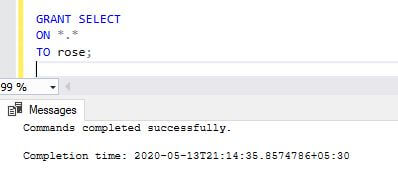
Explanation: Here, we provide the “Select” privilege to all the databases for the user “rose”.
2. Database-level privilege
Code:
GRANT SELECT/ * - - - - -  database Level privilege - - - - * /
ON sourcedb.*
TO rose;
Output:
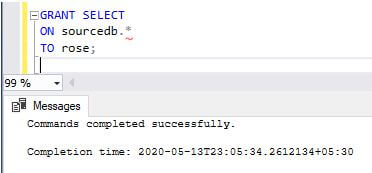
Explanation: Here, “sourcedb” is the database, and we are providing a “select” privilege to the mentioned database for the user “rose”.
3. Table-level privilege
Code:
GRANT SELECT/ * - - - - -  table Level privilege - - - - * /
ON dbo.loan
TO rose;
Output:
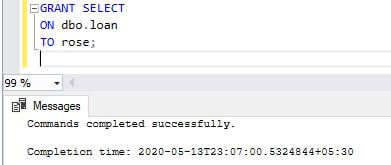
Explanation: Here, “dbo” is in the database, and we are providing the “select” privilege to the “loan” table from the mentioned database for the user “rose”.
4. Column-level privilege
Code:
GRANT SELECT (loan_no, loan_status, state, loan_amount, ap_date)/ * - - - - -  column Level privilege - - - - * /
ON loan
TO rose;
Output:
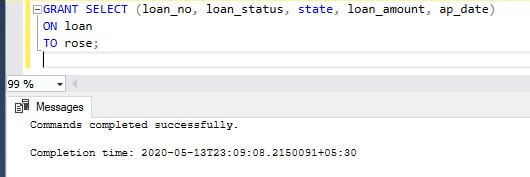
Explanation: Here, loan_no, loan_status, state, loan_amount, and ap_date are the column names of the table loan for which we provide the “select” privilege for the user “rose”.
5. Stored-level privilege
Code:
GRANT EXECUTE/ * - - - - -  stored Level privilege - - - - * /
ON PROCEDURE stored_procedure
TOrose;
Output:
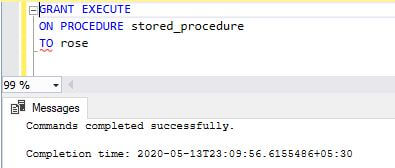
Explanation: Here, we provide the EXECUTE privilege to the stored procedure name “stored_procedure” for the user rose.
6. Proxy Level privilege
Code:
GRANT PROXY/ * - - - - -  Proxy Level privilege - - - - * /
ON ROOT
TO rose;
Output:
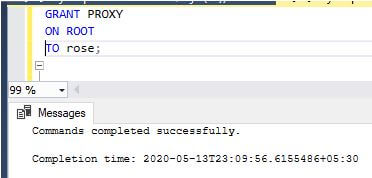
Explanation: Here, we are providing the PROXY privilege to the mentioned ROOT in the MySQL server for the mentioned user.
Recommended Articles
We hope that this EDUCBA information on “MySQL Grant” was beneficial to you. You can view EDUCBA’s recommended articles for more information.

