

Updated July 10, 2026

MuleSoft is the most widely used integration platform. It’s the Integration Mule ESB and Cloud Hub. It helps connect Enterprise and SaaS applications in the cloud and on-premises. Mule ESB is a Java-based enterprise service bus (ESB). The MuleSoft integration platform helps developers connect to their applications via an ESB. It is a lightweight integration framework. ESB is highly scalable, which means it helps connect small applications with multiple applications, but ESB Will did not fit all the projects to implement. If we want to use ESB, the deep analysis should consider all parameters.
The following MuleSoft Interview Questions and Answers for 2026 cover both beginner and advanced topics commonly asked in technical interviews. These questions are divided into two sections to help you prepare systematically:
Mulesoft Interview Questions (Basic)
This first part covers basic MuleSoft interview questions and answers.
Q1. What is Mulesoft? For what is Mulesoft used?
Answer:
MuleSoft is the most widely used integration platform. We will find 2 types of Mule ESB and Cloud Hub for connecting enterprise and SaaS applications on-premises and in the cloud. MuleSoft allows developers to connect applications quickly and easily and exchange data.
Q2. Explain the types of variables in Mule?
Answer:
There are three types of variables available in Mule:
- Flow Variable: Stores data within a single flow and is accessible only during that flow’s execution.
- Session Variable: Stores data that is shared across multiple flows during the same request or session
- Record Variable: Stores values specific to each record during batch processing, allowing each record to maintain its own data.
Q3. What is Mule ESB?
Answer:
Mule ESB is a Java-based ESB (enterprise service bus), and it is the integration platform that all developers can connect to their respective applications directly with ESB. Mule ESB uses service-oriented architecture. The main use of Mule ESB is to enable easy integration with existing systems. It can integrate with various technologies used by applications, including JMS, Web Services, and HTTP.
Let us move to the next Mulesoft Interview Questions.
Q4. What is ESB?
Answer:
ESB stands for Enterprise Storage Bus. It’s a middleware software architecture that provides fundamental services for more complex architectures. These are common MuleSoft interview questions.
Example: ESB incorporates the features required to implement a service-oriented architecture (SOA).
Q5. What is the MuleSoft Anypoint platform, and where will it be used?
Answer:
MuleSoft Anypoint Platform, a suite of integration products, is designed to connect both software-as-a-service (SaaS) and on-premises software.
Mulesoft Interview Questions (Advanced)
Let us now have a look at the advanced MuleSoft interview questions.
Q6. What are the main features of Mule ESB? What are the different ESBs in the market?
Answer:
1) The main Features of Mule ESB are:
- It is a very simple, easy-to-use drag-and-drop graphical design tool.
- SLA monitoring and API management
- High scalability
- We can deploy in a One-click cloud or on-premise deployments
2) Different ESB’s in the Market are:
- Talend
- Mule ESB
- JBoss Fuse ESB
Q7. How will we identify whether ESB is needed in a project?
Answer:
Implementation of ESB is not suitable for all projects. We should analyze whether ESB is really required here. You need to analyze by considering the following points:
- The project requires integrating 3 or more applications and services, with a need for communication between them.
- If it is plain of interacting with more applications and Services in the future, then we can go with Mule ESB because it is highly scalable.
- We need to keep the cost in mind before proceeding with the ESB implementation.
Let us move to the next Mulesoft Interview Questions.
Q8. Explain the difference between Callout and Service Invoke?
Answer:
Callout: We can call the service using a callout or with service invoke. Use the Callout if we need to mediate a message (without calling an intermediate service) before calling a service provider.
- The Callout provides the simplest model for this configuration.
Service Invoke: You need to interact with multiple services and produce an output that combines service responses. The Service Invoke primitive does not switch from request flow to response flow. - Use the Service invoke if we need to call an intermediate service.
Example: We can use an intermediate service to adjust or validate a message externally. The mediation flow contains the Service Invoke mediation primitive and a Callout node that is connected to the service provider; there will be no intermediate service.
Q9. What is the full form of SDO and SMO?
Answer:
- SDO (Service Data Object): An SDO is a standard way to represent and exchange business data between applications and services. It provides a common data model, making it easier for systems to share and process information consistently.
- SMO (Service Message Object): A Service Message Object represents the complete message that flows through an integration. It contains the actual business data (payload) along with additional information such as headers, context, and metadata required for processing and routing the message.
Q10. Explain about Fan-in and Fan-out?
Answer:
Fan-In: Fan-In is always in the flow with Fan-Out and helps decide whether to continue flow execution. The Fan In may only be used in combination with Fan-Out.
Fan-out: We can use the Fan-out primitive to fire the output terminal once with the input message, or multiple times. Fan-out can be used in combination with Fan-In.
Q11. What are Flows and Subflows in MuleSoft?
Answer:
A Flow is the main building block in a Mule application. It defines a sequence of processors that execute from start to finish after receiving an event from a source, such as an HTTP Listener.
A Subflow is a reusable set of processors that can be called from one or more flows. Unlike a flow, a subflow cannot have its own event source.
Difference:
- Flow: Can receive external requests through an event source.
- Subflow: Cannot receive requests directly; called internally by another flow.
Q12. What is DataWeave in MuleSoft?
Answer:
DataWeave is MuleSoft’s data transformation language. It is used to convert data from one format to another, such as:
- JSON to XML
- XML to JSON
- CSV to JSON
- Java Objects to XML
It also supports filtering, sorting, grouping, mapping, and transforming complex data structures.
Example:
Input:
{
“name”: “Felix”,
“age”: 36
}
Output:
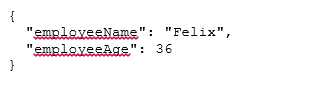
Q13. What is an API-led Connectivity approach in MuleSoft?
Answer:
API-led Connectivity is MuleSoft’s recommended architecture for integrating systems through reusable APIs. System APIs connect backend systems, Process APIs handle business logic, and Experience APIs deliver data to different applications.
It consists of three layers:
- System APIs – Connect to backend systems such as databases, ERP, and CRM.
- Process APIs – Apply business logic and combine data from multiple systems.
- Experience APIs – Deliver data in a format suitable for web, mobile, or partner applications.
This approach improves scalability, reusability, and maintenance.
Q14. What is RAML in MuleSoft?
Answer:
RAML (RESTful API Modeling Language) is a language for designing and documenting REST APIs before they are developed. It follows a design-first approach, meaning the API structure is planned before any code is written.
With RAML, developers can define API endpoints, HTTP methods (GET, POST, PUT, and DELETE), request parameters, request and response formats, and error messages in a clear, standardized way. This makes APIs easier to understand, develop, test, and maintain while ensuring consistency across development teams.
RAML helps developers:
- Define API endpoints
- Specify request and response formats
- Describe parameters
- Generate API documentation automatically
It follows a design-first approach that simplifies API development.
Q15. What are Connectors in MuleSoft?
Answer:
Connectors are pre-built components that enable Mule applications to communicate with external systems without writing custom integration code.
Common connectors include:
- HTTP Connector
- Database Connector
- Salesforce Connector
- FTP/SFTP Connector
- File Connector
- JMS Connector
- SAP Connector
- Amazon S3 Connector
Using connectors speeds up development and reduces coding effort.
Q16. What is error handling in MuleSoft?
Answer:
Error handling in MuleSoft is the process of detecting, managing, and responding to errors that occur while an application is running. Instead of allowing the application to fail completely, MuleSoft lets you handle errors gracefully, log the issue, return meaningful error messages, or continue processing when appropriate. This improves application reliability, simplifies troubleshooting, and provides a better user experience.
Common error handling components include:
- On Error Continue – Handles the error and continues processing.
- On Error Propagate – Handles the error and sends it back to the caller.
Proper error handling improves application reliability and debugging.
Q17. What is Anypoint Studio?
Answer:
Anypoint Studio is MuleSoft’s Eclipse-based Integrated Development Environment (IDE) for designing, developing, testing, debugging, and deploying Mule applications. It provides a user-friendly drag-and-drop interface, making it easy to create integration flows without extensive coding. Developers can configure connectors, transform data with DataWeave, test APIs, and manage projects in a single environment, thereby accelerating application development and simplifying integration tasks.
Its features include:
- Drag-and-drop flow designer
- DataWeave editor
- API testing
- Debugging tools
- Connector configuration
- Maven support
It simplifies application development with minimal coding.
Q18. What is an API Proxy in MuleSoft?
Answer:
An API Proxy in MuleSoft acts as an intermediary between client applications and backend services. Instead of clients accessing the backend directly, all requests pass through the API Proxy. It helps enforce security policies, authenticate users, limit request rates, log API traffic, monitor performance, and protect backend services without modifying the original API implementation.
It provides:
- Authentication
- Authorization
- Rate limiting
- Logging
- Monitoring
- API analytics
- Security policy enforcement
API Proxies help protect backend services without modifying the original API.
Q19. What is the difference between Batch Processing and For Each in MuleSoft?
Answer:
| Batch Processing | For Each |
| Designed for processing large datasets. | Used for processing smaller collections. |
| Executes records asynchronously in batches. | Processes records sequentially. |
| Supports checkpoints and recovery. | Does not support checkpoint recovery. |
| Suitable for millions of records. | Suitable for normal looping operations. |
Q20. What deployment options are available in MuleSoft?
Answer:
MuleSoft applications can be deployed in multiple environments depending on business requirements.
The main deployment options are:
- CloudHub – Fully managed cloud deployment provided by MuleSoft.
- CloudHub 2.0 – Modern cloud-native deployment with improved scalability and performance.
- Runtime Fabric (RTF) – Deploy Mule applications on Kubernetes or private cloud infrastructure.
- Standalone Mule Runtime – Deploy on on-premises servers or virtual machines.
- Hybrid Deployment – Combine cloud and on-premises environments.
These deployment options allow organizations to choose the best environment based on scalability, security, and infrastructure requirements.
Recommended Articles
This has been a guide to the MuleSoft Interview Questions and Answers. Here we have listed the 10 most useful interview question sets so that the jobseeker can crack the interview with ease. You may also look at the following articles to learn more –

