

Updated May 10, 2023
Differences Between MongoDB vs HBase
Databases play a vital role in all organizations and industries. Alternatives to these are growing fast and require faster outcomes. To meet these new requirements, industries use non-tabular databases; we have MongoDB vs HBase. MongoDB is an open-source non-relational database. All related information is stored together to access the data quickly. HBase, on the other hand, is written in Java and works on the Hadoop framework. It uses a key-value pair to access random patterns generated.
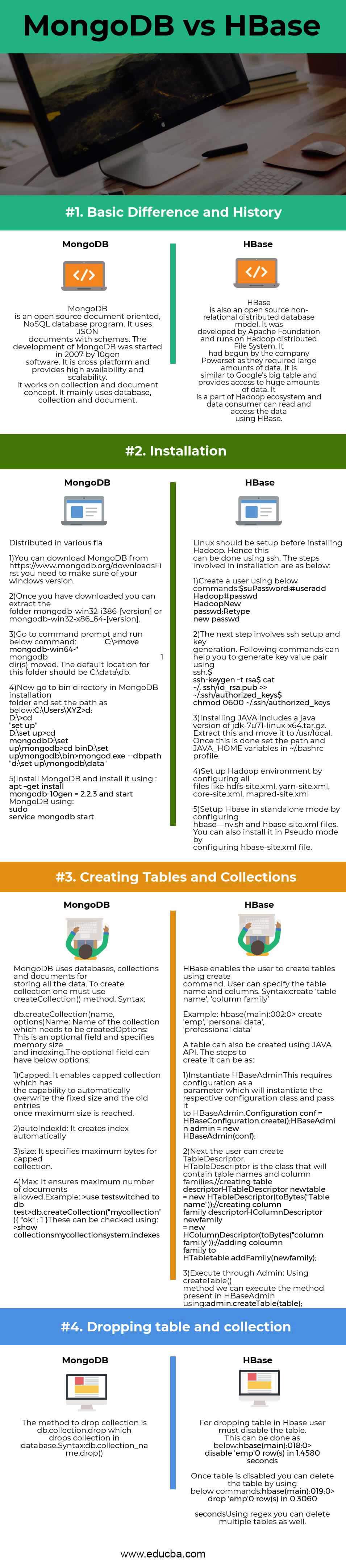
Head-to-Head Comparison Between MongoDB vs HBase (Infographics)
Below are the top 4 comparisons Between MongoDB vs HBase:
Key Differences Between MongoDB vs HBase
Both MongoDB vs HBase are popular choices in the market; let us discuss some of the major differences:
- HBase vs MongoDB, both being No SQL databases, have significant differences. The query model of MongoDB provides different kinds of projections, filtering, and aggregate functions. Hbase, on the other hand, has a key-value pairing for data.
- For text search, MongoDB provides a native feature for text indexes, and in HBase, data is replicated for a search engine. MongoDB provides three nodes, primary and secondary, and one for replication. HBase has 10 tendes for masters, region servers, standby name nodes, data nodes, and zookeepers.
- In MongoDB, partitioning can be done using a hash, range, and zone sharding, while HBase provides only hashing technique.
- In regards to backup and recovery, MongoDB has Ops Manager and Atlas consistent, which provides timely backups and shared clusters. HBase takes snapshots of data every 60 seconds on each cluster node.
- Group by in MongoDB is performed using an aggregation pipeline, and in HBase, it uses the Hadoop traditional map reduction.
Comparison Table Between MongoDB vs HBase
Following is the Comparison Table Between MongoDB vs HBase:
| The Basis of Comparison | MongoDB | HBase |
| Basic differences and history | MongoDB is an open-source, document-oriented, NoSQL database program. It uses JSON documents with schemas. The development of MongoDB was started in 2007 by 10gen software. It is cross-platform and provides high availability and scalability. It works on the collection and document concept. It mainly uses a database, collection, and document. | HBase is also an open-source non-relational distributed database model. Apache Foundation developed it and ran it on the Hadoop Distributed File System. It had begun by the company Powerset as they required large amounts of data. It is similar to Google’s big table and provides access to vast amounts of data. It is part of the Hadoop ecosystem, and consumers can read and access data using HBase. |
| Installation | 1. You can download MongoDB from https://www.mongodb.org/downloads
First, you need to make sure of your Windows version. 2. Once downloaded, you can extract the folder mongodb-win32-i386-[version] or mongodb-win32-x86_64-[version]. 3. Go to the command prompt and run the below command: C:\>move mongodb-win64-* mongodb 1 dir(s) moved. The default location for this folder should be C:\data\db. 4. Now go to the bin directory in the MongoDB installation folder and set the path as below: C:\Users\XYZ>d: D:\>cd “set up” D:\set up>cd mongodb D:\set up\mongodb>cd bin D:\set up\mongodb\bin>mongod.exe –dbpath “d:\set up\mongodb\data” 5. Install MongoDB and install the using : apt-get install mongodb-10gen = 2.2.3 and start MongoDB using: sudo service mongodb start |
Linux should be set up before installing Hadoop. Hence this can be done using ssh. The steps involved in an installation are as below:
1. Create a user using the below commands: $su Password: #useradd Hadoop #passwd Hadoop New passwd: Retype new passwd 2. The next step involves ssh setup and key generation. The following commands can help you to generate a key-value pair using ssh. $ ssh-keygen –t rsa $ cat ~/. ssh/id_rsa.pub >> ~/.ssh/authorized_keys $ chmod 0600 ~/.ssh/authorized_keys 3. Installing JAVA includes a Java version of jdk-7u71-Linux-x64.tar.gz. Extract this and move it to /usr/local. Once this is done, set the path and JAVA_HOME variables in ~/.bashrc profile. 4. Set up the Hadoop environment by configuring all files like hdfs-site.xml, yarn-site.xml, core-site.xml, mapred-site.xml 5. Set up Hbase in standalone mode by configuring hbase—nv.sh and hbase-site.xml files. You can also install it in Pseudo mode by configuring hbase-site.xml file. |
| Creating tables and collections | MongoDB uses databases, collections, and documents for storing all the data. To create a collection, one must use createCollection() method.
Syntax: db.createCollection(name, options) 1. Name: Name of the collection which needs to be created 2. Options: This optional field specifies memory size and indexing. The optional field can have below options: 1. Capped: It enables capped collection that automatically overwrites the fixed size and the old entries once a maximum size is reached. 2. autoIndexId: It creates an index automatically 3. size: It specifies maximum bytes for capped collection. 4. Max: It ensures a maximum number of documents allowed. Example: >use test switched to db test >db.createCollection(“mycollection”) {“ok”: 1 } These can be checked using: >show collections mycollection system.indexes |
HBase enables the user to create tables using create command. User can specify the table name and columns.
Syntax: create ‘table name’,’ column family’ Example: hbase(main):002:0> create ’emp’, ‘personal data’, ‘professional data’ A table can also be created using JAVA API. The steps to create it can be as follows: 1. Instantiate HBaseAdmin This requires configuration as a parameter to instantiate the respective configuration class and pass it to HBaseAdmin. Configuration conf = HBaseConfiguration.create(); HBaseAdmin admin = new HBaseAdmin(conf); 2. Next, the user can create TableDescriptor. HTableDescriptor is the class that will contain table names and column families. //creating table descriptor HTableDescriptor newtable = new HTableDescriptor(toBytes(“Table name”)); //creating column family descriptor HColumnDescriptor newfamily = new HColumnDescriptor(toBytes(“column family”)); //adding coloumn family to HTable table.addFamily(newfamily); 3. Execute through Admin: Using createTable() method we can execute the method present in HBaseAdmin using: admin.createTable(table); |
| Dropping table and collection | The method to drop collection is db.collection.drop, which drops collection in the database.
Syntax: db.collection_name.drop() |
For dropping a table in Hbase user must disable the table. This can be done as below:
hbase(main):018:0> disable ’emp’ 0 row(s) in 1.4580 seconds Once a table is disabled, you can delete the table by using the below commands: hbase(main):019:0> drop ’emp’ 0 row(s) in 0.3060 seconds Using regex, you can delete multiple tables as well. |
Conclusion
HBase can be used when data is in the form of a key-value pair and has a high volume of data. MongoDB, on the other hand, can be used where the user wants to track the user’s behavior on an online application. HBase has high performance and scalability, while MongoDB has a wide range of applications it supports. The user needs to decide if they want better performance or want to support different applications.
Recommended Articles
This has been a guide to the top differences between MongoDB vs HBase. Here we also discuss the key differences, infographics, and comparison table. You may also look at the following articles to learn more –

