


Introduction to MongoDB Date Query
MongoDB date query returns the date either as string or date object, date query will return the current date as a string in the mongo shell. MongoDB date will return the current date as a date object, and mongo shell will wrap the date object with isolate helper in MongoDB. We can specify the particular date by passing the date as an ISO-8601 date string, and this string is used with the range as 0 to 9999 to the new date() function in MongoDB.
How does Date Query work in MongoDB?
- We can use date () command to get a date as a string in a query without the new keyword or MongoDB shell.
- While creating a new date object, we can specify the date object as follows.
- The date query in MongoDB will internally store 64-bit integer value representing the number of milliseconds, and UNIX uses it from 1 Jan 1970.
- MongoDB date object store 64 bit, but it will not store all database versions and operations to support 64 bit.
- We can use the date as a string, and we can also use the date as method and object in MongoDB.
- In MongoDB, we can convert the date object into the string into the specified format. There are different operator available for a date to a string in MongoDB.
- There are two ways available in MongoDB to store date time they are new Date () and new ISODate ().
- In the first approach, we can use the date object in MongoDB like javascript. The date object or method is the best method to store the date or time in MongoDB.
- In the second approach, we can use ISODate method to store date or time in MongoDB.
- MongoDB does not support the date without time zone format. The alternate way to store date without time zone is to use two types of log representation.
- First is millisecond and second is (<YYYY-mm-dd HH:MM:ss>). These are the ways that are available in MongoDB to store the date without time zone in MongoDB.
- We have used ISODate function in MongoDB; this is used to build the native javascript function.
- ISODate in MongoDB provides a convenient way to represent the date in MongoDB.
- String date format is used to store the string in date format. This is used to store the date as a simple string in a human-readable format.
- While storing date in string format, it is very easy to display, while storing the date in string format there is no need to process using the same.
- Also, while storing the date in string format, it is easy to convert it into any other platform or format. But it is tough to determine date format while storing it into the string format.
Various Date Format in MongoDB
Given below are the date format, and each returns a resulting ISODate instance:
- new Date (<milliseconds>)
- new Date (<YYYY-mm-dd THH:MM:ss>)
- new Date (<YYYY-mm-dd>)
- new Date(“<YYYY-mm-ddTHH:MM:ssZ>”)
1. new Date (<milliseconds>)
- A millisecond is an integer, and it specifies the number of milliseconds. Milliseconds defines integer value which was used date format in MongoDB.
- Milliseconds will convert date into standard date format.
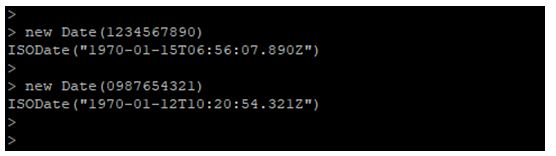
- Below example shows that convert milliseconds into date format. In below example, we have display two examples. In the first example, we have used 1234567890 milliseconds output of this milliseconds is 1970-01-15 and in the second example we have used 0987654321 milliseconds output of this milliseconds is 1970-01-12.
Example:
Code:
new Date(1234567890)
new Date(0987654321)
Output:
2. new Date (<YYYY-mm-dd THH:MM:ss>)
- This format defines the year, month and date in full format, it will also show the hour, minute and second in full format.
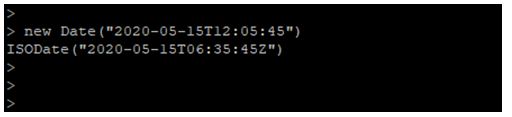
- In below example, we have used the date as (“2020-05-15T12:05:45”), and output of using this date is (“2020-05-15T06:35:45Z”).
Example:
Code:
new Date("2020-05-15T12:05:45")
Output:
3. new Date (<YYYY-mm-dd>)
- This format is defined as a year, month and date in full format.
- In below example, we have used the date as (“2020-05-15”), and output of using this date is (“2020-05-15T00:00:00Z”).
Example:
Code:
new Date("2020-05-15")
Output:

4. new Date(“<YYYY-mm-ddTHH:MM:ssZ>”)
- This format defines the year, month and date in full format, it also shows the hour, minute and second in full format.
- In below example, we have used the date as (“2020-05-15T12:05:45Z”), and output of using this date is (“2020-05-15T06:35:45Z”).
Example:
Code:
new Date("2020-05-15T12:05:45Z")
Output:

Examples of MongoDB Date Query
Given below are the examples of MongoDB Date Query:
Example #1
To store date using new Date () format in MongoDB.
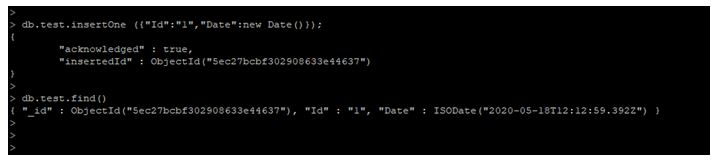
In below example, we have used new Date () object in MongoDB. We have used test collection while using date object in MongoDB.
Code:
db.test.insertOne ({"Id":"1","Date”: new Date()});

db.test.find ()
Output:
Example #2
To store date using new ISODate () format in MongoDB.
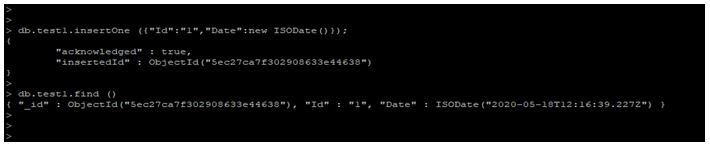
In below example, we have used new ISODate () object in MongoDB. We have used test1 collection while using date object in MongoDB.
Code:
db.test1.insertOne ({"Id":"1","Date":new ISODate()});

db.test1.find ()
Output:
Example #3
Use Date () method in MongoDB.
In below example, we have used the date function.
Code:
Date ()
Output:

Example #4
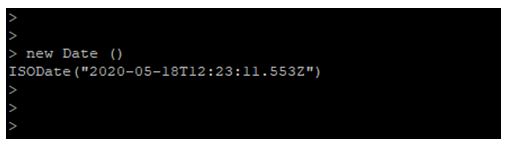
Use a new Date () method in MongoDB.
In below example, we have used the date function.
Code:
new Date ()
Output:
Conclusion
Date query is used to return the date as query or string. Basically, there are two ways to store date, i.e. date () and ISODate (). String date format is used to store a string into date format while storing date into string format it’s very easy to display.
Recommended Articles
This is a guide to MongoDB Date Query. Here we discuss MongoDB Date Query’s introduction, how does date query work with various date format in MongoDB and examples. You may also have a look at the following articles to learn more –

