

Updated March 28, 2023
Introduction to Maven POM File
POM stands for Project Object Model this file contains the project information and configuration details for Maven to build the project. It contains information such as dependencies, source directory, a build directory, plugins, goals, etc.Maven reads the pom.xml file and executes the desired goal .older version of Maven 2 this file was named as project.xml, for the latest version since Maven 2 this file was renamed as POM.XML.
POM.XML stores some additional information such as project version, mailing lists, description. When maven is executing goals and tasks maven searches for POM.XML in the current directory. It reads configuration from pom file and executes the desired goal. pom is a fundamental unit file to work in maven.
- Super POM is mavens default POM.XML file.
- It contains some default values for most of the projects.
Basic Structure of POM.XML
The basic structure of pom.xml are given below:
<project xmlns="http://maven.apache.org/POM/4.0.0"
xmlns:xsi="http://www.w3.org/2001/XMLSchema-instance"
xsi:schemaLocation="http://maven.apache.org/POM/4.0.0
http://maven.apache.org/xsd/maven-4.0.0.xsd">
<modelVersion>4.0.0</modelVersion>
<groupId>com.educba.examples</groupId>
<artifactId>example4</artifactId>
<packaging>jar</packaging>
<version>1.0-SNAPSHOT</version>
<name>Maven Archetype</name>
<url>http://maven.apache.org</url>
<dependencies>
<dependency>
<groupId>junit</groupId>
<artifactId>junit</artifactId>
<version>4.11</version>
<scope>test</scope>
</dependency>
</dependencies>
</project>
Basic Key Elements Pom.Xml Contains
Basic key elements pom.xml contains are given below:
| Tag Name | Description |
| Project | This is the root element of every POM.XML file and this is top level element. |
| modelVersion | Sub element of project tag. Indicates the version model in which the current pom.xml is using. Version model changes in very infrequently .in some cases it’s mandatory to ensure stability. |
| groupId | Sub element of the project tag, indicates a unique identifier of a group the project is created. Typically fully qualified domain name. |
| artifactId | This element indicates a unique base name-primary artifact generated by a particular project. |
| Version | This element specifies the version for the artifact under the given group. |
| packaging | This packaging element indicates packages type to be used by this artifact i.e. JAR, WAR, EAR. |
| Name | This element is used to define the name for the project, often used maven generated documentation. |
| URL | This element defines the URL of the project. |
| description | This element provides a basic description of the project. |
| Dependencies | This element is used to define dependencies in the project. |
| Dependency | Sub element of dependencies, used to provide specific dependency. |
| Scope | This element defines the scope of the maven project. |
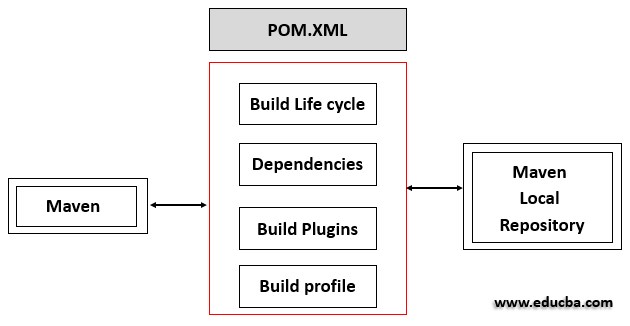
The following figure depicts the Graphical representation use of pom.xml in Maven.
Examples of Maven POM File
Examples of maven pom file are given below:
1. Super POM
This POM file is Mavens default POM file, all POM files extend this super POM files created in the project. Configuration specified in super POM files are inherited.
<project>
<modelVersion>4.0.0</modelVersion>
<repositories>
<repository>
<id>central</id>
<name>Central Repository</name>
<url>https://repo.maven.apache.org/maven2</url>
<layout>default</layout>
<snapshots>
<enabled>false</enabled>
</snapshots>
</repository>
</repositories>
<pluginRepositories>
<pluginRepository>
<id>central</id>
<name>Central Repository</name>
<url>https://repo.maven.apache.org/maven2</url>
<layout>default</layout>
<snapshots>
<enabled>false</enabled>
</snapshots>
<releases>
<updatePolicy>never</updatePolicy>
</releases>
</pluginRepository>
</pluginRepositories>
<build>
<directory>/Maven_projects/src/target</directory>
<outputDirectory>/Maven_project/src/java/classes</outputDirectory>
<finalName>Examplejar<finalName>
<testOutputDirectory>/Maven_project/src/test/java</testOutputDirectory>
<sourceDirectory>/Maven_projects/src/main/java</sourceDirectory>
<scriptSourceDirectory>/Maven_projects/src/main/scripts</scriptSourceDirectory>
<testSourceDirectory>/Maven_projects/src/test/java</testSourceDirectory>
<resources>
<resource>
<directory>/Maven_projects/src/main/resources</directory>
</resource>
</resources>
<testResources>
<testResource>
<directory>/Maven_projects/src/test/resources</directory>
</testResource>
</testResources>
<pluginManagement>
<plugins>
<plugin>
<artifactId>antrun-plugin</artifactId>
<version>1.4</version>
</plugin>
<plugin>
<artifactId>maven-plugin-assemble</artifactId>
<version>2.2</version>
</plugin>
<plugin>
<artifactId>dependency-plugin</artifactId>
<version>2.4</version>
</plugin>
<plugin>
<artifactId>release-plugin</artifactId>
<version>2.5.4</version>
</plugin>
</plugins>
</pluginManagement>
</build>
<reporting>
<outputDirectory>/Maven_project/src/site</outputDirectory>
</reporting>
<profiles>
<profile>
<id>release-profile</id>
<activation>
<property>
<name>performRelease</name>
<value>true</value>
</property>
</activation>
<build>
<plugins>
<plugin>
<inherited>true</inherited>
<artifactId>maven-source-plugin</artifactId>
<executions>
<execution>
<id>attach-sources</id>
<goals>
<goal>jar-no-fork</goal>
</goals>
</execution>
</executions>
</plugin>
<plugin>
<inherited>true</inherited>
<artifactId>maven-javadoc-plugin</artifactId>
<executions>
<execution>
<id>attach-javadocs</id>
<goals>
<goal>jar</goal>
</goals>
</execution>
</executions>
</plugin>
<plugin>
<inherited>true</inherited>
<artifactId>maven-deploy-plugin</artifactId>
<configuration>
<updateReleaseInfo>true</updateReleaseInfo>
</configuration>
</plugin>
</plugins>
</build>
</profile>
</profiles>
</project>
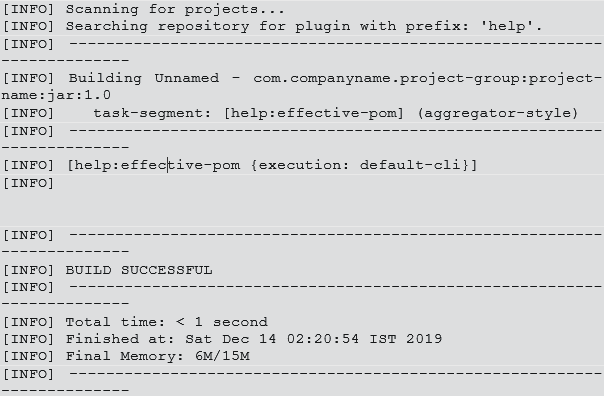
To look out the default configuration of POM.XML file execute the following command.
- Open command console => go to directory containing pom.xml => and execute command.
- In our example, pom.xml exist in D:\Maven\Maven_projects.
- D:\Maven\Maven_projects>mvn help:effective-pom.
help: effective-pom this command effective POM as XML for the build process.
This command produces the following output.
2. Minimal POM
Some of the important requirements for l pom files are given below.
- Project root i.e. <project>
- Model version i.e. <modelVersion>
- Group ID i.e. <groupId>
- Artifact Id i.e. <artifactId>
- Version i.e. <version>
Consider the following POM file.
<Project>
<modelVersion>4.0.0</modelVersion>
<groupId>com.educba.example</groupId>
<artifactId>example4</artifactId>
<version>1</version>
</project>
In pom file compulsorily groupId, artifactId, version should be configured. These three values depict the fully qualified artifact name of the project.in case the configuration details are not specified maven uses default configuration specified in the super pom file. For example, if packaging type is not specified then default packaging type ‘JAR’ is used.
Maven allows two POM files Parent pom and Child pom files. While inheriting from parent pom child pom file inherits or that are merged following properties. And these properties are also contained in parent pom file.
- Plugin configuration.
- Dependencies.
- Resources.
- Plugin lists.
- Plugin execution Ids.
3. Parent POM
Super pom is one of the examples for the parent pom file which is written above. Inheritance is achieved through a super pom file.
For Parent and child pom Maven checks two properties.
- POM file in Project root directory.
- Reference from child POM file which contains the same coordinates stated in parent POM.
An important reason to use parent POM file is to have a central place to store information about artifacts, compiler settings, etc. and these are shared in all modules.
4. Child POM
Child POM file refer the parent POM file using the <parent> tag .groupId, artifactId,version attributes are compulsory in child pom file. Child POM file inherits all dependencies and properties from the parent POM file. additionally, It also inherits subprojects dependencies.
Consider following pom file.
<project>
<parent>
<groupId>com.educba.examples</groupId>
<artifactId>example4</artifactId>
<version>1</version>
</parent>
<modelVersion>4.0.0</modelVersion>
<groupId>com.educba.examples</groupId>
<artifactId>module_1</artifactId>
<version>1</version>
</project>
Conclusion
Maven provides one of the most important benefits is handling project relationships inheritance and dependencies. Dependency management in previous days was the most complicated mess for handling complex projects maven solves these problems through dependency management through repositories .most important feature of the POM file is its dependency List. The POM file programmer can add new dependency easily and quickly. Using POM hierarchy duplication can be avoided. POM inheritance helps in less time consumption and reduces the complexity of multiple dependency declaration. The quick project set up is achieved through POM files no build.xml compared to other tools. In some cases POM.XML becomes very large for complex projects.in large projects sometimes it’s very difficult to maintain the jars in a repository and that makes use of several versions of jar files.
Recommended Articles
This is a guide to Maven POM File. Here we discuss the Introduction and the basic structure of pom.xml along with Examples. You may also have a look at the following articles to learn more –

