
Updated April 12, 2023
Introduction to MariaDB TIMESTAMP
MariaDB provides different types of functions to the users. The TIMESTAMP is the one type of MariaDB function. Basically is used to define which time a row was added or we can say updated, and on the other hand, we by default set the date-time when we record is inserted or updated from the table, and it automatically assigned each insertion or update operation. The automatic option only applies to the first TIMESTAMP from the records; we cannot change TIMESTAMP columns after that. Format of TIMESTAMP in YYYY-MM-DD. This is the single argument function, and it returns the date and time for every insert or update operation.
Syntax
timestamp(expression or value ), timestamp(expression 1, expression 2)Explanation
In the above syntax, we use the timestamp function with expression; here, expression is used for data time value. In the above expression, we used two different arguments that expression 1 and expression 2; here, expression 1 is used to add the time, or we can say date time expression and expression 2 is used to return date time result.
How does the TIMESTAMP function work in MariaDB?
Let’s see TIMESTAMP functions in MariaDB with different parameters as follows.
1. Supported Values
Basically, TIMESTAMP data types use a number of seconds, and those values store the MariaDB that means TIMESTAMP data type can have a specified range for stored values. MariaDB also stores microseconds between 0 to 6 with precision value; if microsecond precision value is not specified, it is used by default value 0.
2. Automatic Values
The automatic property of the TIMESTAMP function is most important. When the first column of the table uses TIMESTAMP data types in a specified table, then MariaDB automatically assigns some properties such as default current_timestamp and on update current_timestamp.
That means if the column doesn’t have any assigned value for insert or update query at that time, MariaDB automatically initializes the column’s value with the current date and time. When we automatically initialize values for specified columns for insert or update query, it can also be explicitly enabled for that column that uses the TIMESTAMP functions.
Sometimes in insert query, automatic initialization is explicitly disabled for a column that uses TIMESTAMP data types. When by default value is 0 and an update query, it is also explicitly disabled for a column that uses the TIMESTAMP data types but not for the update clause. That means if on update clause is not specified for the column, then the TIMESTAMP data type value will not automatically change when we execute the update statement.
The one more important feature of MariaDB is that when we have a null value to the column and that uses the TIMESTAMP data type, then MariaDB will automatically take the current date and time for insert and update query. The automatic initialization for Null can also be explicitly disabled for that specified column that uses TIMESTAMP data type.
3. Time Zones
Currently, MariaDB does not support a time zone identifier. If the column uses TIMESTAMP data type at that time, inserted values are converted from the session time zone to the Coordinated Universal Time.
4. Internal Format
MariaDB 10.1.2 introduced a new format from MySQL 5.6 that alters TIME, DATETIME and TIMESTAMP columns and these columns are operated on a lower level. These changes allow temporal data type, and it has fractional parts and negative values. So we can disable this option by using the mysql156_temporal_format system variable.
Examples of MariaDB TIMESTAMP
Let’s see a different example of the TIMESTAMP function as follows.
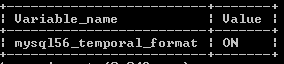
Suppose we need to see the variable name and value of that variable at that time; we use the following statement as follows.
SHOW VARIABLES LIKE 'mysql56_temporal_format';Explanation
In the above example, we use the show variable statement to see instances of TIMESTAMP data type; in this example, a variable name is ‘mysql56_temporal_format’, and the value is ON. The final output of the above query we illustrate by using the following snapshot.
To update table columns from older to the new format, we need to execute alter table command and syntax of alter.
Syntax
alter table table_name modify col_name timestamp;Explanation
In the above syntax, we use the alter table command followed by a table with specified column names with a TIMESTAMP data type shown above syntax.
Example: Now, let’s see how we can create a table with TIMESTAMP data type as follows.
create table tree (Id int, time_stamp timestamp);So we successfully created a tree table, now we are able to see all details about the created table by using the following statement as follows.
desc tree;The final output of the above query we illustrate by using the following snapshot.
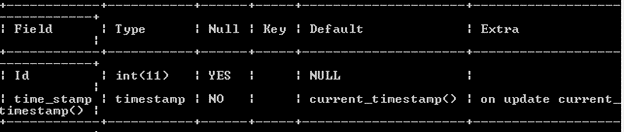
By using the above statement, we created a table name as a tree; now insert some records by using the following statement.
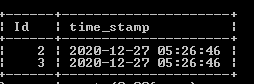
insert into tree (Id) values (2), (3);Explanation
With the help of the above statement, we insert two values as shown in the statement. After that, we can use the select clause to see inserted records.
select * from tree;The final output of the above query we illustrate by using the following snapshot.
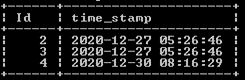
Example: Now, see what happens if we have a null value as follows.
insert into tree values (4, null);Explanation
In the above example, we use the null keyword, but we can see MariaDB takes the current date and time. The final output of the above query we illustrate by using the following snapshot.
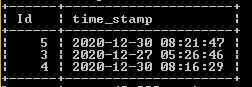
Example: Now see how TIMESTAMP change for Update
update tree set Id=5 where Id=2;Explanation
In the above example, we use an update statement to see how TIMESTAMP is changed. The final output of the above query we illustrate by using the following snapshot.
Similarly, we can implement default null, and we can set only the first TIMESTAMP automatically for insert and update.
Conclusion
We hope from this article you have understood the MariaDB TIMESTAMP function. From the above article, we have learned the basic syntax of the MariaDB TIMESTAMP function, and we also see different examples of TIMESTAMP functions. From this article, we learned how and when we use the MariaDB TIMESTAMP function.
Recommended Articles
We hope that this EDUCBA information on “MariaDB TIMESTAMP” was beneficial to you. You can view EDUCBA’s recommended articles for more information.

