

Updated March 24, 2023

Introduction to Linspace MATLAB
MATLAB is a technical computing language. MATLAB gets its popularity from providing an easy environment for performing and integrating computing tasks, visualizing & programming.
Uses of MATLAB include (but not limited to)
- Computation
- Simulation
- Modeling
- Data analytics (Analysing and Visualizing data)
- Prototyping
- Application development
- Engineering & Scientific graphics
Linspace Function in MATLAB
In this article, we will understand a very useful function of MATLAB called ‘linspace’. This function will generate a vector of values linearly spaced between two endpoints. It will need two inputs for the endpoints and an optional input to specify the number of points to include in the two endpoints.
Syntax of linspace function:
X = linspace(a1, a2)
Now let us understand this one by one
1. X=linspace(a1,a2)
This function will return a row of a vector of 100(default) linearly spaced points between a1 and a2
- a1 and a2 can be real or complex
- a2 can be either larger or smaller than a1
- If a2 is smaller than a1 then the vector contains descending values
Here is an example to understand this:
Example #1
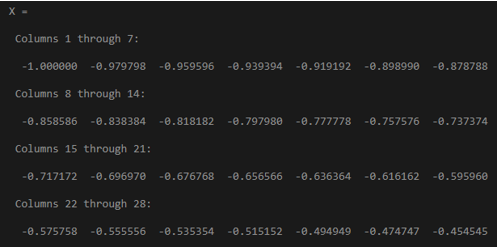
X = linspace(-1, 1)
It will generate a vector of 100 evenly spaced vectors for the interval [-1, 1]
Output:
Example #2
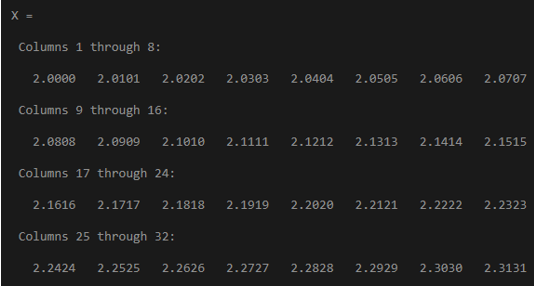
X = linspace(2, 3)
It will generate a vector of 100 evenly spaced vectors for the interval [2,3]
Output:
Example #3
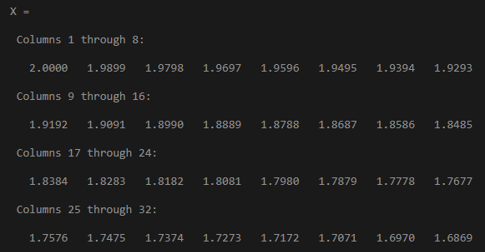
X = linspace(2, 1)
Here a2 is smaller than a1, it will generate a vector of 100 evenly spaced vectors for the interval [2,1] in descending order
Output:
2. X=linspace(a1,a2,n)
This function will return a row of a vector of “n” points as specified in input for linearly spaced points between a1 and a2. This function gives control of the number of points and will always include the endpoints specified in the input as well.
The spacing between the points is (a2-a1)/(n-1).
- If n is 1, the function will return a2 as output
- If n is zero or negative, the function will return 1by0 empty matrix
Here is an example to understand this:
Example #1
X = linspace(-1, 1, 7 )
It will generate a vector of 7 evenly spaced vectors for the interval [-1, 1]
Output:

Example #2
X = linspace(2,3,5)
It will generate a vector of 5 evenly spaced vectors for the interval [2,3]
Output:

Example #3
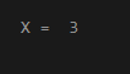
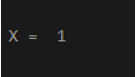
X = linspace(2, 3, 1)
Here n = 1, so the function will return a2 input parameter
Output:
Example #4
X = linspace (5, 1, 0)
Here n = 0, so function will return 1X0 empty double row vector
Output:
Vector of evenly spaced Complex numbers
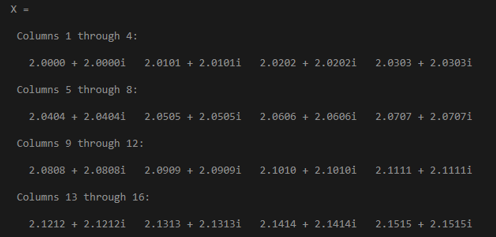
X = linspace(2+2i, 3+3i)
Here a1 and a2 are complex numbers, it will generate a vector of complex numbers for 100 evenly spaced points for the interval [2+21, 3+3i]
Output:
X= linspace(1+1i, 5+5i, 4)
It will generate a vector of complex numbers with 4 evenly spaced point for the interval [1+1i, 5+5i]
Output:

The linspace function in MATLAB provides us with an array/matrix comprising the desired number of values starting from and ending at a declared value. The produced array will have exactly the desired number of terms which will be evenly spaced. The values will be in the range of start and end values passed. So, the linspace function will help us in creating an instantiated matrix or array.
Recommended Articles
This is a guide to Linspace MATLAB. Here we discuss the introduction, Linspace Function in MATLAB and Vector of evenly spaced Complex numbers with examples and outputs. You can also go through our other suggested articles to learn more–

