
Updated June 2, 2023

Introduction to JUnit Test Suite
There could be a condition in the application testing scenario in JUnit that multiple test cases need to be bundled together and executed in one go. Test Suite in JUnit facilitates such bundling in a simple and seamless way.
Test cases in a test suite can be homogenous or heterogeneous in nature. As an example, a test suite can either contain only smoke test cases / functional test cases/performance test cases or a mixture of all the test cases in any combination.
Normally the test cases are grouped as per the sequence of the life cycle of an application and in some scenarios, test cases of similar scope of operations are grouped together. One test case may find a place in a multiple test suite. A test plan will have multiple test suites and each suite will have multiple test cases.
How to Create Test Suite?
A pictorial representation of how test suites and test plans are created.
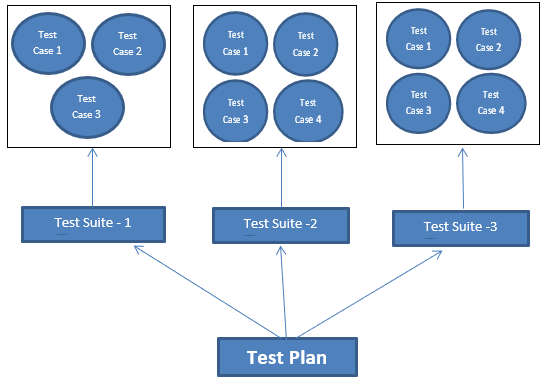
Various test cases are grouped together based on some uniqueness as decided by the developer. It can be pertaining to multiple functionalities of one scenario of an application module or a series of test cases pertaining to one functionality in an application. There could be various test suites in an application and they can become one test plan to be managed by the development/testing team.
A test suite can execute a number of test cases as explained above and any new cases can be added on the fly and it can be executed
TestSuite oursuite = new TestSuite();
oursuite.addtest(new xxxTest("testMultiply"));
oursuite.addtest(new xxxTest("testDivide"));
or it can also extract test cases automatically and execute them. The testcase class will have to be passed to the constructor of the TestSuite.
Testsuite oursuite = new Testsuite(xxxTest.class);The constructor creates our suite with the necessary methods included.
As part of Test Suite, a Java class with @SuiteClasses and @RunWith annotations will have to be created and this will be explained in detail in the below examples.
Steps to Create a TestSuite
The following steps can be followed in creating a Testsuite
First of all, have the class ready that has to be tested by Testuite. The class to be tested may be part of an application or it can be ac critical routine that may be used across many applications.
- Create as many test case classes as required
- Test Suite class will have to be created. It is a Java Class with annotation reference @RunWith.
- Test Classes called in the test suite will have to be referenced using an annotation @Suite.SuiteClasses
- Create as many test suites as needed using multiple combinations of test cases.
- To execute test suite, create a test runner class and verify the output.
Methods used and its Details
| Method Name | Access Specifier, Return Type | Details |
| addTest
(test,test) |
Void | This method adds a test to a suite |
| addTestMethod | Private void | Declares the details |
| addTestSuite | Void | It adds the test class to the suite |
| countTestCases | Integer | Returns the number of test cases that will get executed |
| createTest | Static test | Defines the test case |
| exceptionToString | Private Static | Stack trace is converted into string |
| getName | String | Name of the suite is returned by this method |
| GetTestConstructor | Static | Returns constructor which takes single argument or no argument |
| Run | Void | The test suite is run and the results are collected in TestResult |
| SetName | Void | The name of the suite is set here |
| testAt | Test | Test is returned at the specified index |
| testCount | Integer | Number of tests covered in the suite is returned |
| Tests | Tests as enumeration are returned | |
| Warning | Private static | This method returns the test case which is likely to fail beforehand as a warning |
Examples
Creating a Java class that has to be tested. This class accepts a text and prints it as it is and also prints it with a tag.
/*
* This class prints the given message on console.
*/
public class MessPrintx {
private String messagex;
//Constructor
//Test that is passed has to be printed
public MessPrintx(String messagex){
this.messagex = messagex;
}
// prints the message as it is
public String plainMessage(){
System.out.println(messagex);
return messagex;
}
// tag "Hello!" to the message and then prints it
public String tagMessage(){
messagex = "Hello!" + messagex;
System.out.println(messagex);
return messagex;
}
}
Creating first test case -1
import org.junit.Test;
import org.junit.Ignore;
import static org.junit.Assert.assertEquals;
// test case 1 – TestJunit11
public class TestJunit11 {
String messagex = "RRRRRR";
MessagePrintx messagePrintx = new MessagePrintx(messagex);
@Test // Annotation
public void testPlainMessage() {
System.out.println("Inside testPlainMessage()");
assertEquals(messagex, messagePrintx.plainMessage());
}
}
Creating second test case – 2
import org.junit.Test;
import org.junit.Ignore;
import static org.junit.Assert.assertEquals;
// Test case -2 TestJunit22
public class TestJunit22 {
String messagex = "RRRRRR";
MessagePrintx messagePrintx = new MessagePrintx(messagex);
@Test // annotation
public void testTagMessage() {
System.out.println("Inside testTagMessage()");
messagex = "Hello!" + "RRRRRR";
assertEquals(messagex,messagePrintx.tagMessage());
}
}
Creating Test Suite
import org.junit.runner.RunWith;
import org.junit.runners.Suite;
@RunWith(Suite.class) // Annotation is attached
@Suite.SuiteClasses({ // Another annotation is attached
TestJunit11.class,
TestJunit22.class
})
public class JunitTestSuitex {
}
Creating Runner Class to execute the test
import org.junit.runner.JUnitCore;
import org.junit.runner.Result;
import org.junit.runner.notification.Failure;
// Actual execution starts from this line using JunitTestSuitex class defined earlier
public class TestRunner {
public static void main(String[] args) {
Result result = JUnitCore.runClasses(JunitTestSuitex.class);
for (Failure failure : result.getFailures()) {
System.out.println(failure.toString());
}
System.out.println(result.wasSuccessful());
}
}
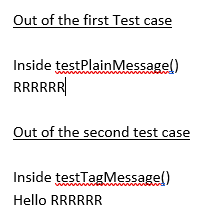
Result when executed
Conclusion
JUnit Test Suite improves the productivity of the developers and testers by reducing their efforts in testing the various applications scenarios in a single shot as against testing them individually. By this clubbing of test cases, total testing time, as well as time to market, comes down appreciably and the accuracy of the product improves to a greater extent.
Recommended Articles
This is a guide to JUnit Test Suite. Here we discuss the Definition, How to create Test Suite? examples with code implementation. You may also have a look at the following articles to learn more –

